Indicators
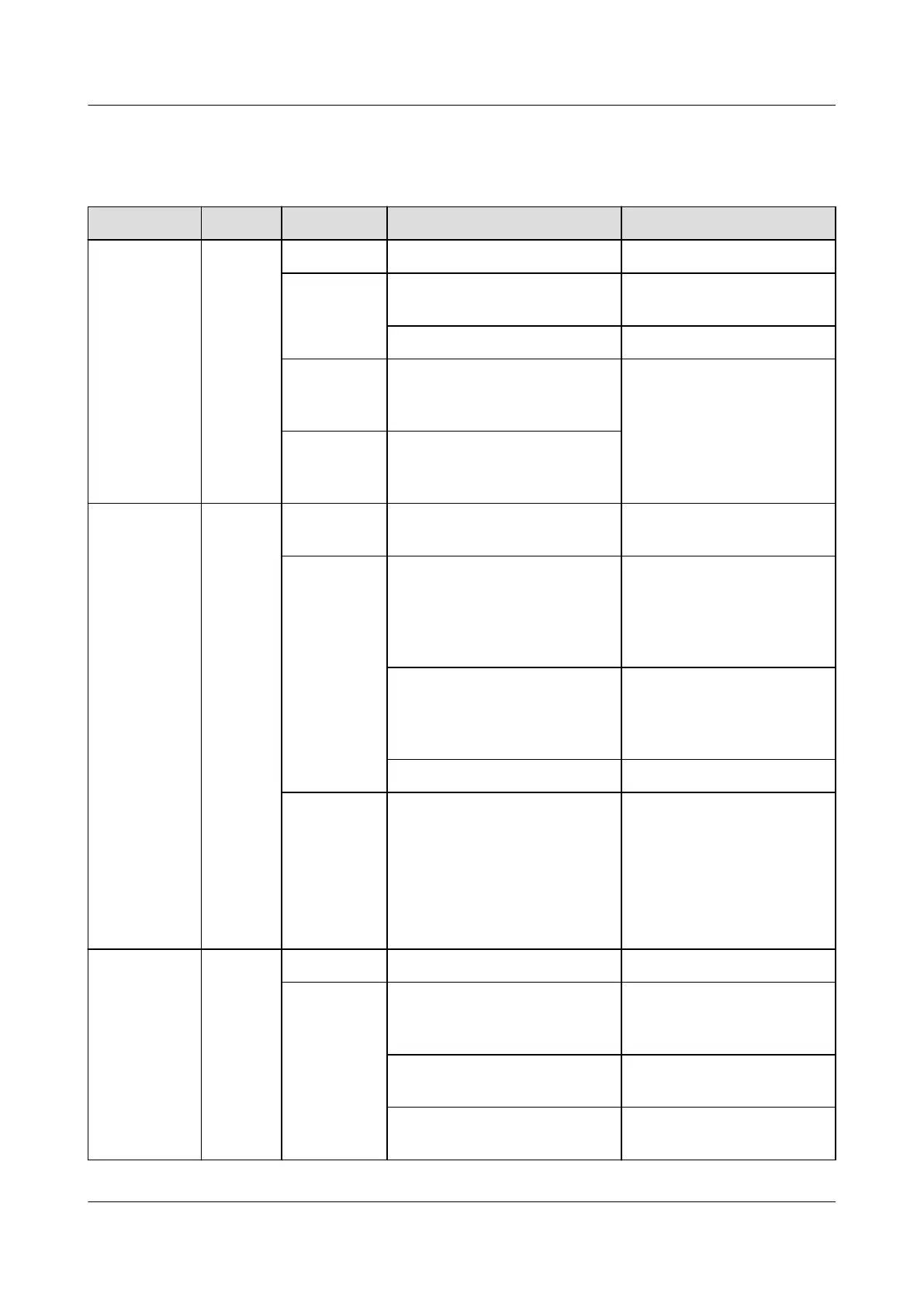
Table 3-21 Indicators on the S4875G1
Indicator Color State Description Suggestion
Power
indicator
Green Steady on The SSU has PV input. Normal status
O The SSU has no PV input. Check that the PV input
voltage is normal.
The SSU is faulty. Replace the SSU.
Blinking
(0.5 Hz)
The PV input is available,
and the SSU is being
queried.
The SSU automatically
recovers after the loading
is nished, and no action
is required.
Blinking (4
Hz)
The PV input is available,
and the SSU is loading
software.
Alarm
indicator
Yellow O The SSU has no protection
alarms.
Normal status
Steady on An SSU overtemperature
warning occurs.
Ensure that the
ventilation vent is
unblocked and the
ambient temperature is
within the normal range.
An input overvoltage or
undervoltage alarm occurs.
Check whether the
overvoltage or
undervoltage is caused by
external faults.
The SSU is hibernating. Restart the SSU.
Blinking
(0.5 Hz)
The SSU fails to
communicate.
Clean the edge connectors
of the SSU.
If the indicator is still
blinking, check whether
the external
communication module is
faulty.
Fault
indicator
Red O The SSU is normal. Normal status
Steady on The SSU locks out due to
output overvoltage.
Hot-swap the SSU. If the
fault persists, replace the
SSU.
The SSU has no output due
to internal faults.
Replace an SSU.
The SSU is not in position. Check that the SSU is
properly installed.
iSitePower Integrated Smart Site (ICC1000-A1-E1)
User Manual 3 Components
Issue 04 (2022-10-15) Copyright © Huawei Technologies Co., Ltd. 46









 To Next Page