WindO/I-NV4 User’s Manual 28-49
4 E-mail Function
28
Maintenance
● Creating an E-mail Group
You can register multiple e-mail addresses together into one contact as an E-mail Group.
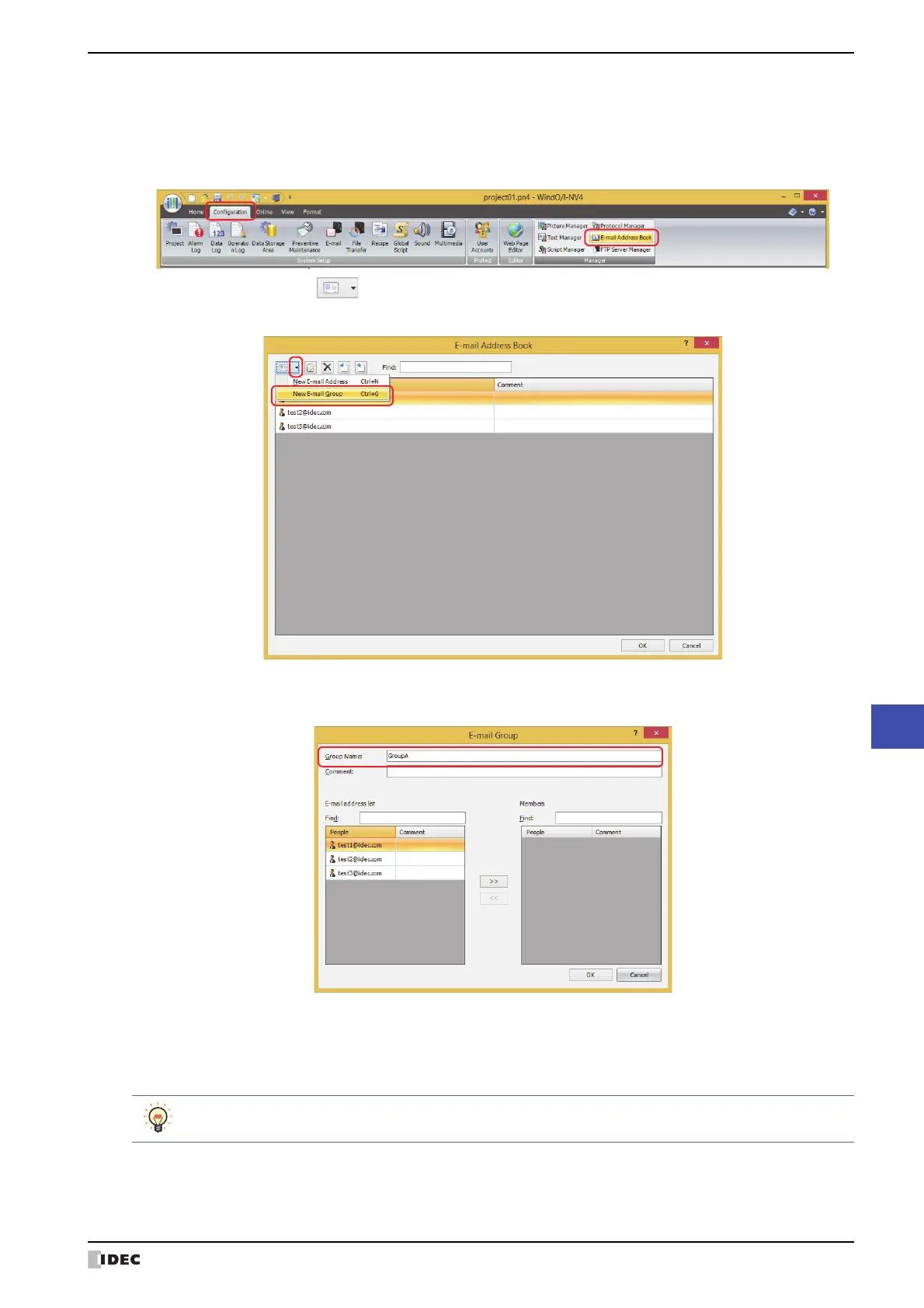
1 On the Configuration tab, in the Manager group, click E-mail Address Book.
The E-mail Address Book dialog box is displayed.
2 click the arrow to the right of (New E-mail Address), then click New E-mail Group.
The New E-mail Group dialog box is displayed.
3 Enter the name for the E-mail Group in the Group Name.
The maximum number is 60 characters. Only alphanumeric characters and symbols can be used.
4 Enter the comment for the E-mail Group in the Comment.
The maximum number is 80 characters.
5 Select the e-mail address as the member from the E-mail address list, and then click >>.
To select multiple e-mail addresses, press and hold SHIFT or CTRL while you click the specific items.



 To Next Page
 Loading...