Multitron - Incubation Shaker
Operation
Page 102 of 146 25 February 2019
equipment. Alternatively, more complex programs can be pro-
grammed comfortably using eve
®
.
Requirements
To ensure the equipment can be operated via the Ethernet inter-
face, the function must be activated in the settings menu. Here,
you can choose between the options on (read only) and Auto (read
and write) (see chapter 7.7.9 "Setting up Data Exchange via the
Ethernet", page 106).
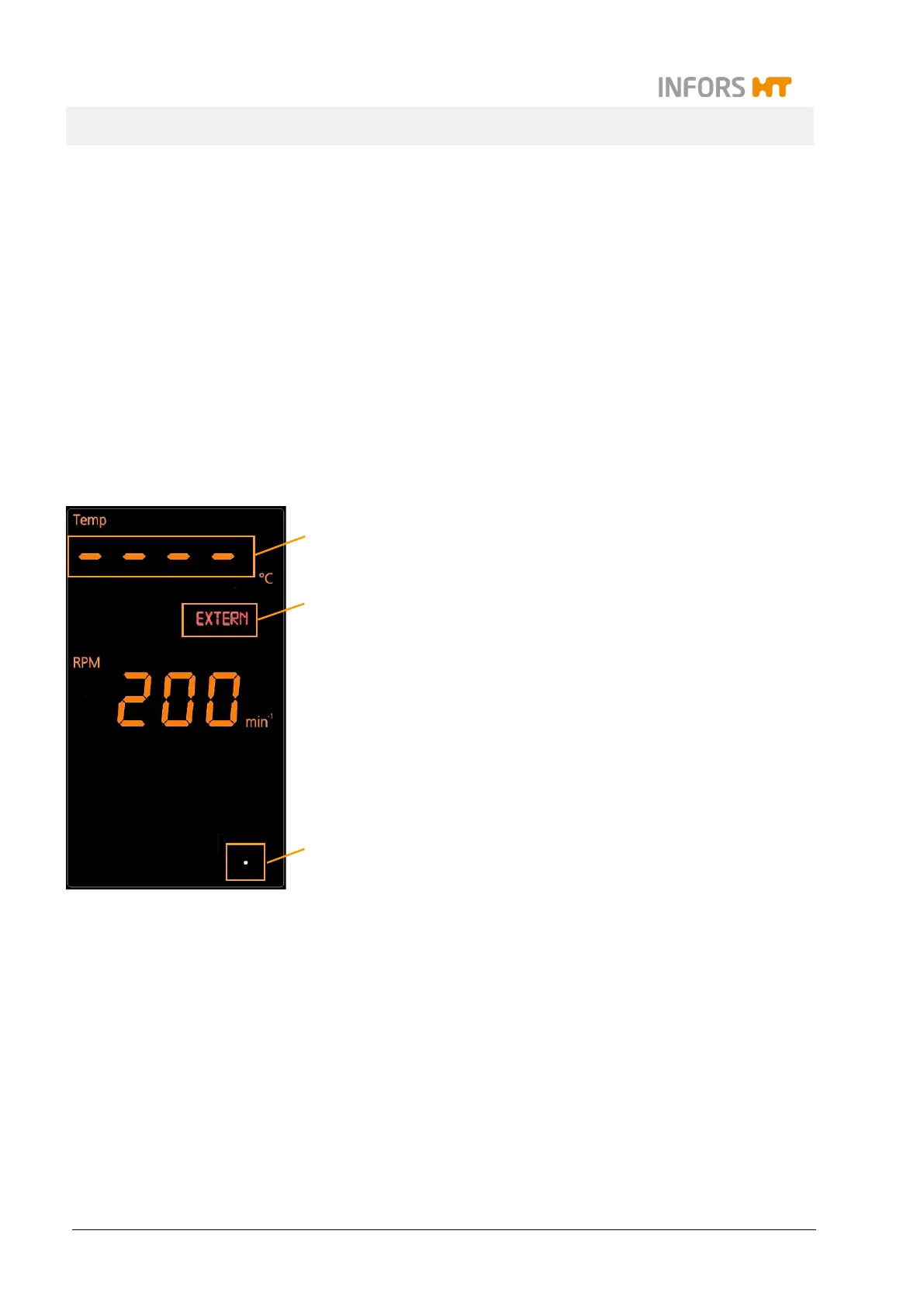
Displays on the equipment
If the equipment is controlled using eve
®
, this is displayed on the
equipment as follows:
While the equipment is being registered in eve
®
, the interior
lighting of the equipment is flashing. This is used, in particu-
lar, to identify the unit when equipment is stacked.
The white dot at the bottom right of the operating panel (3)
lights up if the Ethernet connection has been recognised (ca-
ble connected and IP address received from DHCP).
The white dot (3) flashes at four-second intervals if the con-
nection to the equipment was interrupted or the equipment
was not registered in eve
®
.
If setpoints are written to the equipment, the red symbol EX-
TERN (2) lights up on the display field.
If a parameter has been deactivated by sending setpoint 0,
this is indicated by four dashes (1) on the operating panel.
1
3
2



 To Next Page