24 Micromate Operator Manual – 721U0201 Revision 6
8.2. Sensor Check Button
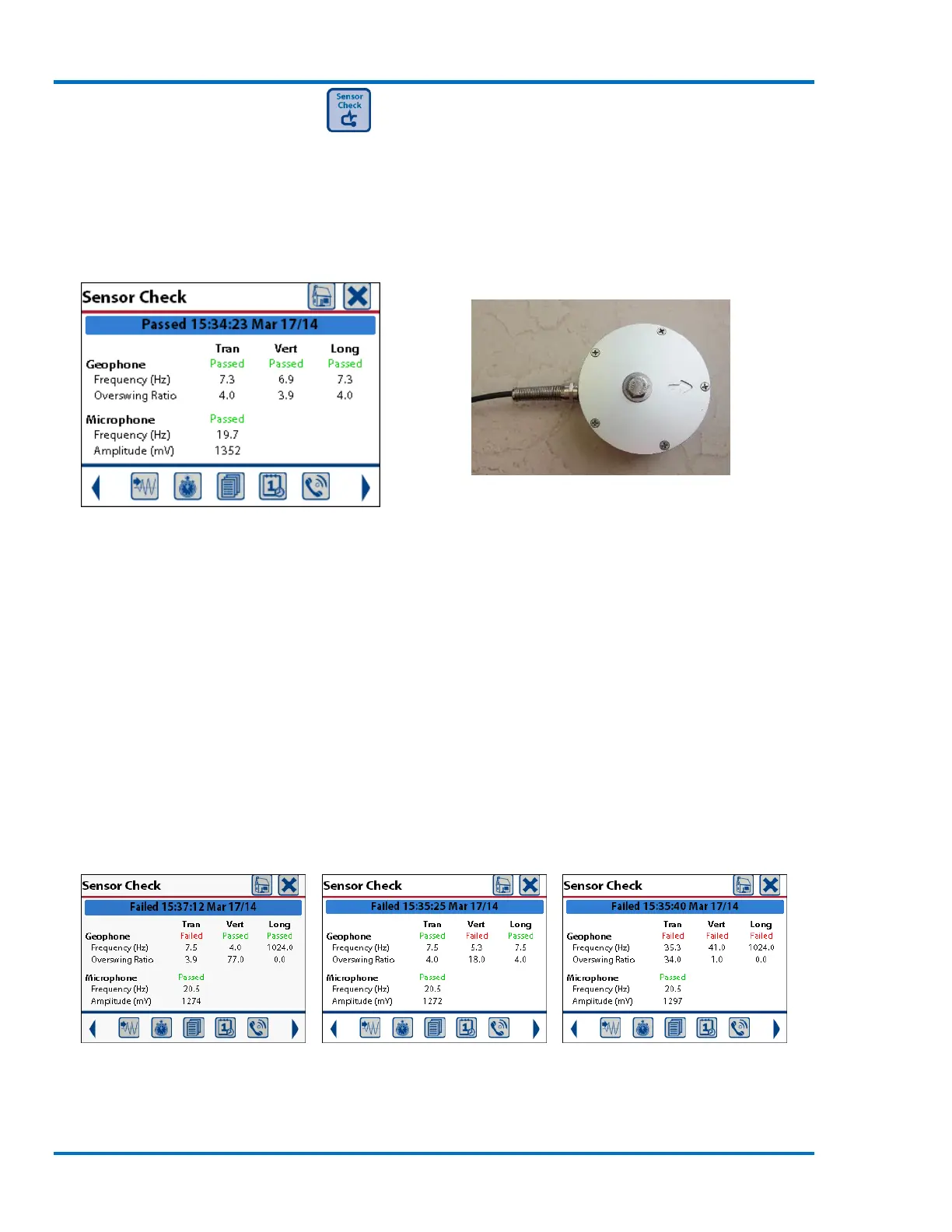
Pressing the Sensor Check button will send a pulse or series of pulses to the geophone and
microphone while the Micromate monitors their response. This allows the Micromate to ensure
the geophone and microphone are connected and that the geophone is level. The results of the
sensor check will be presented on the display. A failed sensor check must be rectified before
placing the unit into monitor mode, otherwise the unit could record inaccurate data.
Side
Back Front
Side
All Sensors Passing
The most common reasons for a failed geophone sensor check are due to the improper leveling or
connection of the geophone.
If the transverse (Tran) channel fails, inspect the geophone to ensure it is level cfrom side to
side.
If the longitudinal (Long) channel fails, inspect the geophone to ensure it is level from front
to back.
Both of these cases could also cause the vertical (Vert) channel to fail.
The vertical channel will also fail if the geophone has been installed upside down.
If all of the channels are failing, ensure the cable is attached to the proper connector and
that the cable has not been damaged.
Failing Tran Channel Failing Vert Channel Failing all Geophone Channels



 To Next Page