Micromate Operator Manual – 721U0201 Revision 6 5
3. BASIC TUTORIAL
In this Basic Tutorial, you will connect the geophone and microphone and configure your
Micromate to create a sample Event using the Waveform record mode. Then once the event has
been recorded you will review the results on the Micromate’s touch screen display.
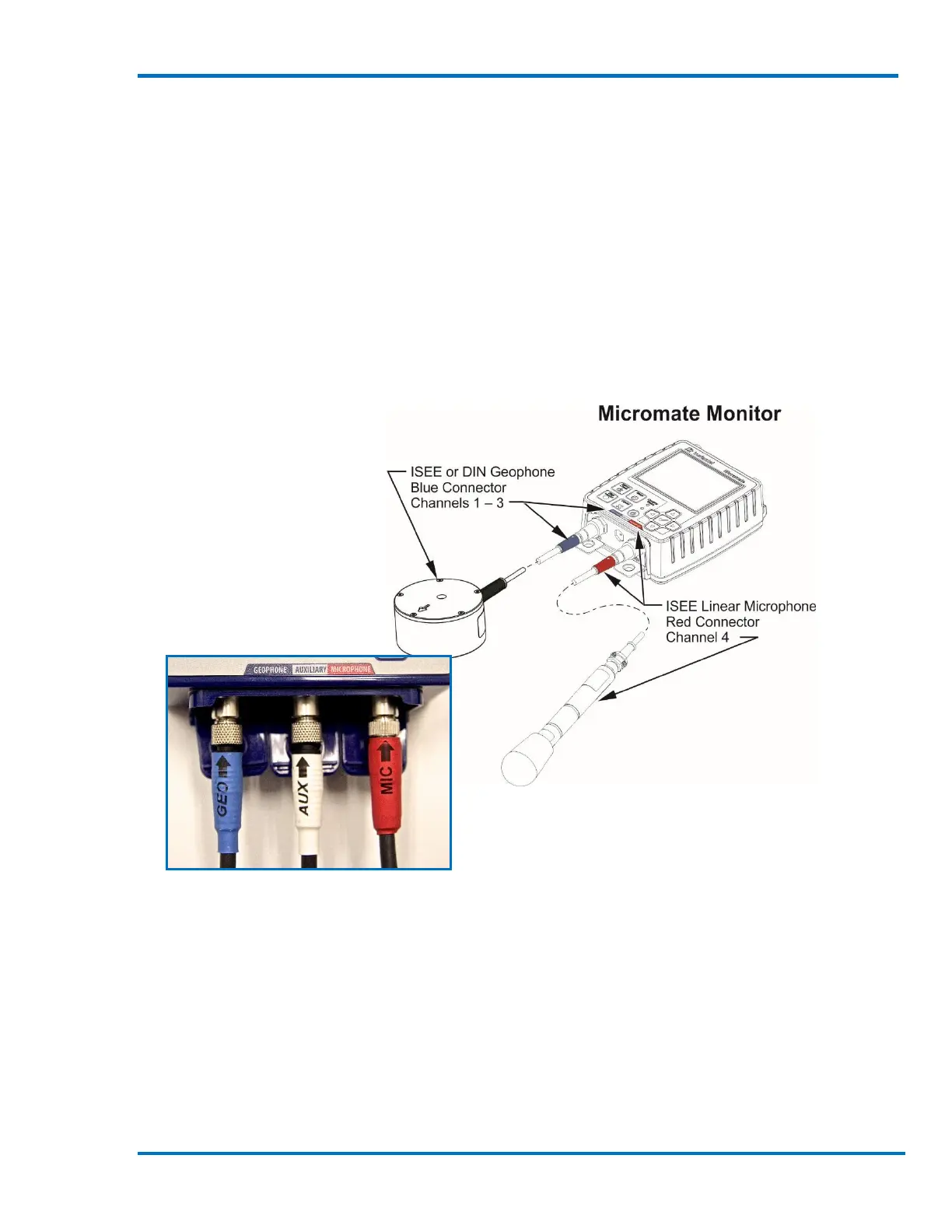
Step 1: Connect the Geophone and Microphone
Align and connect the ISEE Geophone or DIN Geophone and the Linear Microphone to the
connections with the proper labels on the Micromate. The color on each sensor connector
corresponds with the color of the label on the top of the unit. On the unit, below each connector,
is a white text label indicating the name of each connector.
Step 2: Turn the Unit On
If you have received your Micromate directly from Instantel, or from an Authorized Instantel
Service and Calibration Facility, the battery will be deactivated for shipping safety and battery life
conservation. To activate the battery, press and hold the power button for five (5) seconds; the
unit will turn the display on and begin loading the operating system. An installation progress bar
will be displayed during this time. After the unit operating system has been loaded, the main
Micromate display will appear.



 To Next Page