30 Micromate Operator Manual – 721U0201 Revision 6
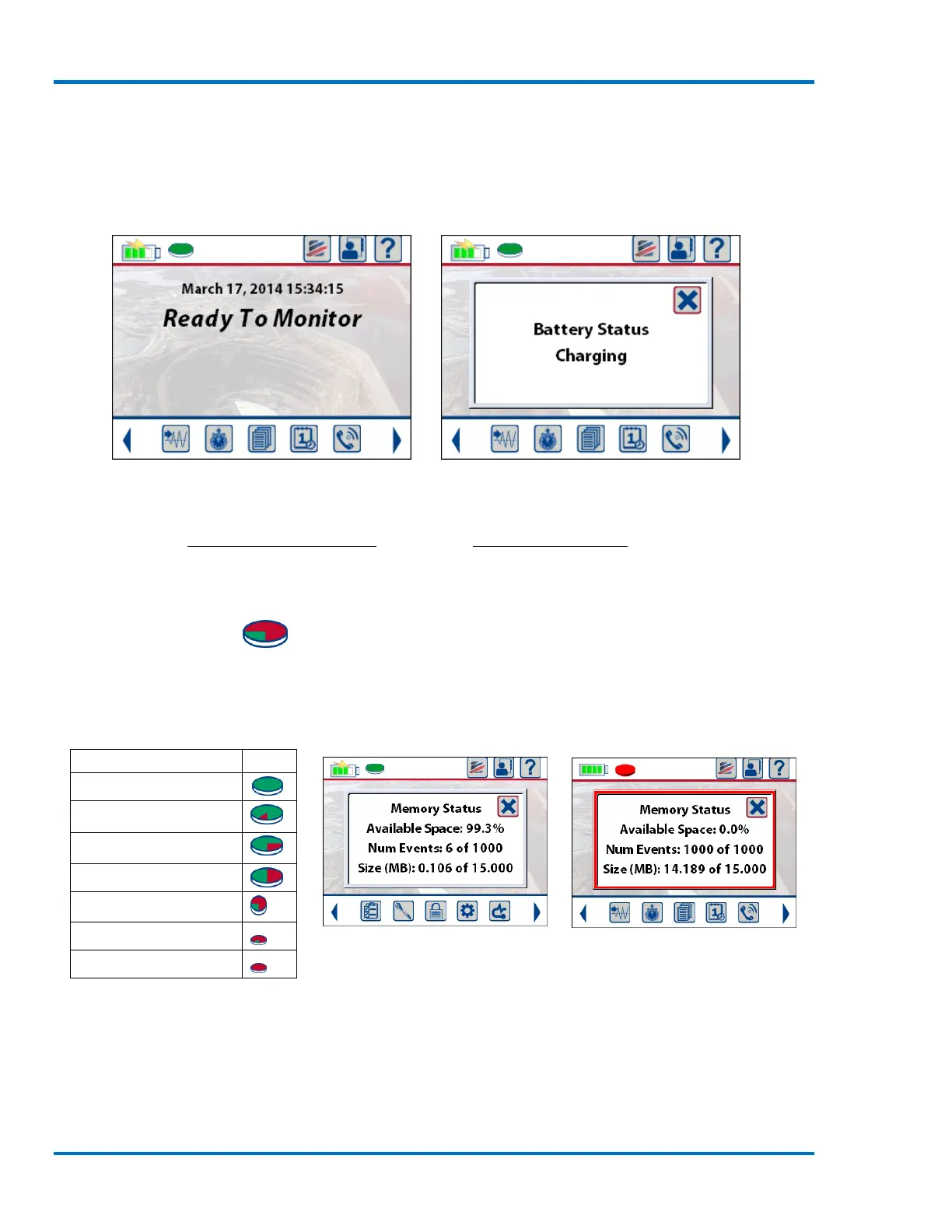
When the Micromate is connected to an external power source the battery icon will show 75%
charged and have a lightning bolt in the middle. This indicates the battery is currently being
charged. If the battery icon is touched while the Micromate is connected to an external power
source, the resulting message will also indicate the unit is charging.
Micromate with External Power Connected Result of Touching Battery Icon
Refer to sections 11.5.3 View Battery Data and section 12 Battery Overview for additional
information.
9.1.2. Memory Icon
The Memory icon will change as events are recorded and the memory is consumed. The memory
icon has seven different states with the color red indicating the amount of internal memory that
has been consumed. The exact memory status details are available by touching the memory icon.
Sample Memory Status
a. Memory Capacity
The Micromate can store a maximum of 1000 events in its 15 Megabytes (MBs) of storage memory.
An event is defined as a four channel one second waveform event that has been recorded at a
sample rate of 2048 S/s. The Micromate will stop recording events when it has recorded 1000
events or when it has used all of its 15 MBs of storage memory. The number of events and



 To Next Page