Micromate Operator Manual – 721U0201 Revision 6 79
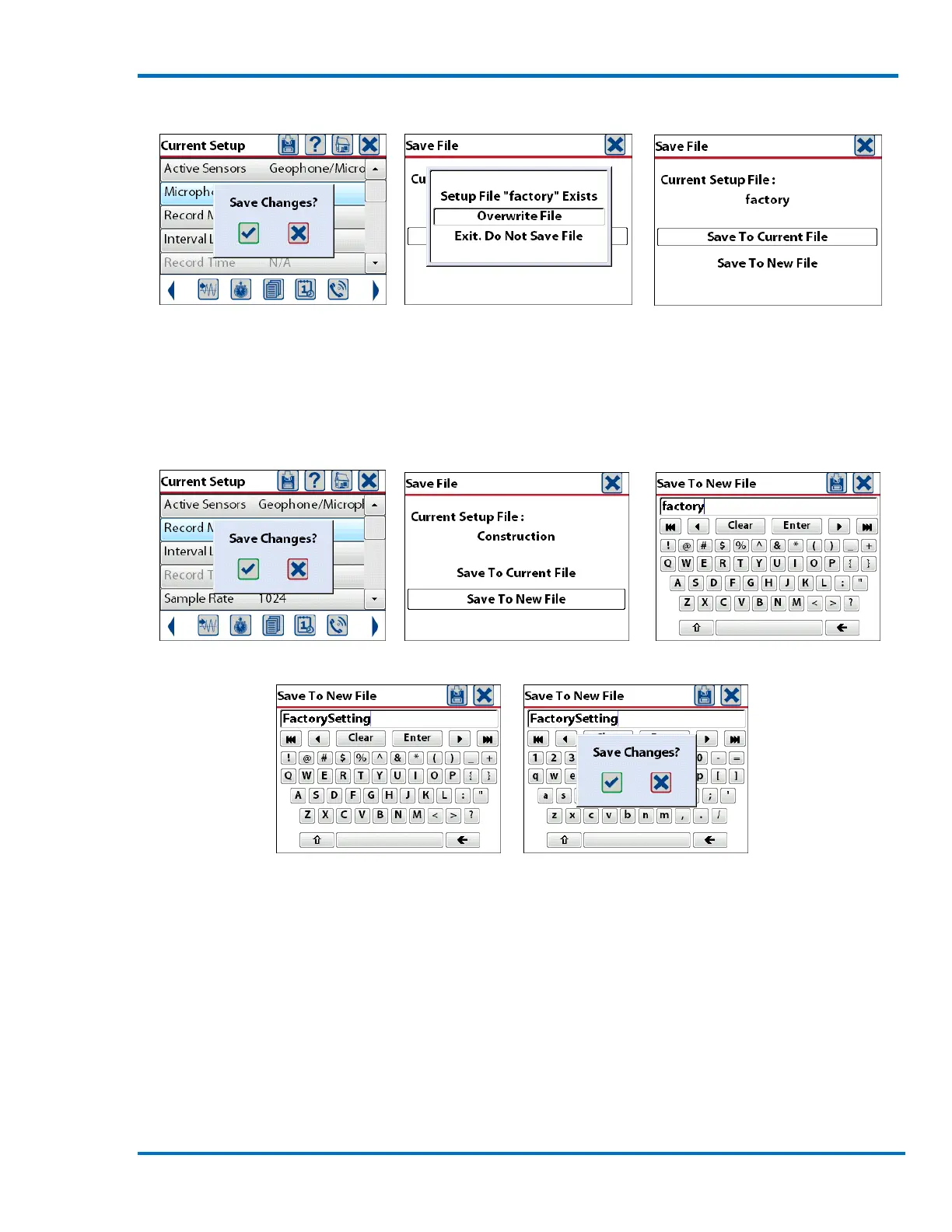
Save Setup File Save to Current File Overwrite the Current File
b. Save To New File
If the current setup file is to be saved as a new setup file, press the save icon and select the Save To
New File option. This will open the keyboard window and display the current setup filename. Edit
the current filename or press the Clear key and type the new filename.
Save Setup File Save to New File Current Setup Filename
Enter New Setup Filename Save to New Filename
The filename can be up to 20 character long and may only contain alpha numeric characters as well
as the hyphen (-) and underscore (_). The filename can describe the type of monitoring being done
or it could be the location of the monitor. Enter the desired filename and press the save icon or
Enter key.
11.2. Select Setup File
The Micromate can store up to 25 different setup files. This allows the Micromate to be configured
to different job specifications very quickly. It can also prevent having to re-enter information when
the unit is deployed in a location that was previously monitored.



 To Next Page