Konica Minolta 240f 8-33
8.2 Specifying default settings
8
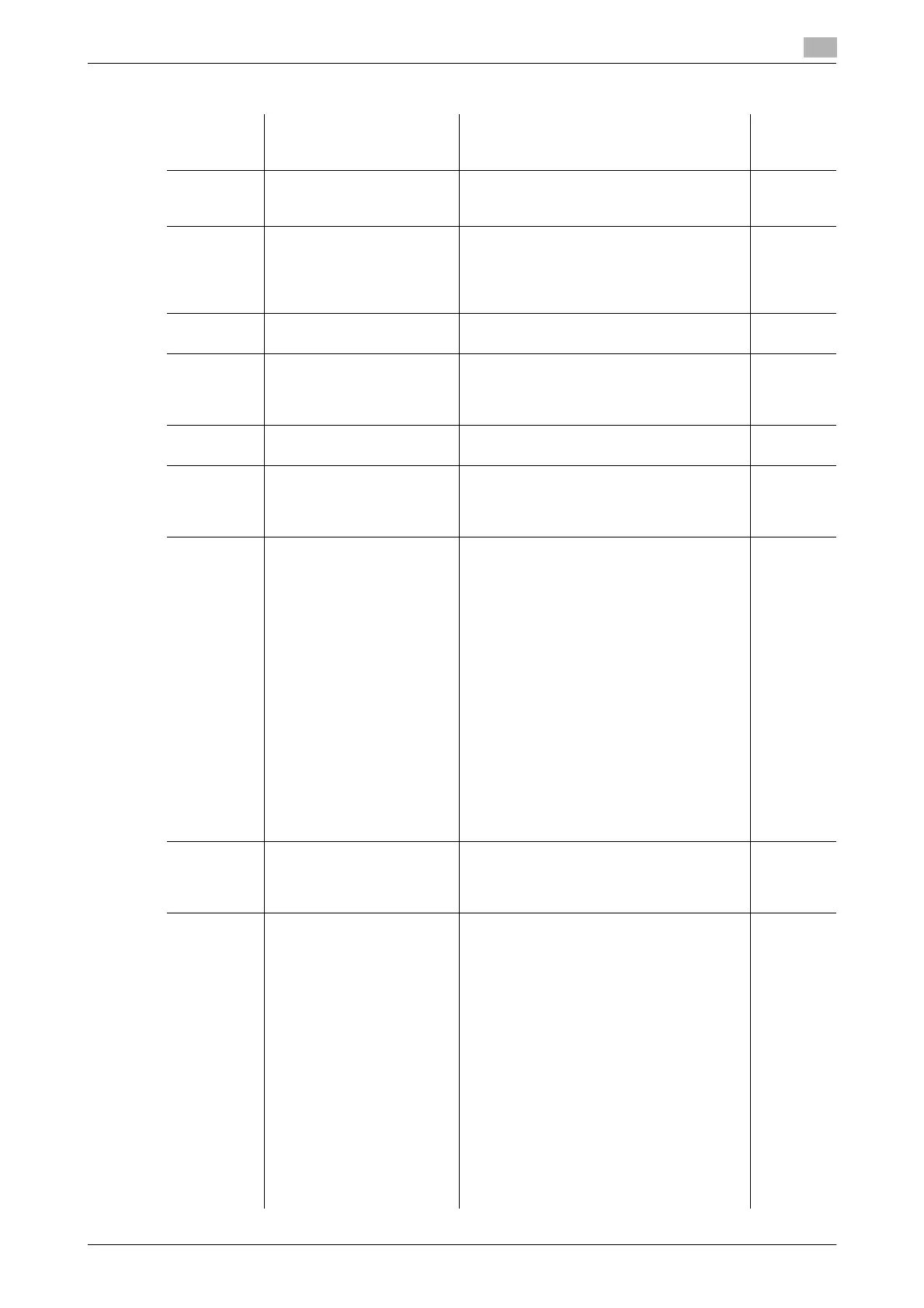
List of default scanner settings
Function Description Settings Refer-
ence
page
Doc.Type Set the default document
type setting.
Text
Auto
Photo
p. 2-15
Contrast Set the default contrast set-
ting.
Lightest
Lighter
Normal
Darker
Darkest
p. 2-16
Color Set the default scan format
setting.
Mono
Color
p. 2-18
Resolution Set the default resolution
setting.
100 dpi
200 dpi
300 dpi
600 dpi
p. 2-17
Scan Size Set the default scan size
setting.
A4
, A5 v, F4, Letter, H.Letter v, Legal p. 3-5
Next Doc. You can scan a series of
separate documents and
transmit them as a single
document.
ADF: ON,
OFF
FBS (Document glass):
ON,
OFF
p. 3-8
Color Adjust Set the default color adjust-
ment setting.
Contrast
-3 / -2- / -1 /
0
/ 1 / 2 / 3 :
0
Sharpness
-3 / -2- / -1 /
0
/ 1 / 2 / 3 :
0
Hue
-3 / -2- / -1 /
0
/ 1 / 2 / 3 :
0
Saturation
-3 / -2- / -1 /
0
/ 1 / 2 / 3 :
0
Lightness
-3 / -2- / -1 /
0
/ 1 / 2 / 3 :
0
RGB
R -3 / -2- / -1 /
0
/ 1 / 2 / 3 :
0
G -3 / -2- / -1 /
0
/ 1 / 2 / 3 :
0
B -3 / -2- / -1 /
0
/ 1 / 2 / 3 :
0
p. 3-11
Sort Set the default setting for
whether to perform sorting
with the Scan to Print func-
tion.
No Sorting
Sort
p. 2-13
FileFormat This sets the default file for-
mat used when a scanned
document is saved. In the
default settings for PDF
w/ Password, you can set
the encryption level and re-
strictions with a permis-
sions password.
d
If you have
changed the file
format in the de-
fault e-mail set-
tings, that setting
is also changed.
(page 8-36)
Mono
TIFF
PDF
PDF w/ Password
Color
JPEG
PDF
PDF w/ Password
PDF w/ Password
• Encryption Level:
Low (40-bit RC4),
High (128-bit RC4),
High (128-bit AES)
•Printing:
Allowed
, Not allowed
•Editing:
Allowed
, Not allowed
•Copying:
Allowed
, Not allowed
p. 3-23





 To Next Page