Basics
Entering Text
- 65 -
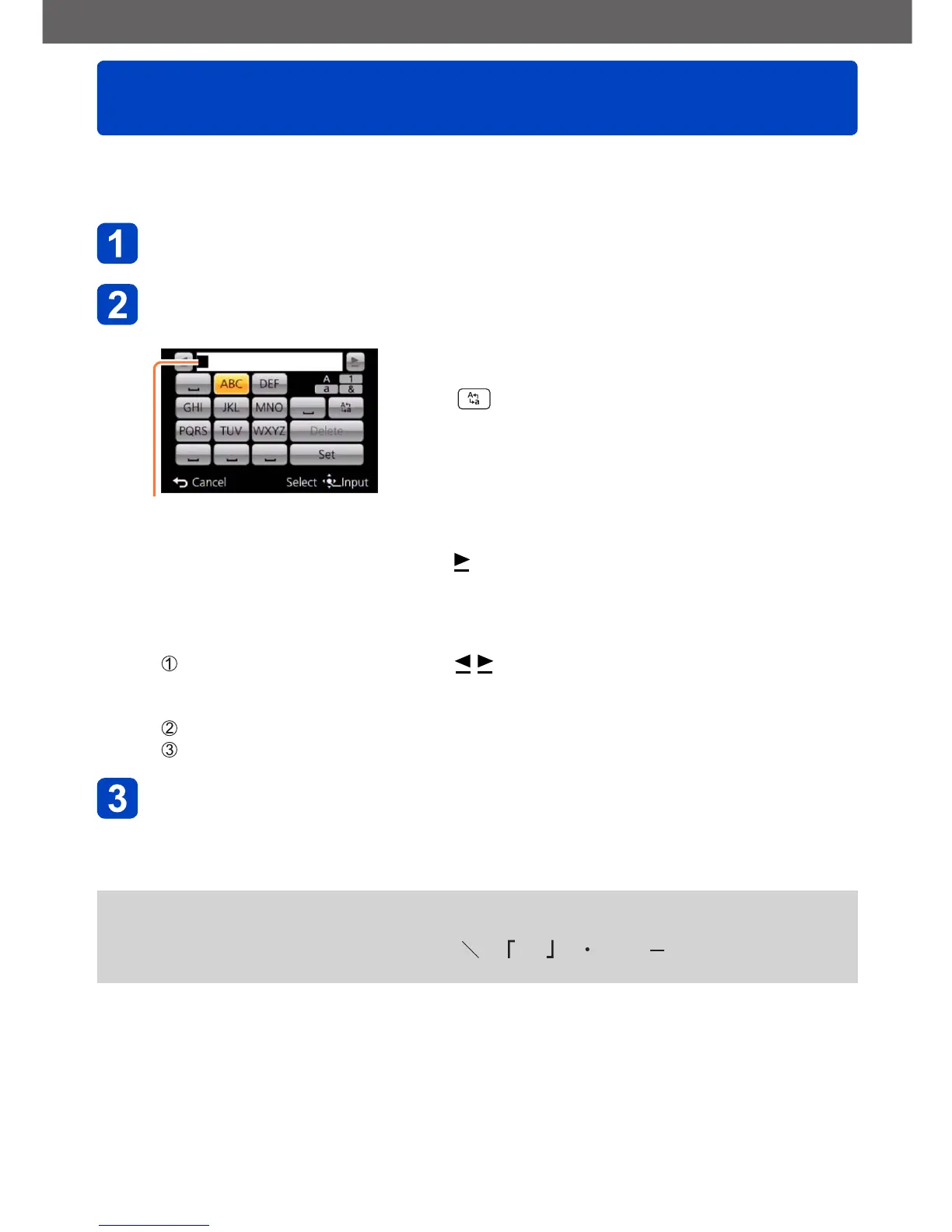
Use the cursor buttons to enter names with the Face Recognition function and in the
Scene modes [Baby] and [Pet], or to register locations in [Travel Date] etc.
Use the cursor buttons to select characters
Press [MENU/SET] several times until the desired character is
displayed
Cursor position
The character is inserted at the cursor position.
• To change the character type:
Select , and press [MENU/SET]
■
To continue entering characters
• Use the cursor buttons to select
, and then press [MENU/SET]
• Push the zoom lever toward the T side
• Turn the control dial to the right
■
Editing text
Use the cursor buttons to select and press [MENU/SET]. Then, move the
cursor to the character to edit
• You can also use the zoom lever or control dial to reposition the cursor.
Use the cursor buttons to select [Delete], and then press [MENU/SET]
Use the cursor buttons to select the correct text, and then press [MENU/SET]
When you are finished entering text, use the cursor buttons to
select [Set], and press [MENU/SET]
●
A maximum of 30 characters can be entered. (Maximum of 9 characters for [Face
Recog.] names)
●
Up to 15 characters can be entered for [ ], [ ], [ ], [ ] and [ ]. (Maximum of
6 characters for [Face Recog.] names)



 To Next Page