Connecting to other devices
Using with your computer
- 210 -
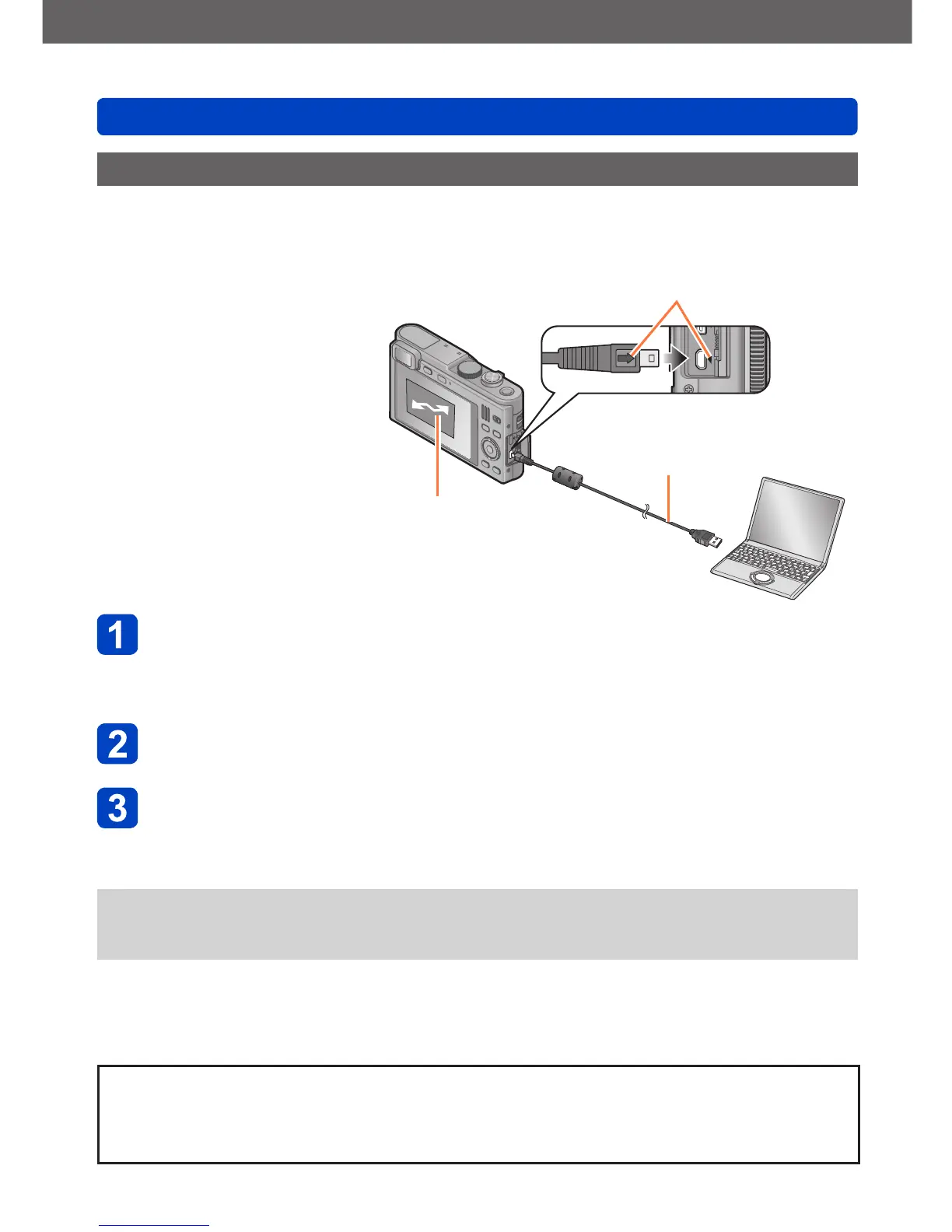
Connect camera and computer
• Do not use any other USB cables except a genuine Leica USB cable of the
supplied type.
Using cables other than the above may cause a malfunction.
Use the cursor buttons on the camera to select [PC], and then
press [MENU/SET]
Operate with your computer
• You can save pictures to use on your computer by dragging and dropping folders
and files into separate folders on your computer.
●
Files and folders containing copied AVCHD motion pictures cannot be played back
or edited if they have been deleted, modified, or moved using Windows Explorer or
similar methods.
Preparation:
• When importing pictures from
the built-in memory, remove
any memory cards.
• Turn on the camera and
computer.
Make sure the plug is aligned correctly and that it is
inserted straight.
(Otherwise the connectors may be bent out of shape
which will cause trouble.)
Also, do not insert into the wrong socket. Doing so may
cause damage to the camera.
[Access] (sending data)
• Do not disconnect
the USB cable while
[Access] is displayed.
USB cable
Copying still and motion pictures
To cancel the connection
• Windows: Execute “Safely Remove Hardware” on the taskbar
• Mac: Open the Finder and click the eject icon that appears on the sidebar



 To Next Page