Taking pictures
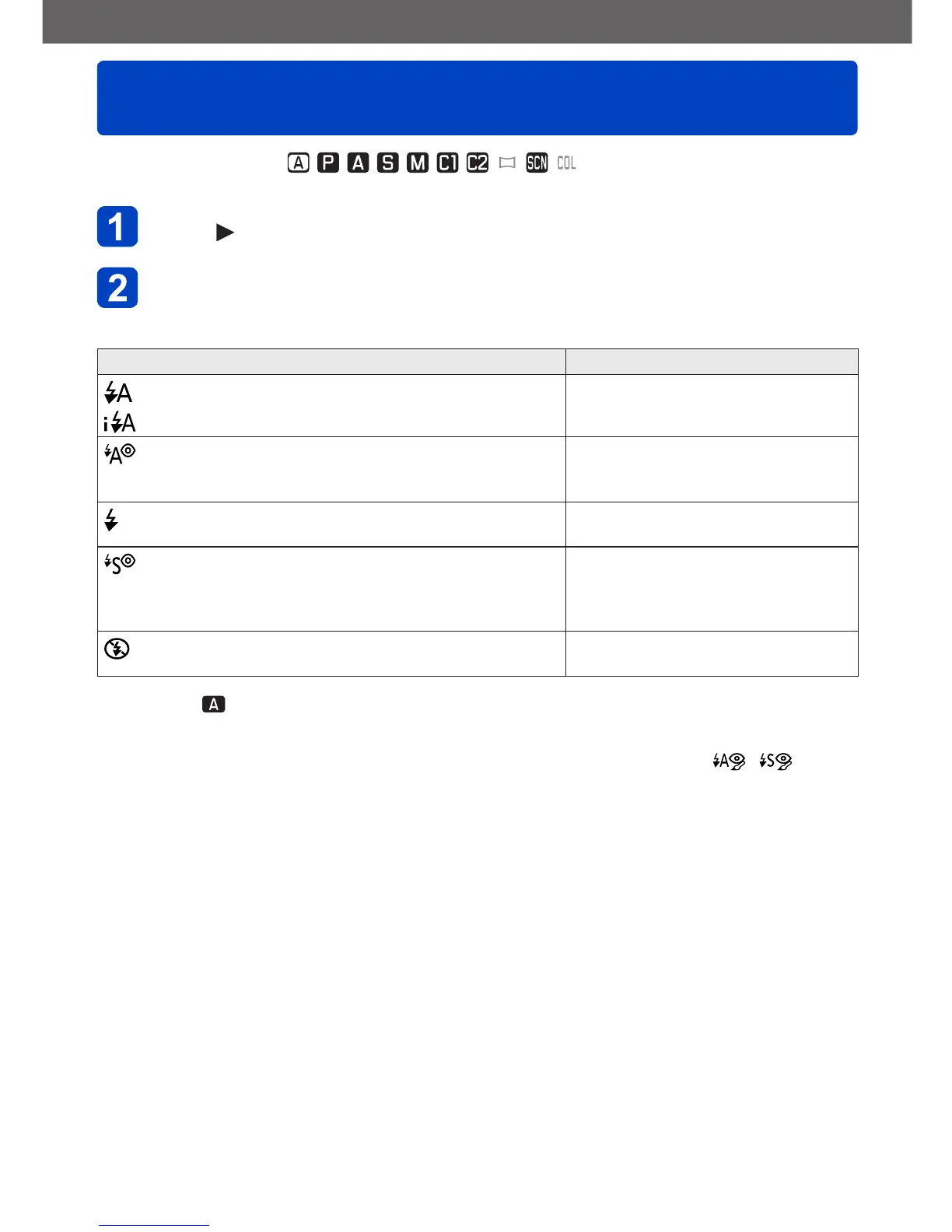
Using the built-in flash
- 75 -
■
Recording modes:
Press to display [Flash]
Use the cursor buttons to select the desired mode, and then
press [MENU/SET]
Modes, function Application
*
1
[Auto]
• Automatically judges whether or not to flash
Normal use
[Auto/Red-Eye]
*
2
• Automatically judges whether or not to flash
(reduce red-eye)
For pictures of subjects in dark
places
[Forced Flash On]
• Always flash
For pictures with backlight or under
bright lighting (e.g. fluorescent)
[Slow Sync./Red-Eye]
*
2
• Automatically judges whether or not to flash
(reduce red-eye; slow shutter speed to take
brighter pictures)
For pictures of subjects against a
nightscape (tripod recommended)
[Forced Flash Off]
• Never flash
For situations in which flash use is
prohibited or undesirable
*
1
Only in the mode
*
2
Two flashes will be emitted. Do not move until after the second flash. The interval between flashes
varies according to brightness of subject.
When [Red-Eye Removal] in the [Rec] menu is set to [ON], the icon changes to [
]/[ ], red-
eye is automatically detected and the picture data is corrected. (only if the camera has detected a
face)



 To Next Page