Doc #: L-2600-1023 Page 40 Rev. 02
3.3.4.6 Increment Counter
This parameter is available for “Cyclic” and all “Part Detector” channel types. It is available only when
a counter had been configured for sensor-based counting and selects which, if any, counter to increment
when the sensor is detected.
3.3.5 Die Protection Channel Window Angles Setting Screen
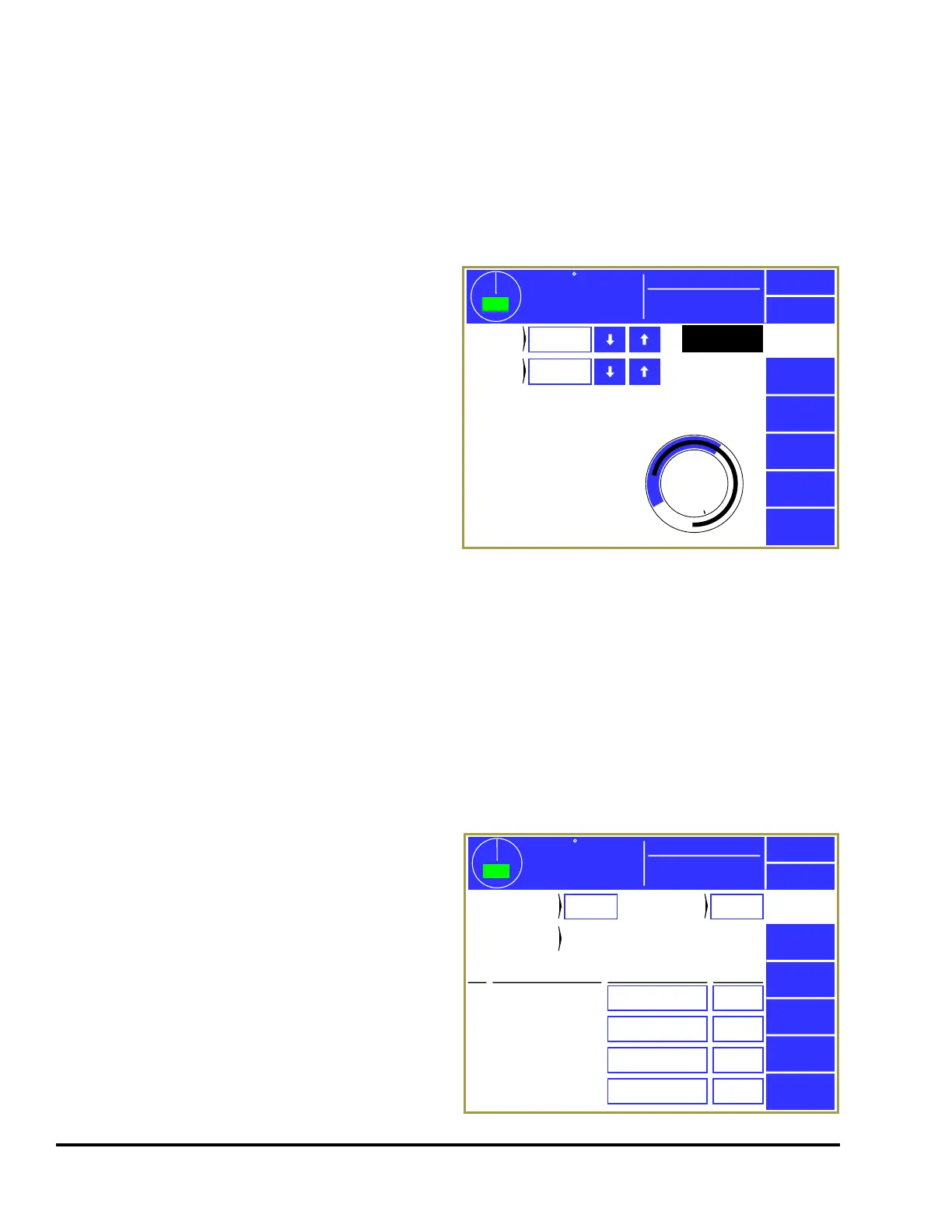
Touch inside the window angle area (see “b” in
Figure 26) to enter the angle setting screen for the
channel. Not all channel types use a timing
window, and this area will not appear for those.
The screen shown in Figure 29 is a typical example
of this screen.
The blue arc in the circular angle display shows the
timing window that is set for the channel, assuming
the “Channel Type” requires one. The black arc in
the circular angle display shows the actual angles
where the sensor was “On” in the last full stroke (0
to 359 degrees). This could be displayed as more
than one arc if the sensor turns “On” in multiple
places in the stroke. The captured sensor angles are
automatically updated every stroke.
3.3.5.1 Window On and Window Off
These are the angular settings in degrees for the timing window. These parameters are required for all
channel types except “Static” and “Part Detect Anywhere”. The permissible values are from 0º to 359º.
Once the timing window values are entered, they will be graphically displaced on the circular display in
the lower right corner of the screen. The timing window duration will be highlighted in blue.
3.3.6 Die Protection Bypass Screen
Press the Bypass softkey in the die protection main
screen (see Figure 24 on page 33) to display the
bypass screen as shown in Figure 30. This screen
allows the user to bypass the die protection system
as a whole, or just individual sensors.
3.3.6.1 System Bypass
If configured to allow System Bypass (see Section
4.5 on page 60), the screen will display the
System Bypass softkey. Press this softkey to
bypass all the sensors on the die protection system
– this effectively turns die protection off.
359
TOP
Stroke Speed
0
SPM
ACC
Espanol
Exit
Die
Protection
Die Prot.
Channel 3
0
270
180
90
Window
On
240°
Window
Off
35°
Mode:
Production
Figure 29: Die Protection Channel Angle Setting
359
TOP
Stroke Speed
0
SPM
ACC
Espanol
Exit
Die
Protection
Module: OIT
Ch
No
Yes
No
Yes
Description Channel Bypass
Bypass
In Setup
Mode
1
2
3
4
Stock Buckle
End of Stock
Feed Complete
Part Detector
No
No
No
No
Limited Bypass
Strokes
5
Limited
Bypass Time
10 min
System
Bypass
Limited
Bypass
Mode:
Production
Bypass
Status
Not Bypassed
Figure 30: Die Protection Bypass Screen



 To Next Page