McHale Fusion 2 requirements & preparation section
07-2
McHale Fusion 2 round baler wrapper technical service manual
Issue 1: 0208
7.4 Loading and operating the netter system
Warning! Pay attention to the heavy weight of the net roll! It is recommended
that full net rolls should be handled by two persons.
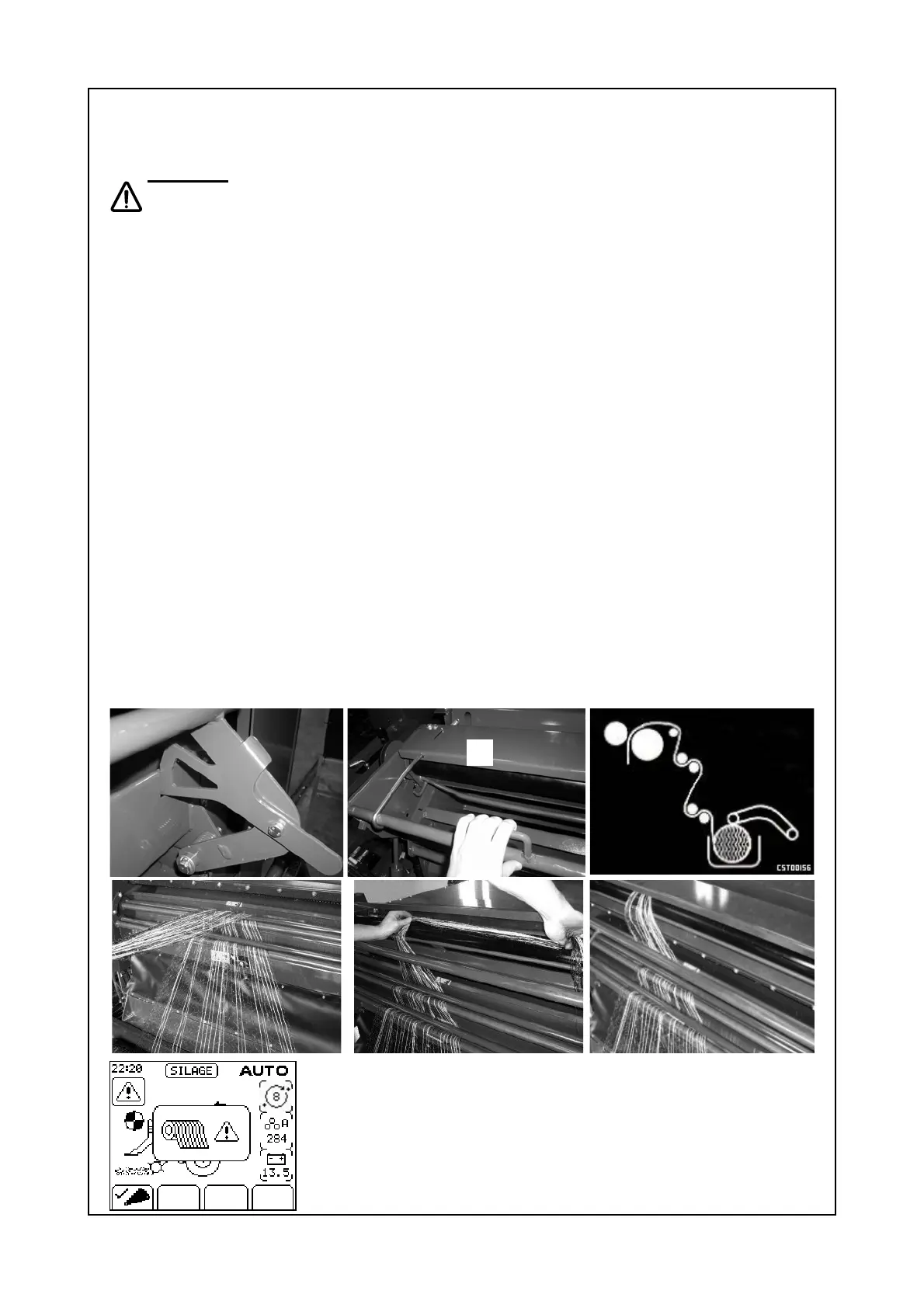
The passage of net through the netting unit is monitored; if the net cutting knife
does not trip within 20 seconds of the netter starting, the alarm sounds, the net
error symbol (7.4.2) is displayed in the control box display and the cycle is halted.
The following is the procedure for changing the roll or fitting the first roll:
¾ The PTO is first switched off.
¾ Open the net brake bar “A”, hold it in place with latch “B”, remove the empty
cardboard core of the finished net roll and dispose of responsibly.
¾ Put the new net roll in the net container.
¾ Open the cover (C) over the net feed rollers as shown in pic. 2 and pull a loose
net end of approx. 0.5 m from the roll, feed through net tension bar and over
the knife trip bar as shown in 3.
¾ Roll up the net and rest it across the rollers from left to right or vice versa as
shown in 4 and 5, insert it in between the rubber and the aluminium feeding
roller.
¾
Finally close the cover on the net feed rollers followed by the net brake bar “A”
of the net container see figure 7.4.1, parts 1 and 2. The loose net end should
not be more than 10 cm inside the bale chamber to prevent it being pulled in
by the rotating bale. When finished the net should look something like figure
Fig. 7.4.1: part 6.
¾ After roll of net is replaced, PTO is engaged and the “net” button is pushed,
net feeds into the chamber, netting the bale and the knife trips; the operator
then checks that netting is complete and advances the cycle by pushing the
‘chamber door open’ button for one second, work can then continue as normal.
A
1
B
2 3
5 4 6
Fig. 7.4.1 Feeding net through rollers.
7.4.2 Net error symbol
C



 To Next Page