McHale Fusion 2 requirements & preparation section
07-3
McHale Fusion 2 round baler wrapper technical service manual
Issue 1: 0208
7.5 Net cutter setting
In an automatic cycle the netter starts feeding net when the set bale density has
been reached, and the cutter is tripped when the bale is wrapped with the
predetermined net length. The net length can be adjusted at the net cutter drive on
the left hand side, see figure 7.5.1. It is recommended that a minimum of two
layers of net are applied to the bale. Dry conditions and very high densities require
up to four or more layers to ensure a good bale shape. Note: When the control box
is set to ‘Bale Only’ for hay or straw with high dry matter being baled more net must
be applied.
Warning! The net adjustment lever must never be adjusted while the baler PTO
shaft is engaged and the tractor is running. Never climb onto the baler platform
while the pick-up reel is still spinning! Beware of sharp knife edges!
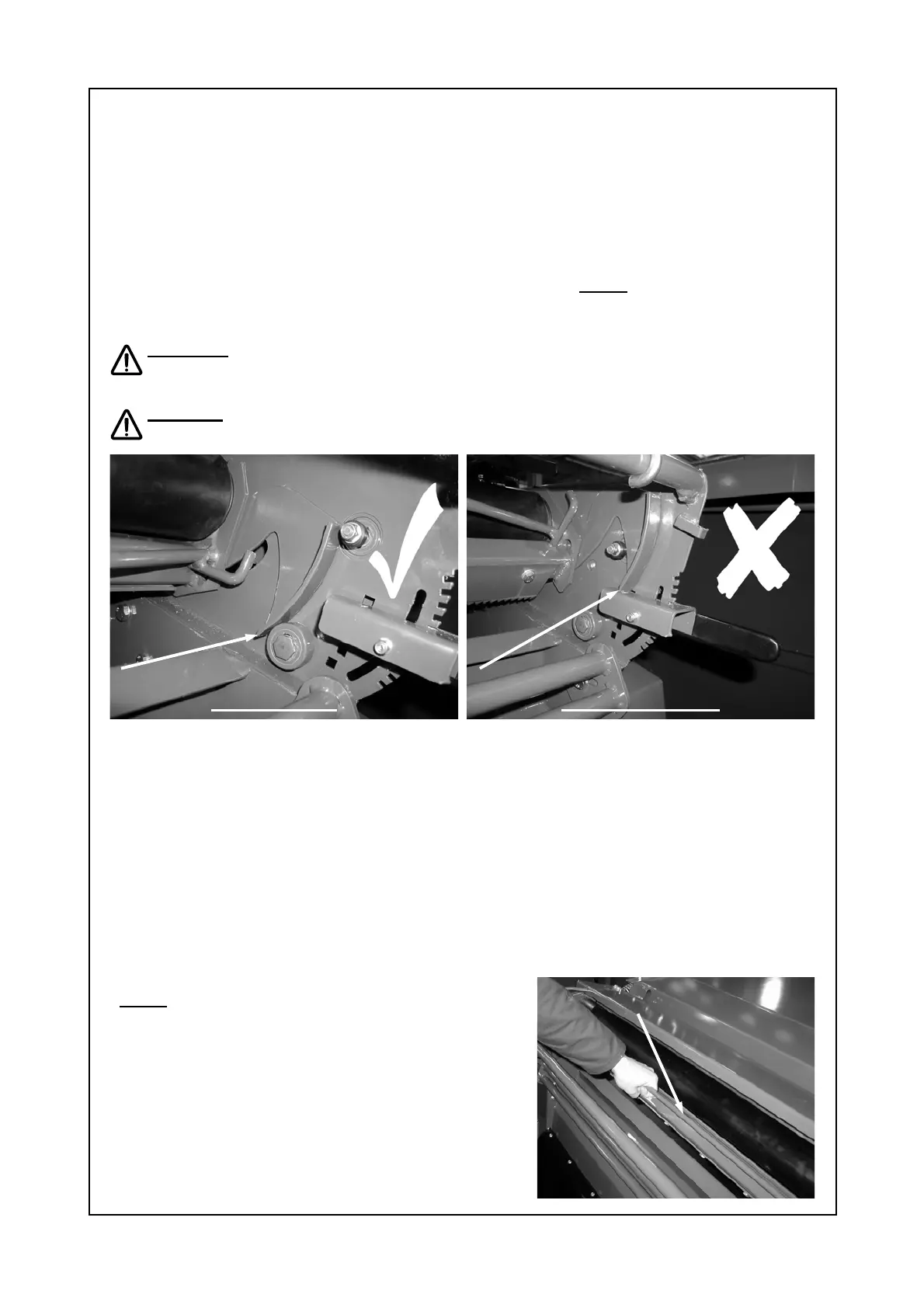
Caution: Never attempt to adjust the net cutter setting until the knife has
tripped, see figures 7.5.1 and 7.5.2.
7.5.1 Adjustable position 7.5.2 Nonadjustable position
Trip the knife by following the procedure below:
1. Ensure PTO shaft power is disengaged, tractor is turned off and safely parked,
i.e. cannot roll.
2. Climb onto the baler platform. Carefully pull upwards on the knife frame bar,
see figure 7.5.3, and while applying pressure upwards on the bar, release the
bill hook, by pushing it off the adjuster, refer to figures 7.5.1 and 7.5.2.
3. Allow knife to rest in it’s cutting position.
4. Adjust the net amount adjuster accordingly, refer to table 7.5.5 for settings.
5. Once desired setting is selected, replace the bill hook onto the adjuster by
pulling upwards on the knife frame bar.
Note: Ensure that the bill hook rests on the
adjuster as shown in figure 7.5.2.
Figure 7.5.3 Knife frame bar.
Knife tripped, bill hook off adjuster!
CAN ADJUST!
Knife not tripped, bill hook on adjuster!
DO NOT ADJUST!
Knife frame bar.



 To Next Page