MOOR INSTRUMENTS moorLDI2 RESEARCH USER MANUAL
109
4.
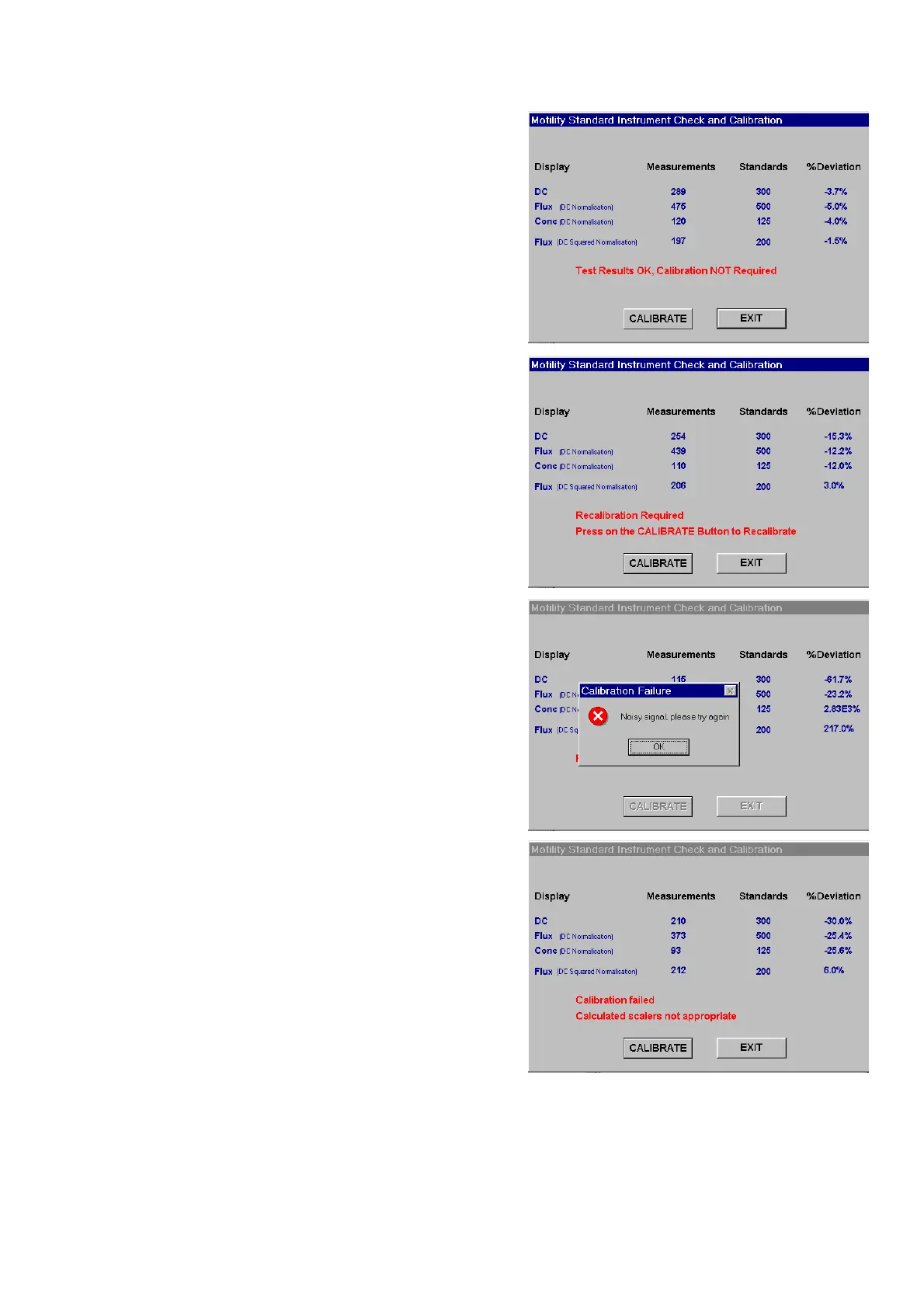
Test results appear with %Deviation from
standard calculated. In the example (right)
Deviation is within the acceptable range and
calibration is not recommended - in which
case quit the utility with the EXIT key.
5.
If measured values are outside acceptable
limits, then proceed to calibration with the
CALIBRATE key. Do not calibrate if there is
any doubt about the set up and accurate
positioning of the calibration block. Exit and
repeat from 1.
6.
If there is excessive vibration during
calibration then the Noisy Signal Message
appears. Attempt calibration a second time by
clicking OK then CALIBRATE.
If the MoorLDI persistently fails to calibrate,
consult Moor Instruments or your authorized
distributor for further guidance.
7.
If the ‘Calibration failed’ message appears,
press EXIT and re-load the calibration utility.
Pay particular attention to measurement
conditions, following instructions from 2.
(over).
If the MoorLDI persistently fails to calibrate,
consult Moor Instruments or your authorized
distributor for further guidance.



 To Next Page