239
卡 DNC 操作(使用用户存储区操作)
CARD DNC OPERATION (OPERATION USING USER MEMORY AREA)
d) 使用光标移动键选择要执行的程序的文件名。 d) Select the file name for the program to be executed
using the cursor control keys.
e) 按下 [ 执行 ]。 e) Press [EXECUTE].
[ 所读取的文件名显示在屏幕上。] [The name of the read file appears on the screen.]
5存储卡、USB 存储器、RS232C、使用 ‘MORI-SERVER’的
网络和数控存储器可用于从用户存储区中输入和输出程序。
5A memory card, USB memory, RS232C, the network using
‘ MORI-SERVER ’, and NC memory can be used for
program input and output with respect to the user memory
area.
< 执行 DNC 运行 > <Executing DNC Operation>
1) 从‘ 卡 DNC 操作列表 ’屏幕上选择文件夹,然后按下
[
(Enter) 键 /
\
( 输入 ) 键。
1) Select the folder from the ‘ CARD DNC OPERATION LIST ’
screen and press the
[
(Enter) key/
\
(INPUT) key.
[ 这里列出了文件夹中的文件。] [The files in the folder are listed here.]
2) 使用光标移动键选择要执行的程序的文件名,然后按下 [ 文
件搜索 ] 或
[
(Enter) 键 /
\
( 输入 ) 键。
2) Select the file name for the program to be executed using
the cursor control keys and press [FILE SEARCH] or the
[
(Enter) key/
\
(INPUT) key.
[ 在‘ 程序检查 DNC ’屏幕上显示所选择的文件。] [The selected file is displayed on the ‘ PROGRAM CHECK
DNC ’ screen.]
3) 按下自动运行按钮
q
[ 开始 ] 开始加工。 3) Press the automatic operation button
q
[START] (Start) to
start machining.
也可以通过下列操作,启动卡 DNC 运行。 It is also possible to start card DNC operation by the following
operation.
1) 显示‘ 程序检查 DNC ’屏幕。 1) Display the ‘ PROGRAM CHECK DNC ’ screen.
[ 屏幕上显示了当前正在执行的 DNC 程序。] [The DNC program currently being executed is displayed
on the screen.]
2) 输入包含要执行程序的文件名,然后按下 [ 文件搜索 ]。
[ 在屏幕上显示搜索找到文件中的程序。]
2) Input the file name containing the program to be executed
and press [FILE SEARCH].
[The program in the file found in the search is displayed on
the screen.]
3) 按下自动运行按钮
q
[ 开始 ] 开始加工。 3) Press the automatic operation button
q
[START] (Start) to
start machining.
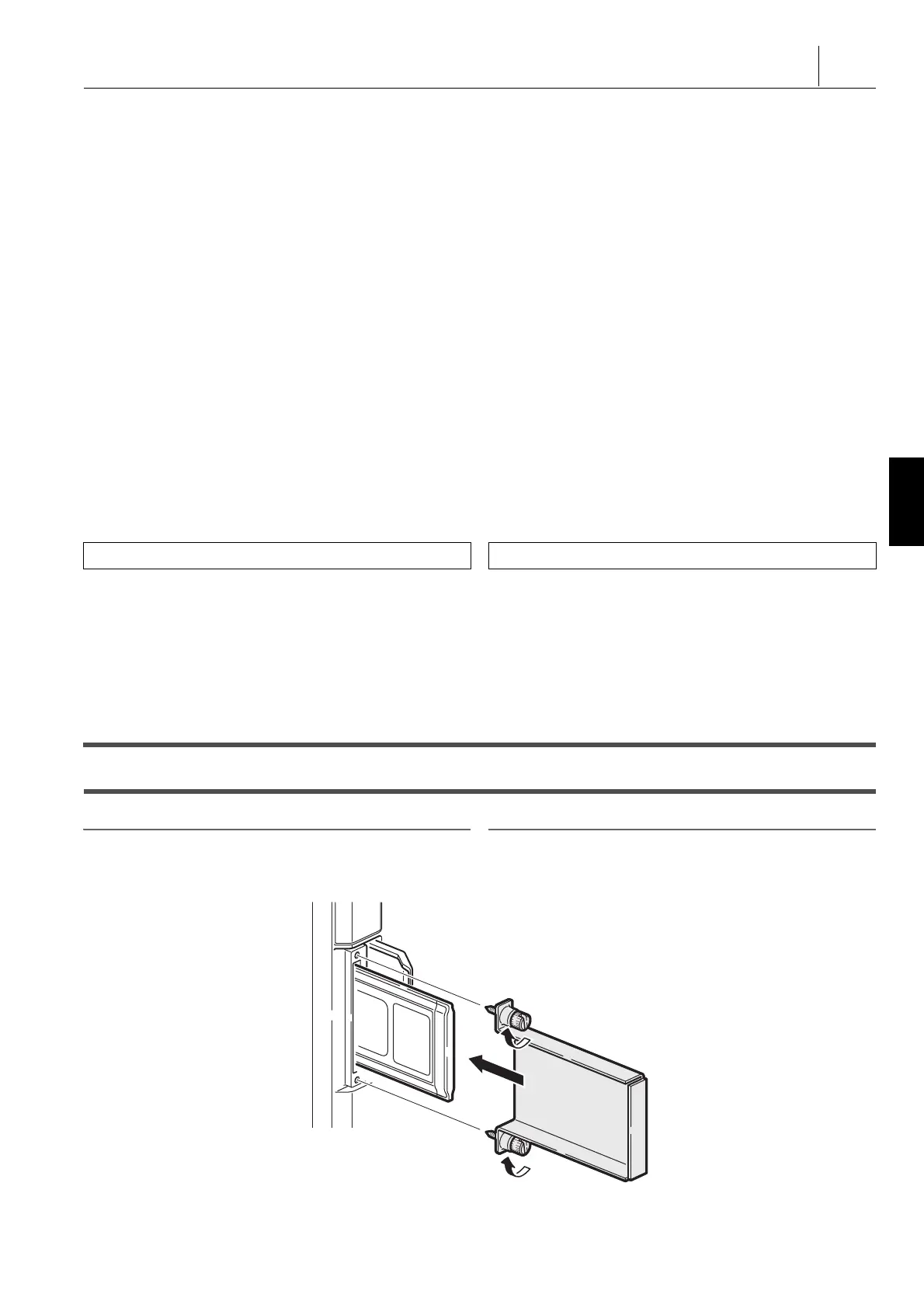
8-2 存储卡(前卡) DNC 运行(选项)
Memory Card (Front Card) DNC Operation (Option)
2 注意 2 NOTE
为了防止卡掉落,确保用如下所示的附件(作为选项,以附件方式提供
)安装前卡。
In order to prevent the card from falling out, be sure to equip the front
card with the attachment (provided as an accessory for the option)
shown below.
功能选择键
p
( 程序 )
Function selection key
p
(PROG)




 To Next Page