173
数控操作面板
NC OPERATION PANEL
背景灯关闭功能 Backlight OFF function
按下 [ 屏面关闭 ] 软键关闭屏幕背景灯以节约电能。 Pressing the [SCREEN OFF] soft-key turns off the screen
backlight in order to conserve energy.
使用操作面板按钮 / 键再次打开屏幕背景灯。 Using the operation panel buttons/keys turns the screen
backlight on again.
3-17 功能选择键
Function Selection Keys
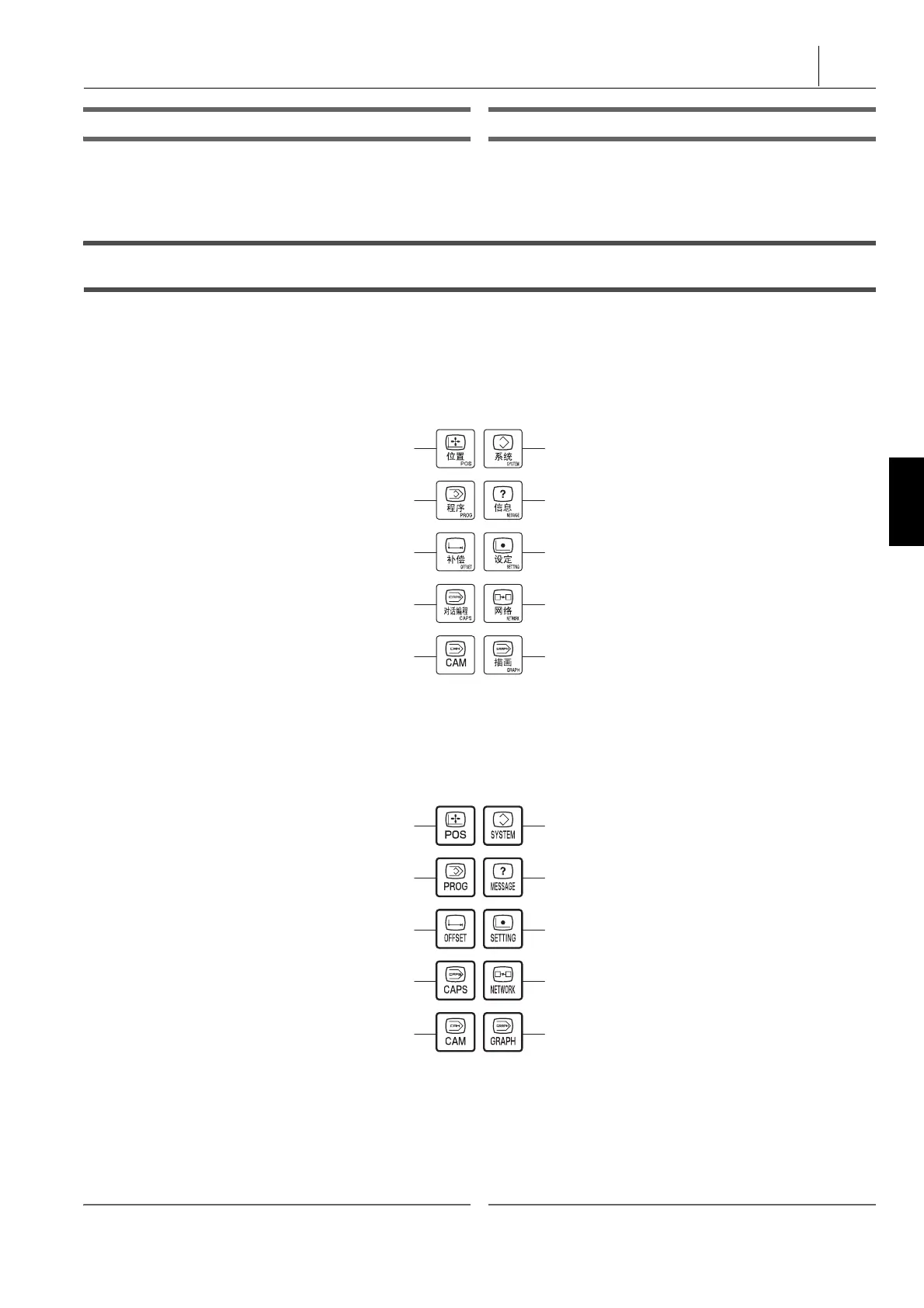
功能选择键允许操作员选择要显示的屏幕。功能选择键如下。 The function Selection Keys allow the operator to select the
screen to be displayed. The function selection keys are as
follows.
1 关于按下功能选择键所显示的屏幕,参见 “ 功能选择键和显示屏
幕 ” ( 175 页)。
1 Refer to “FUNCTION SELECTION KEYS AND DISPLAY
SCREENS” (page 175) for the screens displayed by pressing
function selection keys.
2 注意 2 NOTE
1. 数控式键盘(选项)上的功能选择键的布局可能不同于上图所示。 1. The arrangement of the function selection keys on the NC-type
keyboard (option) may vary from the image above.
a
“ 功能选择键 ( 位置 )” ( 178 页)
f
“ 功能选择键 ( 系统 )” ( 199 页)
b
“ 功能选择键 ( 程序 )” ( 180 页)
g
“ 功能选择键 ( 信息 )” ( 207 页)
c
“ 功能选择键 ( 补偿 )” ( 189 页)
h
“ 功能选择键 ( 设定 )” ( 207 页)
d
“ 功能选择键 ( 对话编程 )” ( 199 页)
i
“ 功能选择键 ( 网络 )” ( 217 页)
e
“ 功能选择键 (CAM)” ( 199 页)
j
“ 功能选择键 ( 描画 )” ( 217 页)
a “Function Selection Key (POS)” (page 178) f “Function Selection Key (SYSTEM)” (page 199)
b “Function Selection Key (PROG)” (page 180) g “Function Selection Key (MESSAGE)” (page 207)
c “Function Selection Key (OFFSET)” (page 189) h “Function Selection Key (SETTING)” (page 207)
d “Function Selection Key (CAPS)” (page 199) i “F
unctio
n Selection Key (NETWORK)” (page 217)
e “Function Selection Key (CAM)” (page 199) j “Function Selection Key (GRAPH)” (page 217)




 To Next Page