VBA23001-R.3762.A
- A38 ・ D90 -
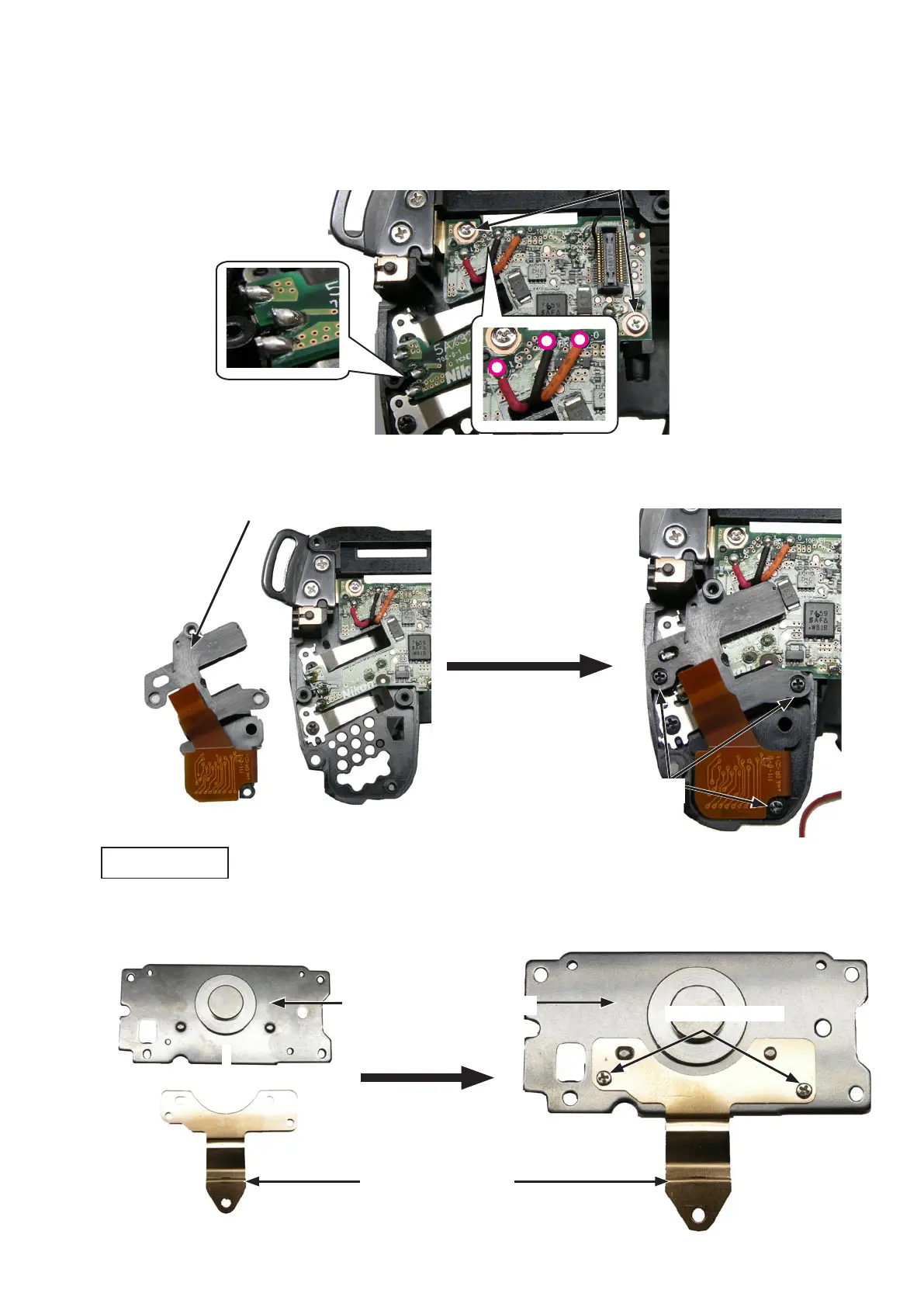
・Tighten the two screws (#683).Tighten the two screws (#683).
・Make the three solder bridges.Make the three solder bridges.
・Solder the wires (Red/Black/Orange).Solder the wires (Red/Black/Orange).
・Mount the OP FPC unit (#B1016), and tighten three screws [ROHS (#609)].Mount the OP FPC unit (#B1016), and tighten three screws [ROHS (#609)].
OP FPC unit (#B1016)
・Attach the GND plate (#140) to the bottom plate unit (#B67).Attach the GND plate (#140) to the bottom plate unit (#B67).
・Tighten the two screws (#617).Tighten the two screws (#617).
Screw (#617)
×
2
Screw (ROHS) (#609)
×
3
Screw (#683)
×
2
Bottom plate unit (#B67)
GND plate (#140)
Bottom plate unit



 To Next Page
 Loading...








