VBA23001-R.3762 .A
- D54 ・ D90 -
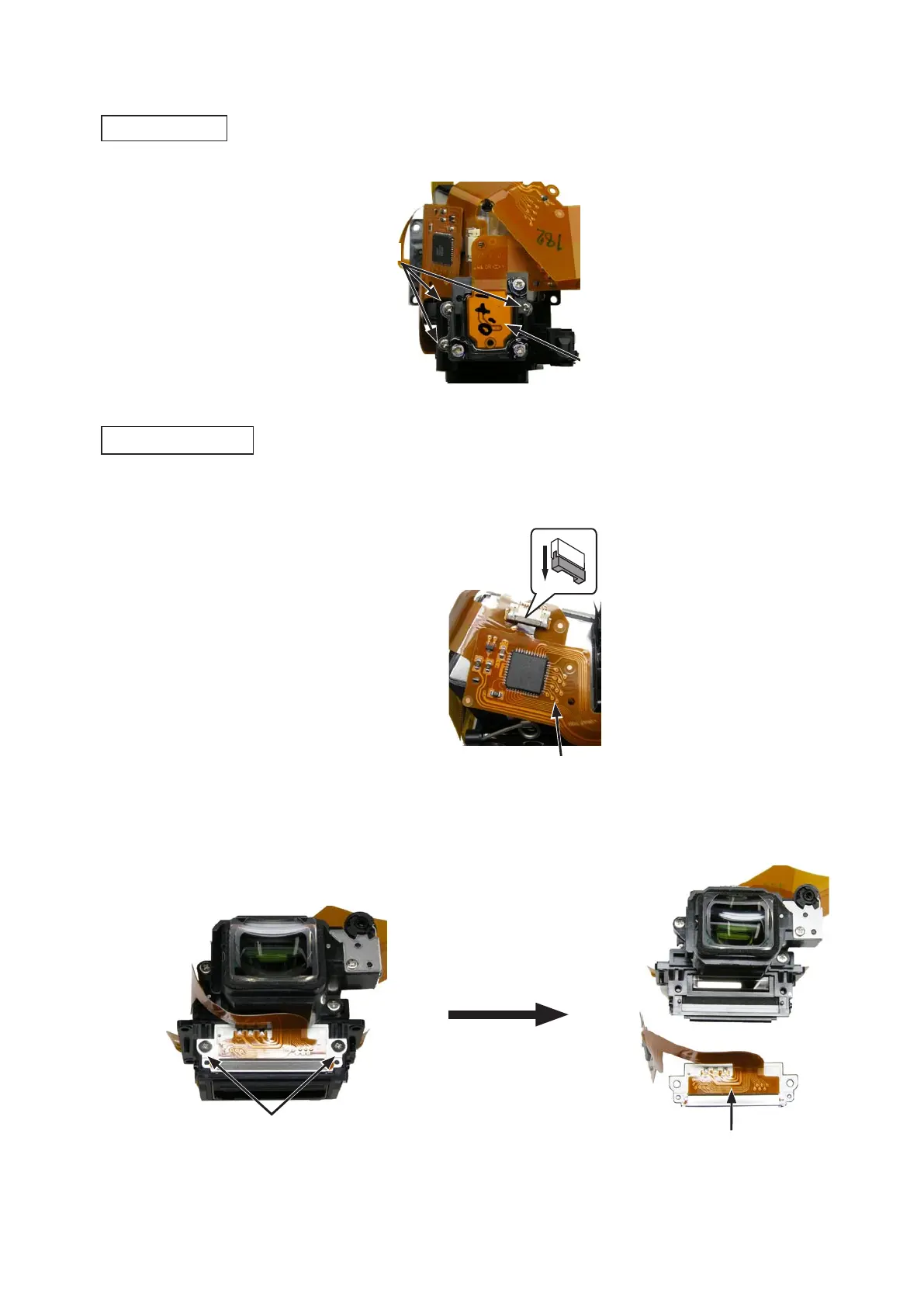
・Take out the two screws (#708), and remove the inside finder LCD unit (#B1010).Take out the two screws (#708), and remove the inside finder LCD unit (#B1010).
・Disconnect the FPC of the inside finder LCD unit (#B1010) from the connector on the penta prism FPC unit (#B1021).Disconnect the FPC of the inside finder LCD unit (#B1010) from the connector on the penta prism FPC unit (#B1021).
・Take out the three screws (#607), and remove the metering FPC unit (#B11008).Take out the three screws (#607), and remove the metering FPC unit (#B11008).
Screw (#607)
×
3
Screw (#708)
×
2
Inside finder LCD unit (#B1010)
Metering FPC unit (#B11008)
Metering FPC unit
Inside finder LCD unit
Inside finder LCD unit (#B1010)
7. Prism box unit



 To Next Page
 Loading...








