VBA23001-R.3762 .A
- D35 ・ D90 -
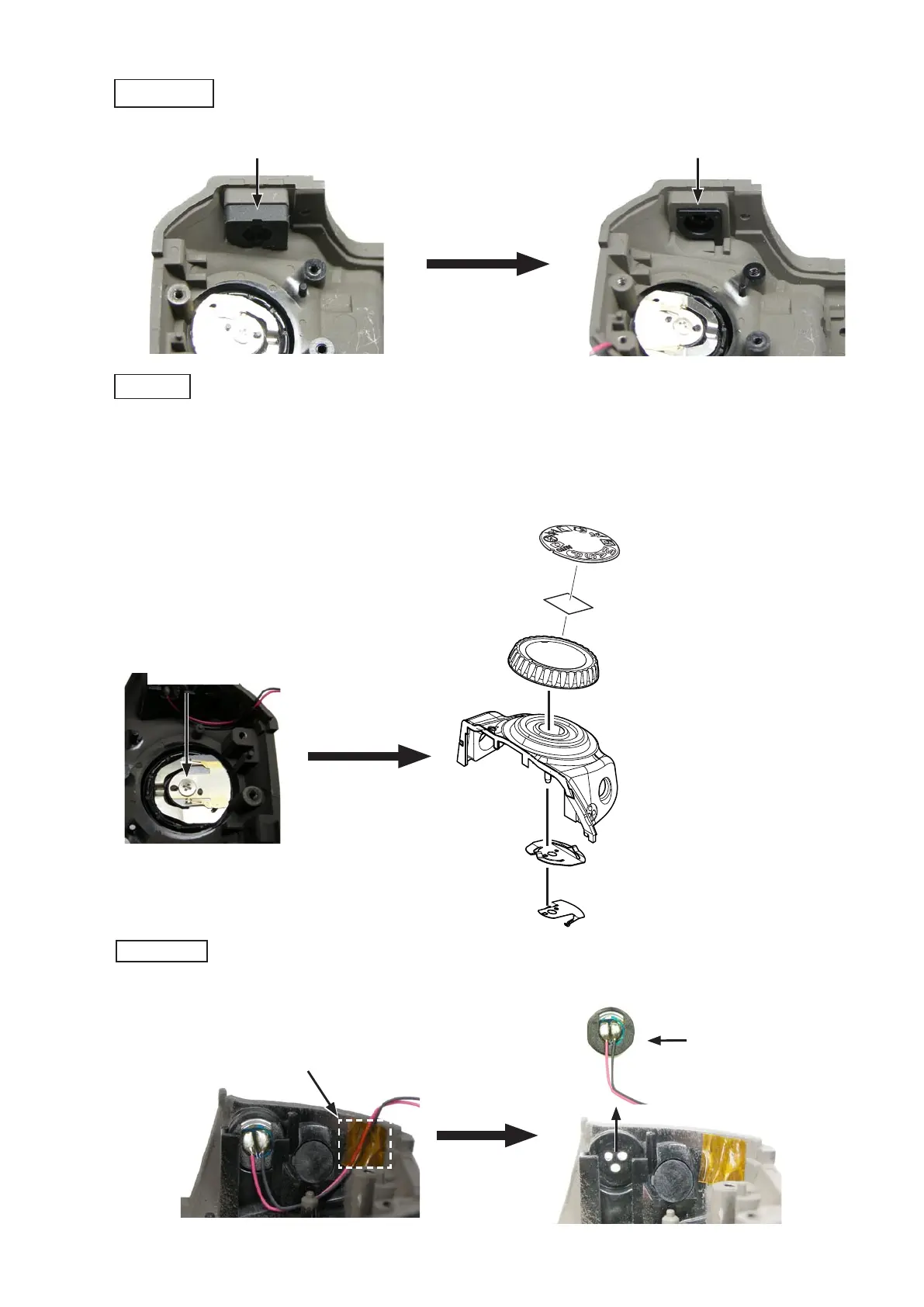
・Peel off the tape [TA-0009 (6Peel off the tape [TA-0009 (6
×
6)], and remove the microphone (#1051).
・Take out the screw (#640).Take out the screw (#640).
・Remove the mode dial (#451), the click spring (#453) and the contact brush (#452).Remove the mode dial (#451), the click spring (#453) and the contact brush (#452).
・Peel off the tape [TA-0026 (8Peel off the tape [TA-0026 (8
×
8)], and the mode dial cap (#460).)], and the mode dial cap (#460)., and the mode dial cap (#460).
・Remove the conducting rubber (#399) and the button (#398).Remove the conducting rubber (#399) and the button (#398).
Conducting rubber (#399)
Button (#398)
Microphone (#1051)
Delete button
Mode dial
Microphone
Screw (#640)
Mode dial (#451)
Click spring (#453)
Contact brush (#452)
[TA-0026 (8
×
8)])]
Mode dial cap (#460)
Tape [TA-0009 (6
×
6)]



 To Next Page
 Loading...








