VBA23001-R.3762 .A
- D12 ・ D90 -
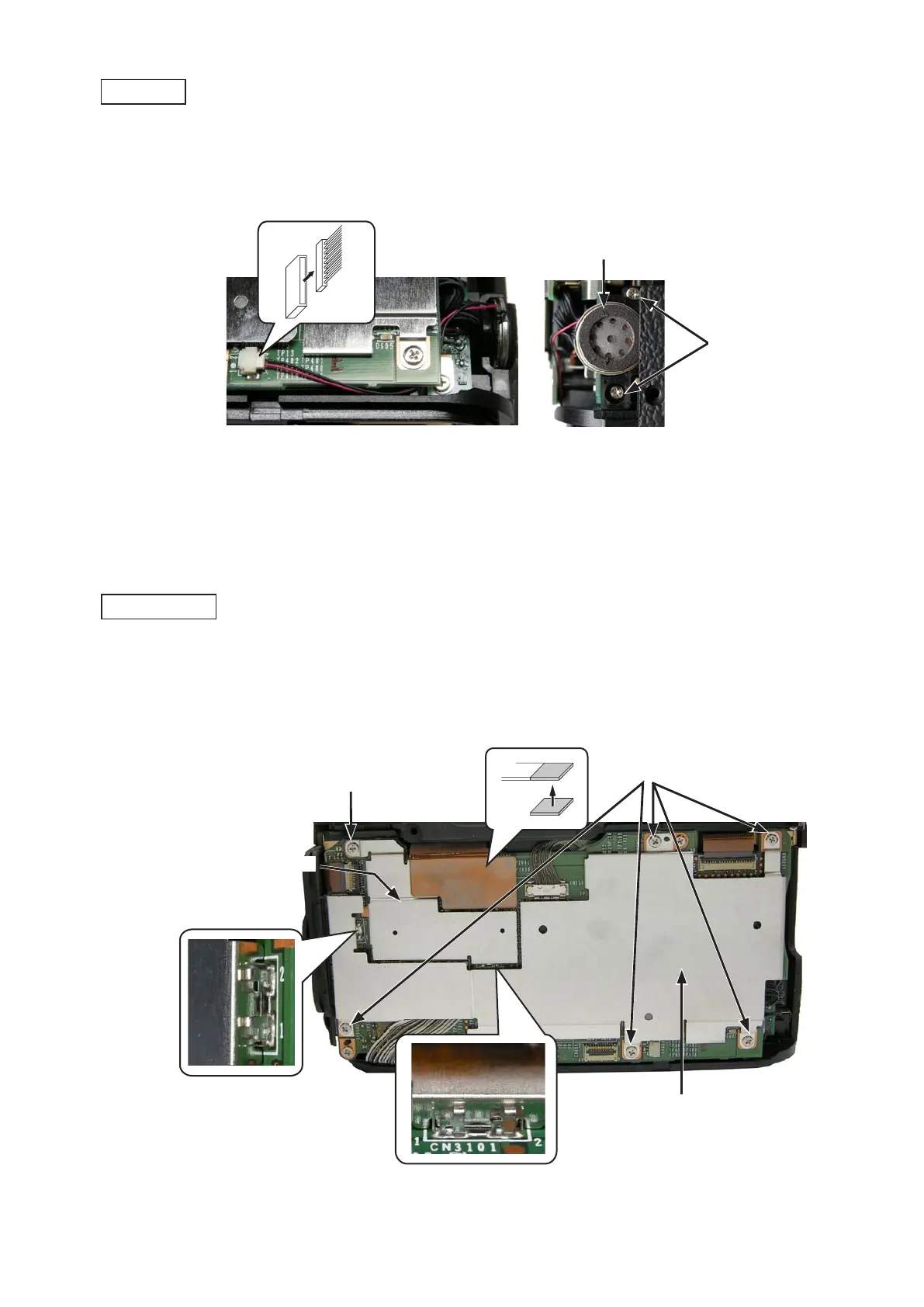
・Disconnect the image sensor unit-FPC.Disconnect the image sensor unit-FPC.
・Take out the six screw (#683).Take out the six screw (#683).
・Remove the shield plate (#78) and shield plate unit (#B79) carefully not to damage the clip.shield plate (#78) and shield plate unit (#B79) carefully not to damage the clip.
・Disconnect the connector.Disconnect the connector.
・Take out the two screws (#612), and remove the speaker unit (#B45).Take out the two screws (#612), and remove the speaker unit (#B45).
Speaker unit (#B45)
Shield plate (#78)
Shield plate unit (#B79)
Screw (#683)
×5
Screw (#612)
×2
Screw (#683)
×1
Speaker unit
DG-shield plate



 To Next Page
 Loading...








