VBA23001-R.3762 .A
- D17 ・ D90 -
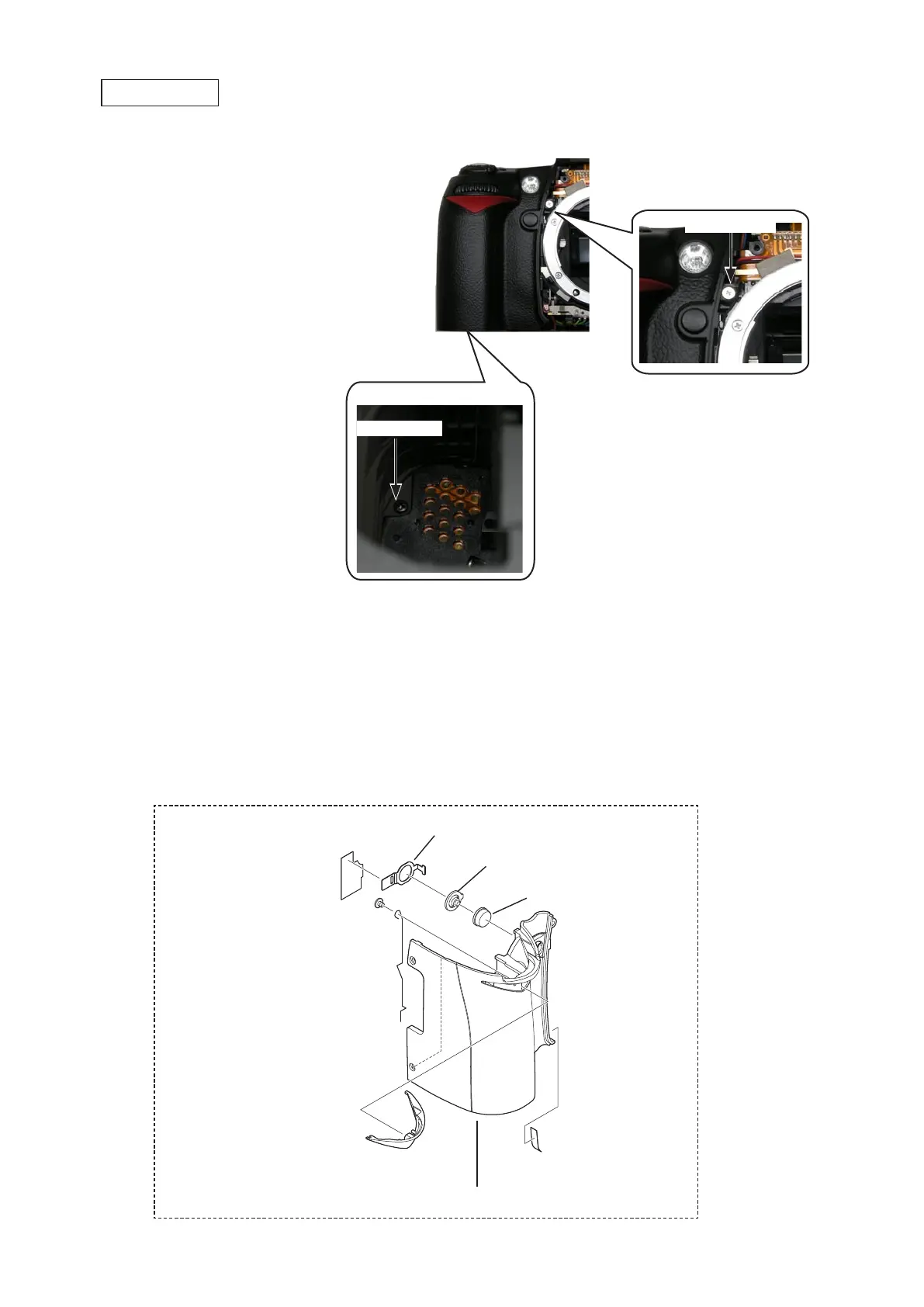
・Peel off the tape [TA0005 (3.3Peel off the tape [TA0005 (3.3
×
11)].
・Peel off the tape (#811).Peel off the tape (#811).
・Remove the plate (#388).Remove the plate (#388).
・Remove the button (#390) and the conducting rubber (#389).Remove the button (#390) and the conducting rubber (#389).
・Attach the spring (#161) from behind, and take out the screw (#638).spring (#161) from behind, and take out the screw (#638).
・Remove the grip red mold (#29) from the front side of the grip cover.grip red mold (#29) from the front side of the grip cover. from the front side of the grip cover.
Grip rubber unit (#B26)
Grip rubber unit
Battery chamber
Screw (#618)
・Take out the screws (#627 and #618).Take out the screws (#627 and #618).
・Remove the grip rubber unit (#B26).Remove the grip rubber unit (#B26).
Screw (#627)
Grip cover
Grip red mold (#29)
Spring (#161)
Screw (#638)
Button (#390)
Conducting rubber (#389)
Plate (#388)
Tape [TA0005 (3.3
×
11)]
Tape (#811)



 To Next Page
 Loading...








