VBA23001-R.3762 .A
- D48 ・ D90 -
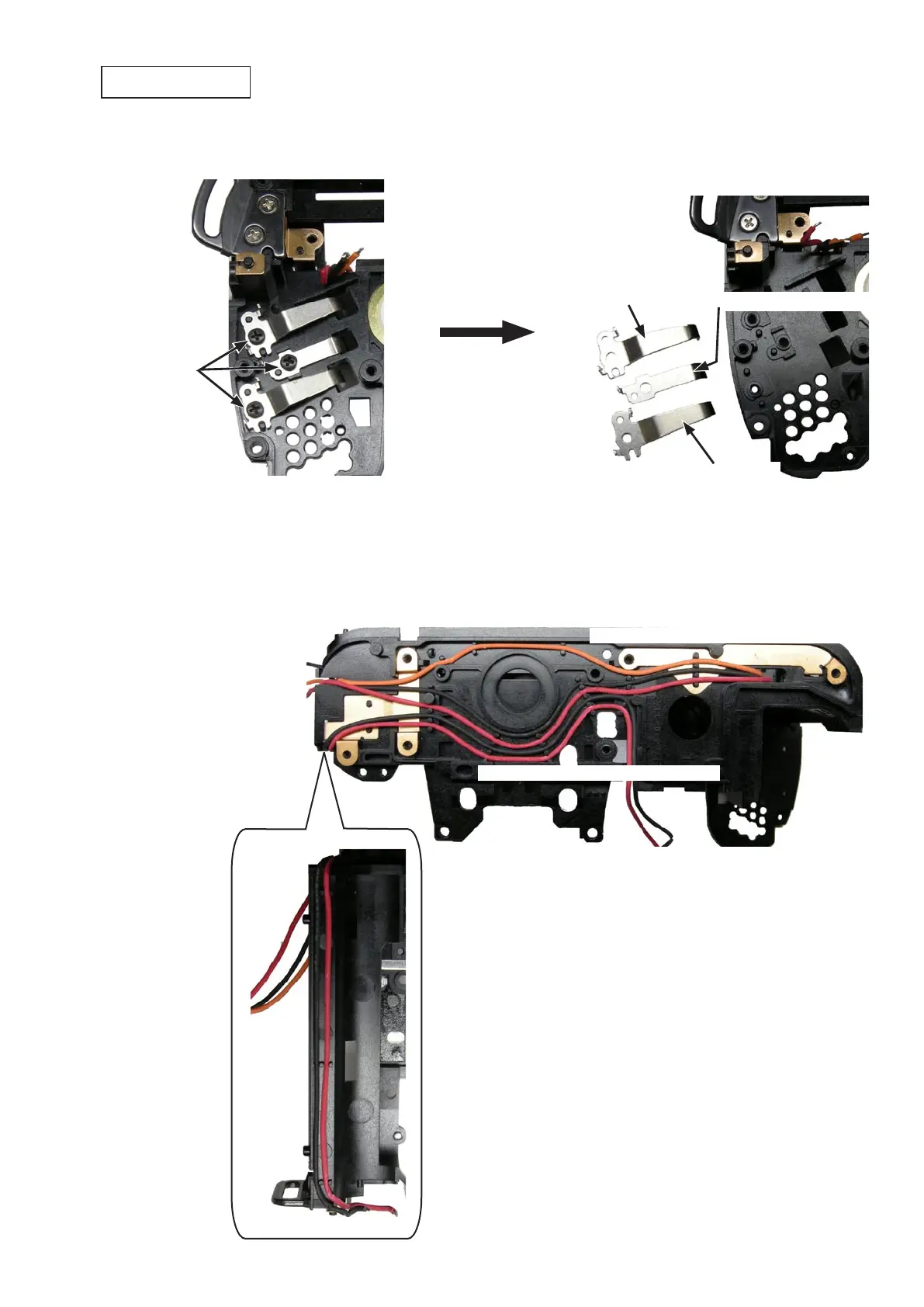
・Take out the three screws (#619).Take out the three screws (#619).
・Remove the FG/ID contact-spring (#80) and the two battery contact-springs (#157).Remove the FG/ID contact-spring (#80) and the two battery contact-springs (#157).
・Remove the (back-side) wires (Orange/Black/Red).Remove the (back-side) wires (Orange/Black/Red).
・Remove the (Bayonet-side) wires (Red/Black).Remove the (Bayonet-side) wires (Red/Black).
Screw (#619)
FG/ID contact-spring (#80)
Battery contact-spring (#157)
Battery contact-spring (#157)
(Back-side) wire
×
3 (Orange/Black/Red) (Orange/Black/Red)(Orange/Black/Red)
(Bayonet-side) wireBayonet-side) wire wire
×
2 (Red/Black)
Battery contact-spring



 To Next Page
 Loading...








