EasyManua.ls Logo

Nikon VBA23001 - Page 61

Nikon VBA23001
219 pages
Print Icon
To Next Page IconTo Next Page
To Previous Page IconTo Previous Page
Loading...
VBA23001-R.3762 .A
- D55 D90 -
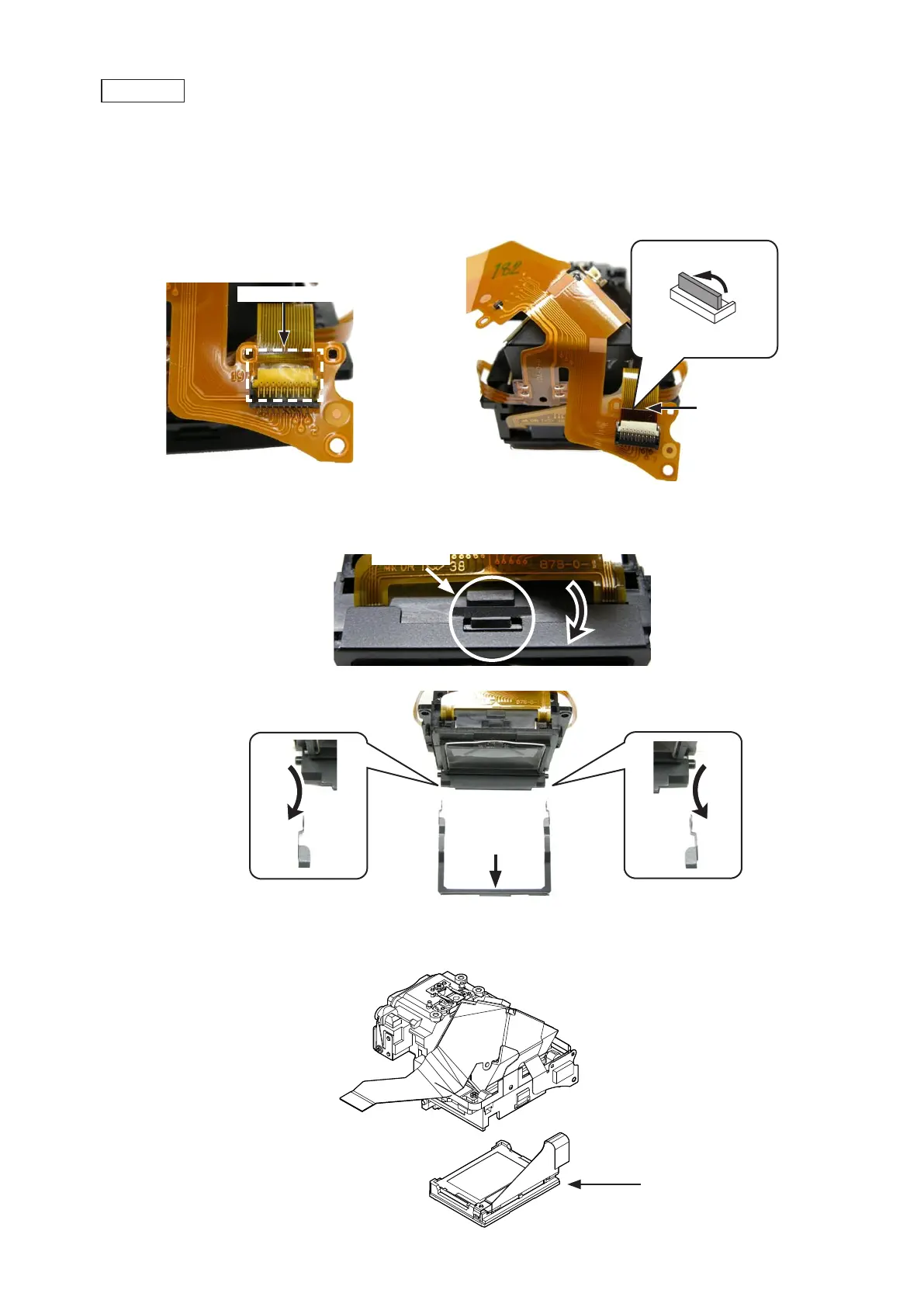
Peel off the tape [TA0009 (7Peel off the tape [TA0009 (7
×
5)].
Disconnect the FPC of the SI unit (#B1046) from the connector on the penta prism FPC unit (#B1021).Disconnect the FPC of the SI unit (#B1046) from the connector on the penta prism FPC unit (#B1021).
SI unit (#B1046)
Screen box
Remove the screen box assembly.Remove the screen box assembly.
Remove the screen box plate (#511) by unhooking from the penta prism box unit (#261) and releasing from the sideRemove the screen box plate (#511) by unhooking from the penta prism box unit (#261) and releasing from the side
bosses.
Screen box assembly
(#511)
Unhook
Tape [TA0009 (7
×
5)]
INC

Table of Contents

Related product manuals