7-6 Service Manual
XZAC4219-05
Mechanical assy disassembly/reassembly
1. Disassembling the casing. See the section “Casing disassembly/reassembly” on page 7 - 4.
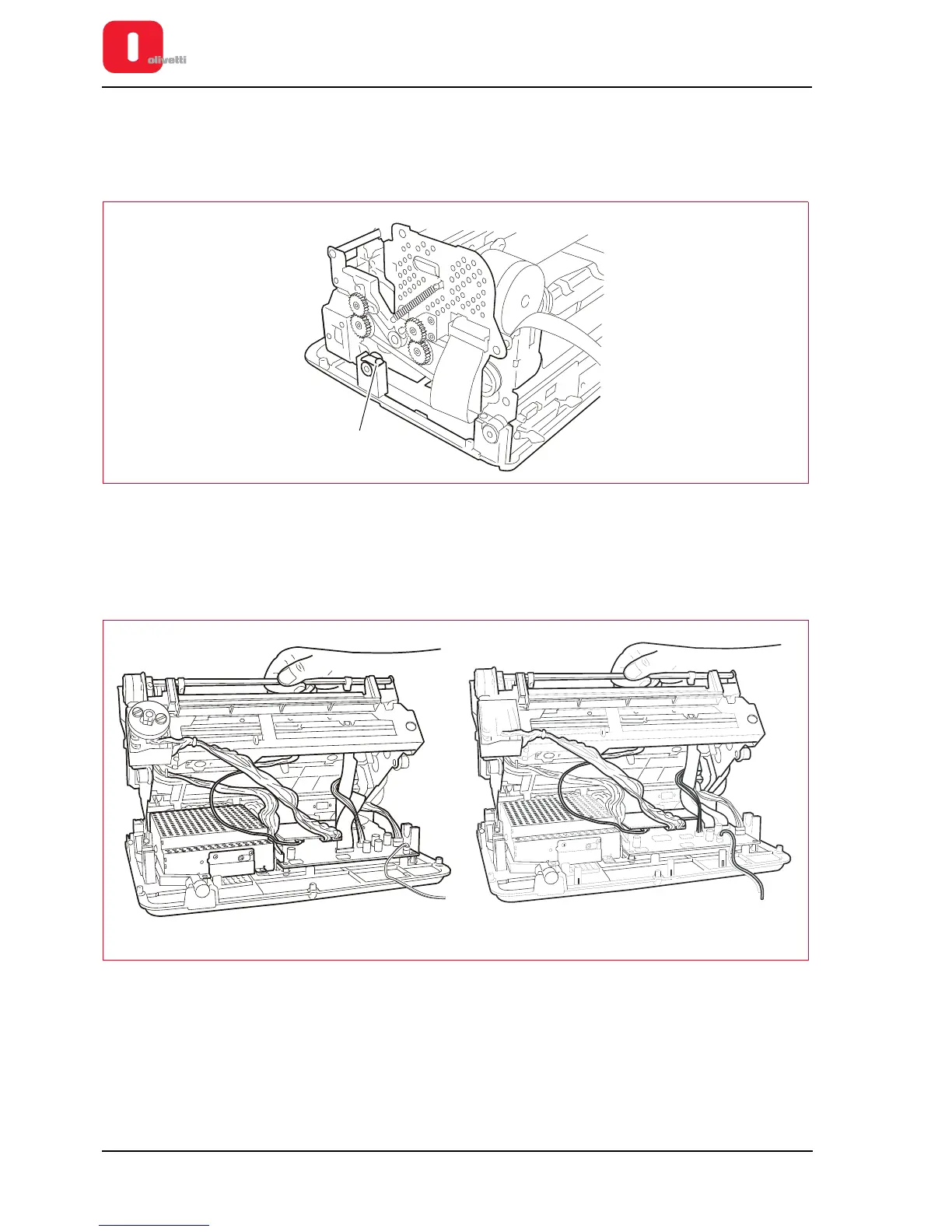
2. On both sides, back off the lock-screws (1) of the tabs that fasten the front rubber pads so that these can be
removed from their housing.
Figure 7 - 6 Disassembling the mechanical assy
3. From the front, lift the entire mechanism from the base plate and rotate it partially so as to access the
connectors of the motherboard.
4. Disconnect all the connection cables of the mechanism to the motherboard, except for the motherboard - power
supply unit connection cable.
Figure 7 - 7 Disconnecting the cables
5. Loosen the lock-screws (2) of the tabs that fasten the rear rubber pads so that these can be removed from their
housing.
6. Back off the screw (3) that fastens the ground cables.
7. Lift the mechanical assy and separate it from the base plate.















 To Next Page