XZAC4219-05 Service Manual
7-33
CIS assy (upper scanner) disassembly/reassembly
1. Remove the casing. See the section “Casing disassembly/reassembly” on page 7 - 4.
2. Remove the upper mechanical assy. See the section “Upper mechanical assy disassembly/reassembly” on
page 7 - 11.
3. Remove the roller assy. See the section “Roller assy (upper scanner) disassembly/reassembly” on page 7 - 31.
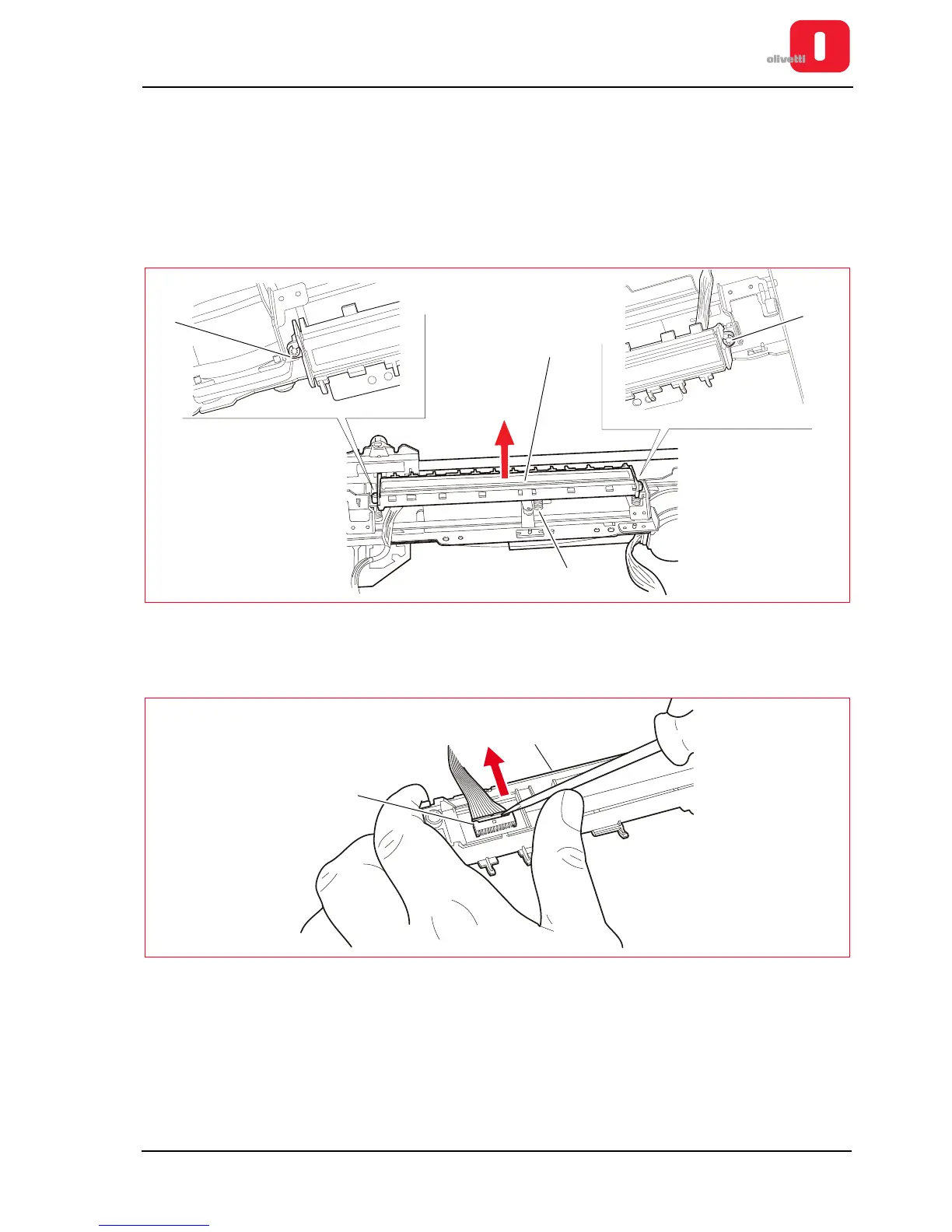
4. Remove the two snap rings (1).
5. Remove the CIS assy (2) lifting it and taking care not to mislay the spring (3).
Figure 7 - 47 Removing the CIS unit
6. Disconnect the cable (4) from the CIS (2) taking great care not to damage the connectors (use a slotted
screwdriver as indicated in the figure).
Figure 7 - 48 Disconnecting the CIS cable















 To Next Page