XZAC4219-05 Service Manual
5-19
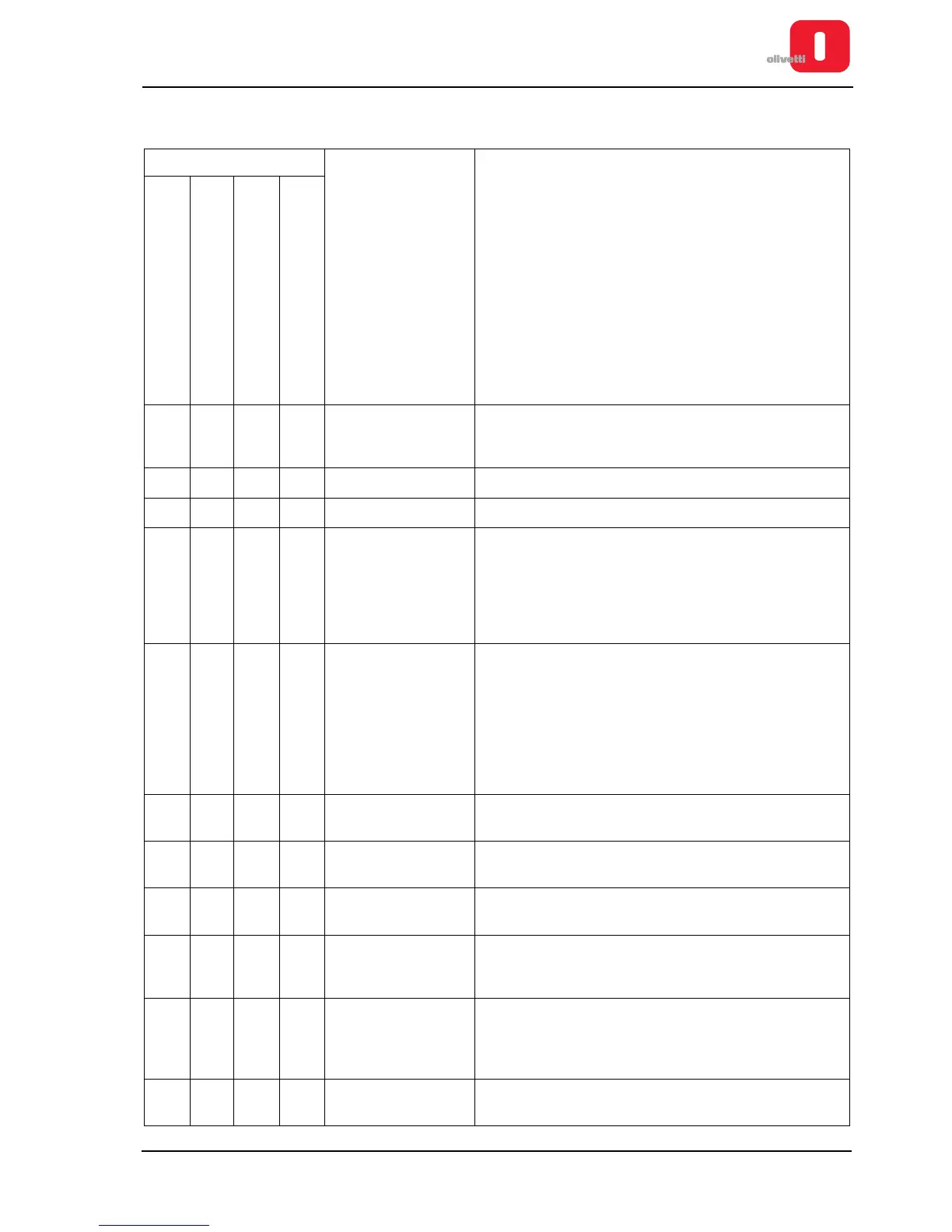
Faults with document handling
Fault
Possible cause Solution
The machine does not
introduce/eject the document
The document is
fed crookedly
The document
iswrinkled
The document
has irregular line feeds
XXXX
Document not acc.
to specs
Check the dimensions and the type of the document . See
“DOCUMENTS THAT CAN BE HANDLED BY THE BASIC
MACHINE” on page 1 - 3
XXXXDocument ruined Use another document.
XXXClosing levers open Lower the lever for closure.
XX
Front
photosensors
fault
1 Carry out the calibration procedure
.
See the section
“CALIBRATING THE PHOTOSENSORS” on page 4 -
18
2
Clean and if necessary replace the fault
photosensor
.
See
“PROCEDURE FOR CLEANING / REPLACING
THE PHOTOSENSORS” on page 6 - 2
X
Paper
photosensor
fault
1
Adjust the sensor position.
See the section
“Adjusting
Paper Photosensor” on page 6 - 8
2 Carry out the calibration procedure.
See
“CALIBRATING THE PHOTOSENSORS” on page 4 -
18
3
Clean and if necessary replace the fault
photosensor
.
See
“PROCEDURE FOR CLEANING / REPLACING
THE PHOTOSENSORS” on page 6 - 2
X Service motor fault
Replace the services motor. See the section “Services
motor disassembly/reassembly” on page 7 - 14
XX
Paper feed
motor fault
Replace the paper feed motor. See “Paper feed motor
disassembly/reassembly” on page 7 - 12
X
Adjustment of needle
roller incorrect
See “Adjusting the roller gears” on page 6 - 9
X
Print bar not adjusted
correctly
See “Adjusting the print bar (where torsion bar present)”
on page 6 - 4 or “Adjusting the print bar (where torsion bar
absent)” on page 6 - 5
X Band not adjusted
Adjust the printing band. See “Adjusting the print bar
parallelism and leaf spring load on the basic machine” on
page 6 - 6 or “Adjusting parallelism of print bar (without
torsion bar)” on page 6 - 7
X
Roller gears not
adjusted
Adjust the gears. See “Adjusting the roller gears” on
page 6 - 9















 To Next Page