7-28 Service Manual
XZAC4219-05
MACHINE OPTIONS DISASSEMBLY/REASSEMBLY
Horizontal magnetic/MICR disassembly/reassembly
1. Disassembling the casing. See the section “Casing disassembly/reassembly” on page 7 - 4.
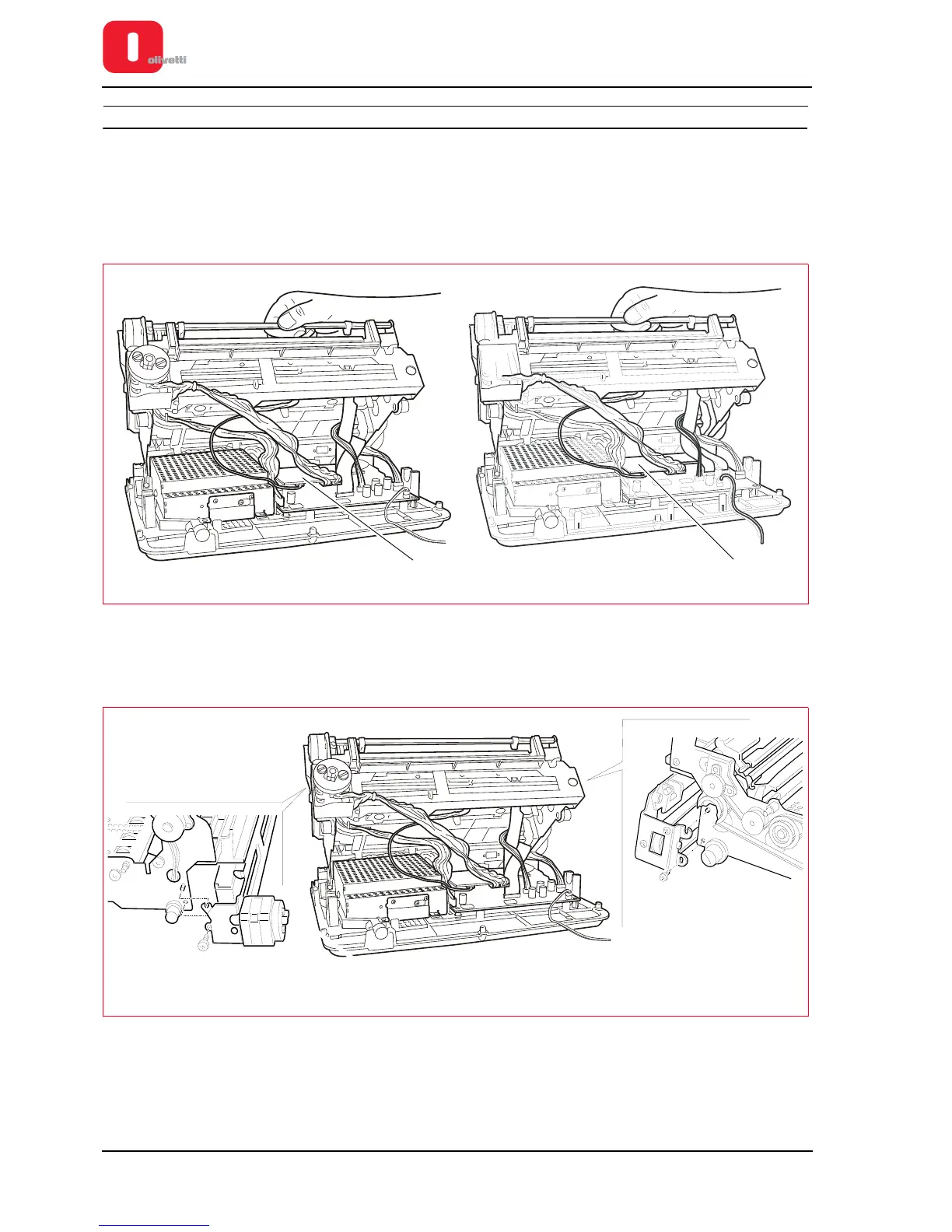
2. From the front, lift the entire mechanical assy from the baseplate and rotate it partially so as to access the
connectors on the horizontal magnetic board (1).
Figure 7 - 37 Disconnecting cables
3. Detach the connectors of the cables connected to the horizontal magnetic board.
4. Back off the two lock-screws that fasten the assy to the structure of the machine and disassemble the option.
Figure 7 - 38 Fastening screws for horizontal magnetic unit (printers with serial number 8.xxx.xxx)















 To Next Page