3-8 Service Manual
XZAC4219-05
REPLACING THE RIBBON CARTRIDGE
WARNING: the ribbon cartridge must be replaced when printing is faded or incomplete, or in the
case of frequent optical reading errors of printed documents. This procedure must be
carried out with the machine off.
1. Switch off the printer.
2. Open the upper cover of the printer, lifting it up.
3. Actioning the lever, raise the upper part of the printer mechanical assembly to access the printhead. Refer to
section “Lever for lifting the upper part of the mechanism” on page 3 - 4.
4. Move the printhead manually to the centre of the carriage.
WARNING: the printhead could be very hot, therefore be very careful when handling it. Only touch
the parts in plastic.
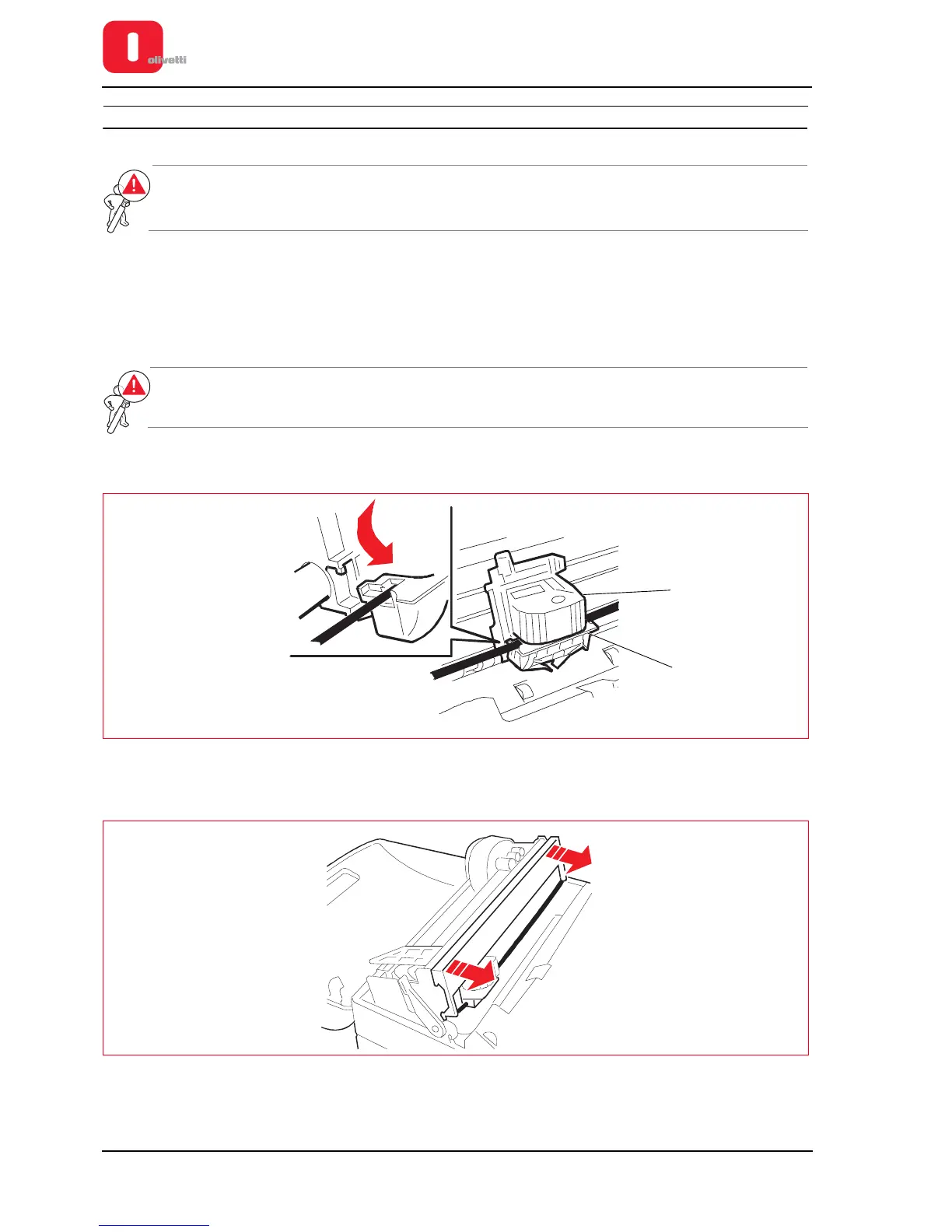
5. Push the ribbon guide (2) down until it is released from the print cartridge (1).
Figure 3 - 8 Unhooking the ribbon guide
6. Remove the old cartridge, pulling it outwards.
Figure 3 - 9 Removing the ribbon cartridge















 To Next Page