P o o l C o p M a n u a l : V 4 2 EN P a g e | 105
www.poolcop.com PCFR
6.3 SERVER CONNECTION AND POOL SETUP
This operation requires the use of a computer with an internet browser of your choice. It can be done from any location, though it is
preferable to remain in close proximity to the PoolCop should any communication issues arise.
Compatible Browser Versions
Internet Explorer: 8 - 11
Firefox: 30
Chrome: 35
Opéra: 20
Safari: 5
Creating a User Account
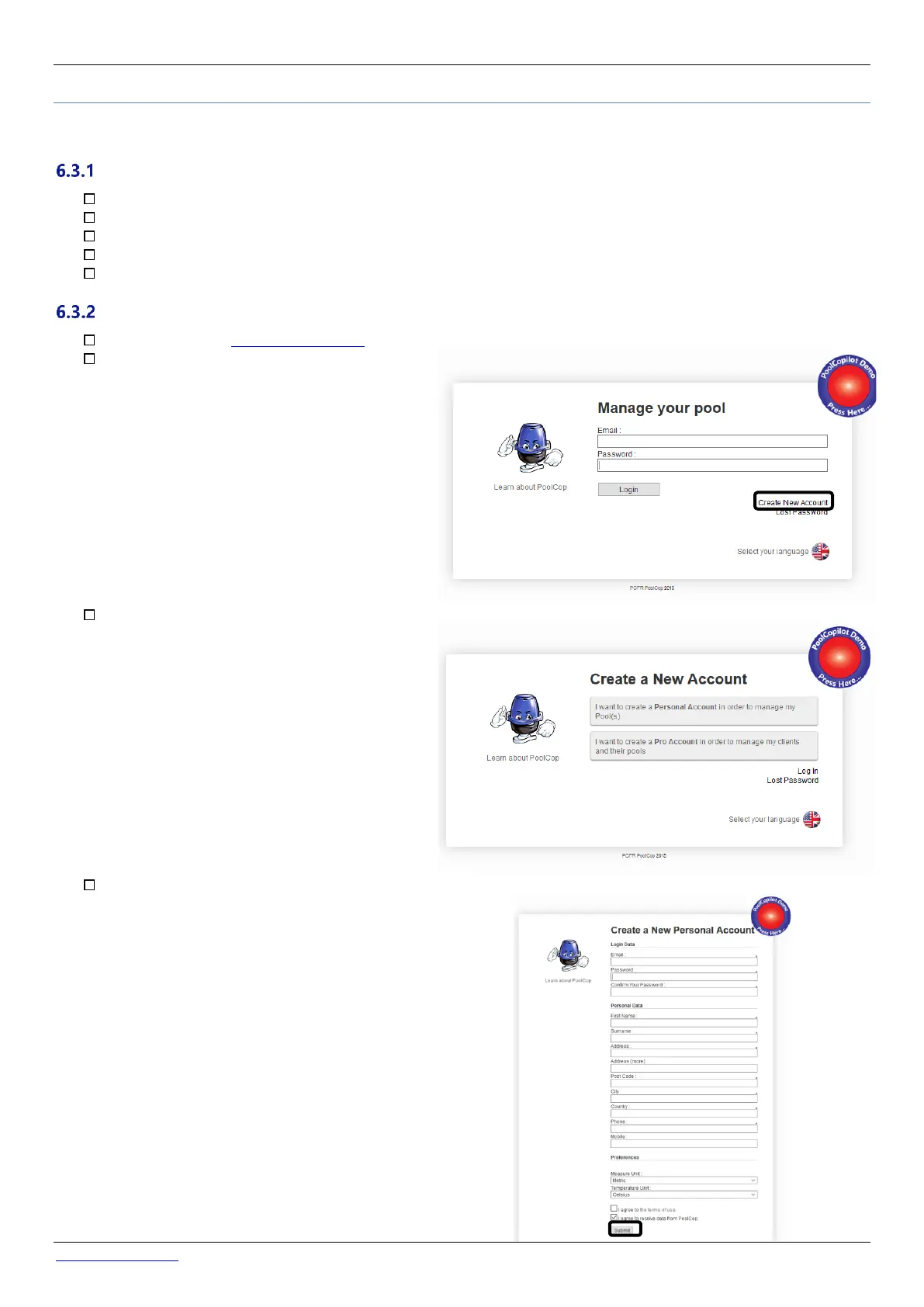
Connect to the site www.poolcopilot.com.
On the home page, select “Create New
Account”.
Select the type of profile required:
• "Personal Account" will allow you to manage
only your own pool as a final customer.
• "Pro Account" will allow you to manage your
clients’ pools.
Complete all the information required in the form,
in particular:
• Supply a valid email address; this will be used to
identify the client and to route email alerts.
• Tick the boxes to agree to terms of use, and
optionally “I agree to received data from
PoolCop” to receive newsletters.
• Click on “Submit” to register and create your
new account.



 To Next Page