P a g e | 106 P o o l C o p M a n u a l : V 4 2 EN
www.poolcop.com PCFR
Adding your first Pool and PoolCopilot Module Automatically
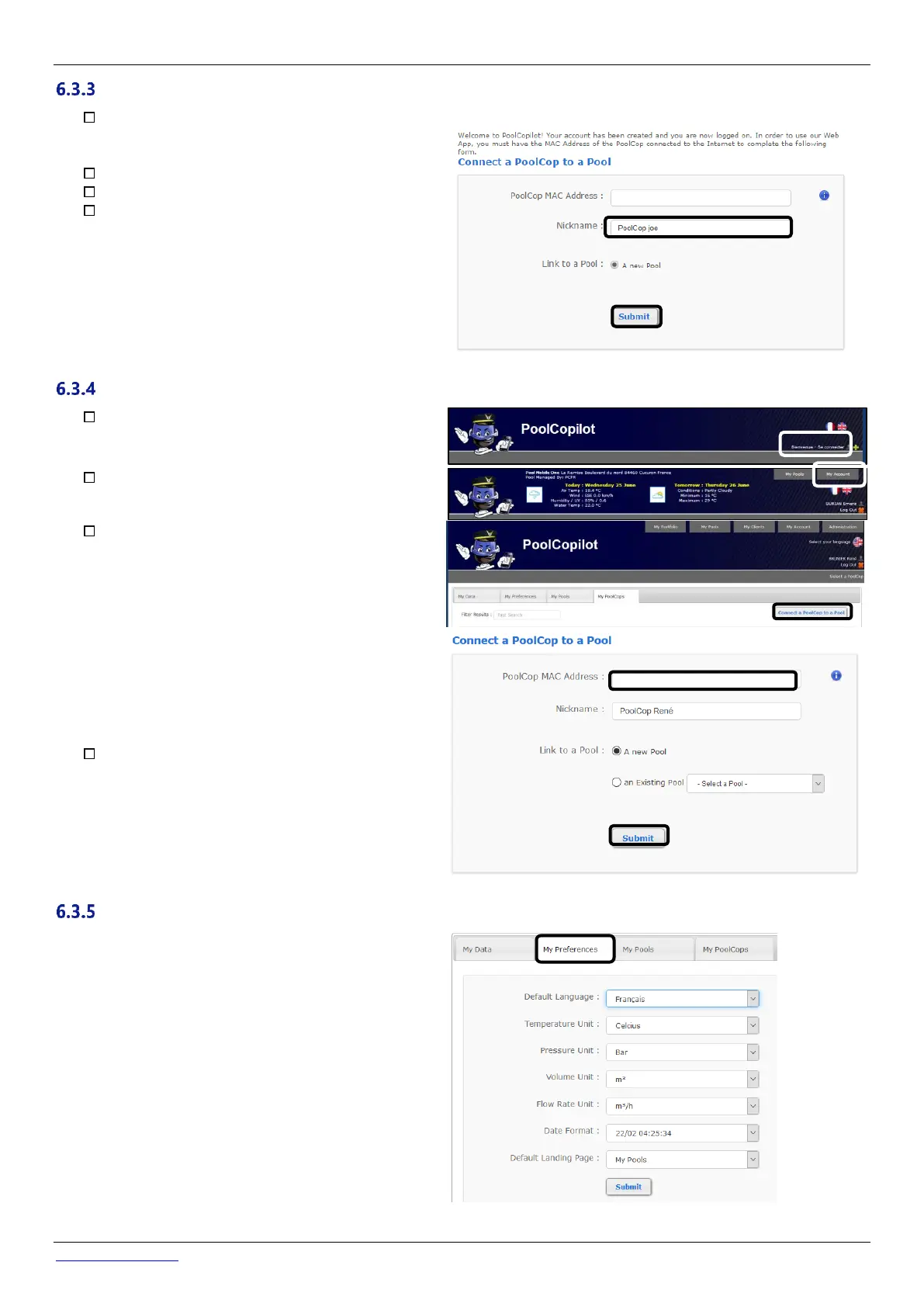
The setup wizard will now take you to a page to add
the MAC address of the PoolCopilot module, and
create your new pool.
Add your 12 number MAC address.
Choose a Pseudo
Click on submit.
YOU WILL BE REDIRECTED TO THE CONTROL PANEL VIEW OF YOUR
NEW POOL.
Adding a Pool and PoolCopilot Module “Manually”
Connect and logon to the site using the email
address and password used to create the account.
On the Home Page, select “My Account” at the top
right of the page.
Now select “My PoolCops”, "connect a PoolCop"
and complete the form:
• The Mac Address is the unique identification of
the new PoolCop. This code is written on the
sticker located on the PoolCopilot Web RJ45
module inside the ABS Box.
• The nickname allows easy identification of the
PoolCop.
• If connecting to a new Pool, select "Add a pool
manually" and complete Pool data.
• If connecting to an existing pool, select the pool
from the dropdown list.
Click on “Submit”.
To set preferences such as Language, Units and Formats,
select “My Preferences”:



 To Next Page