P o o l C o p M a n u a l : V 4 2 EN P a g e | 107
www.poolcop.com PCFR
Access Pool or Pools
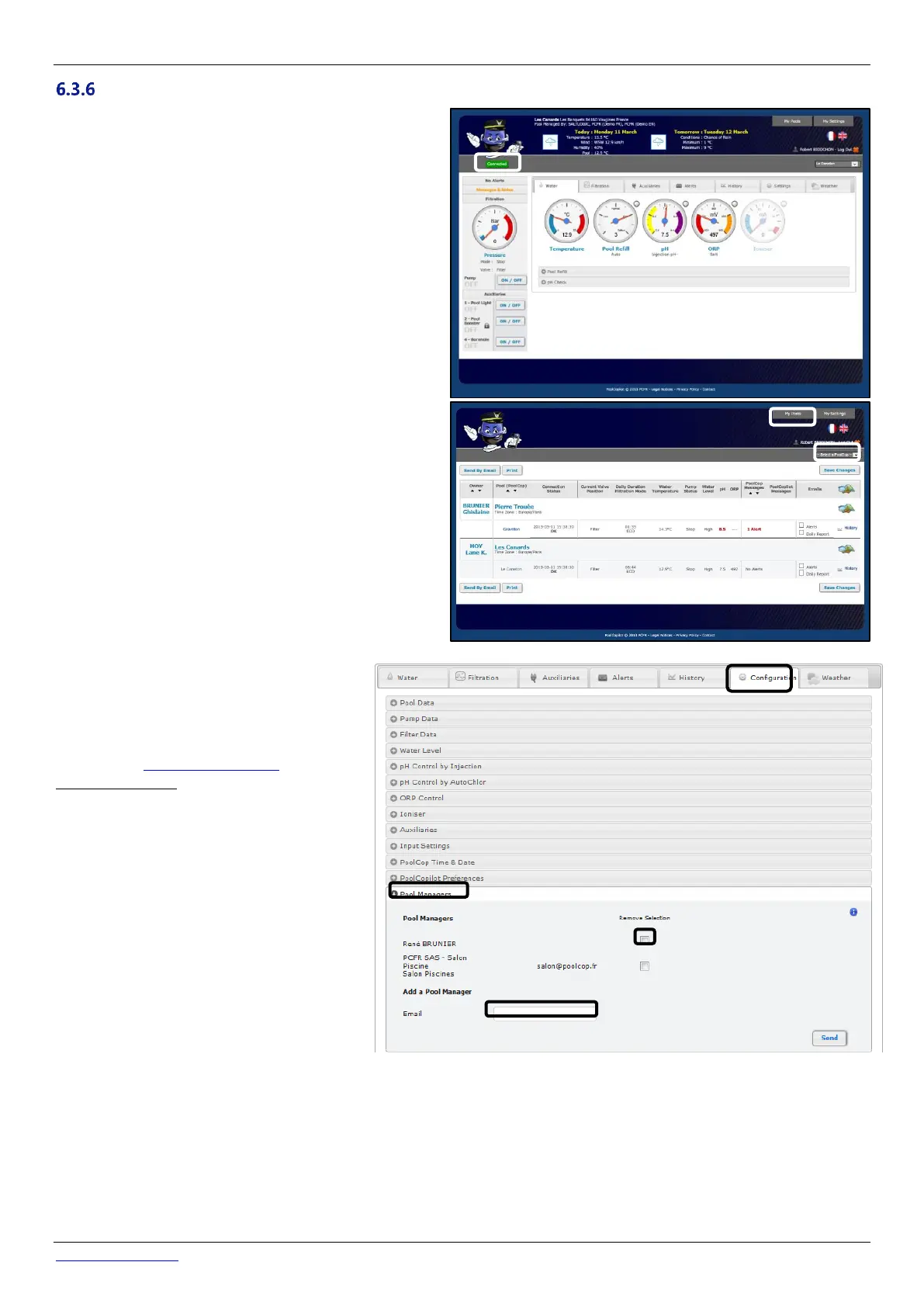
In the case where you are managing one swimming pool,
you will be automatically directed to the Control Panel. after
logging on.
The connection status between PoolCop and the server can
be viewed on the top left. This allows you to ascertain that
data is up to date nd valid.
Should you be managing multiple pools you will be directed
to the “My Pools” display after logging on; from here you
can select the pool and PoolCop required.
Quickly access a specific pool from the list of pools in your
portfolio by selecting a pool by nickname from the drop-
down list.
If you wish to give access to your pool to
somebody else, go to "Configuration/Pool
Managers" and type in the email address
provided by the manager.
The pool manager must have or must create an
account on www.PoolCopilot.com using the
same email address to access your pool.
You can suppress this access at any time simply
by ticking the corresponding box. Your manager
will then be notified he is no more allowed to
access your pool.



 To Next Page