P a g e | 46 P o o l C o p M a n u a l : V 4 2 EN
www.poolcop.com PCFR
Connecting Inputs
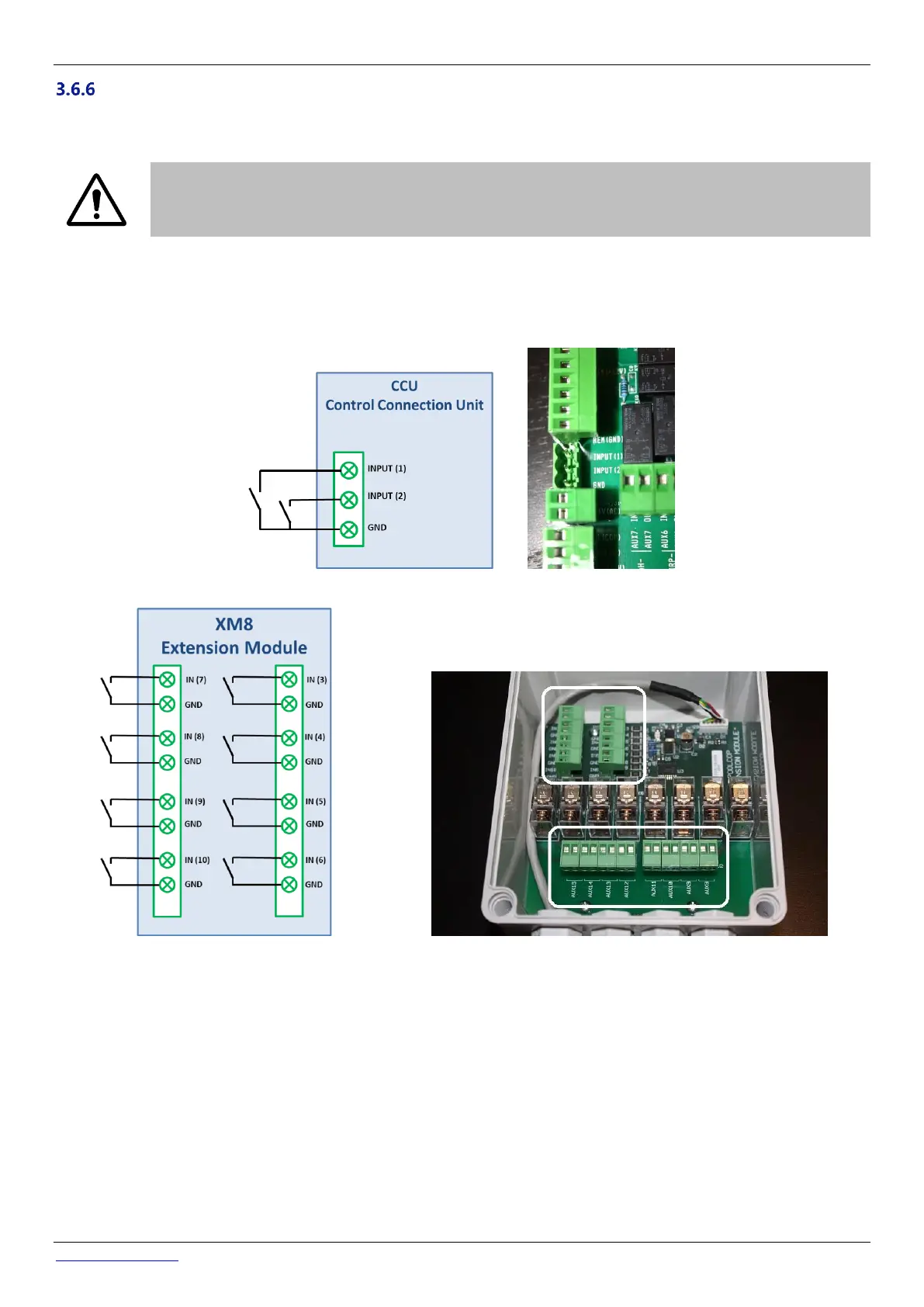
Several types of sensors can be connected to the PoolCop to add functionality and trigger alerts. Inputs must be connected
between the chosen input channel and the GND.
CAUTION:
Inputs are polarized by PoolCop with 5Vdc.
Make sure that the signal connected to each input is potential free to avoid damages
The Input can be assigned to any predefined functions with direct action (action when the contact is closed) or reverse action
(action when the contact is open). Inputs must be potential free contacts. The configuration menu lets you select the role and
direction of action of each entry.
The inputs are situated either in the Control Connexion Unit, and are labelled Input (1) and Input (2), either in the XM8 Extension
Module and are labelled In(3) to In(10):
Figure 44 – Connecting Inputs in CCU
Figure 45 - Connecting Inputs in XM8



 To Next Page