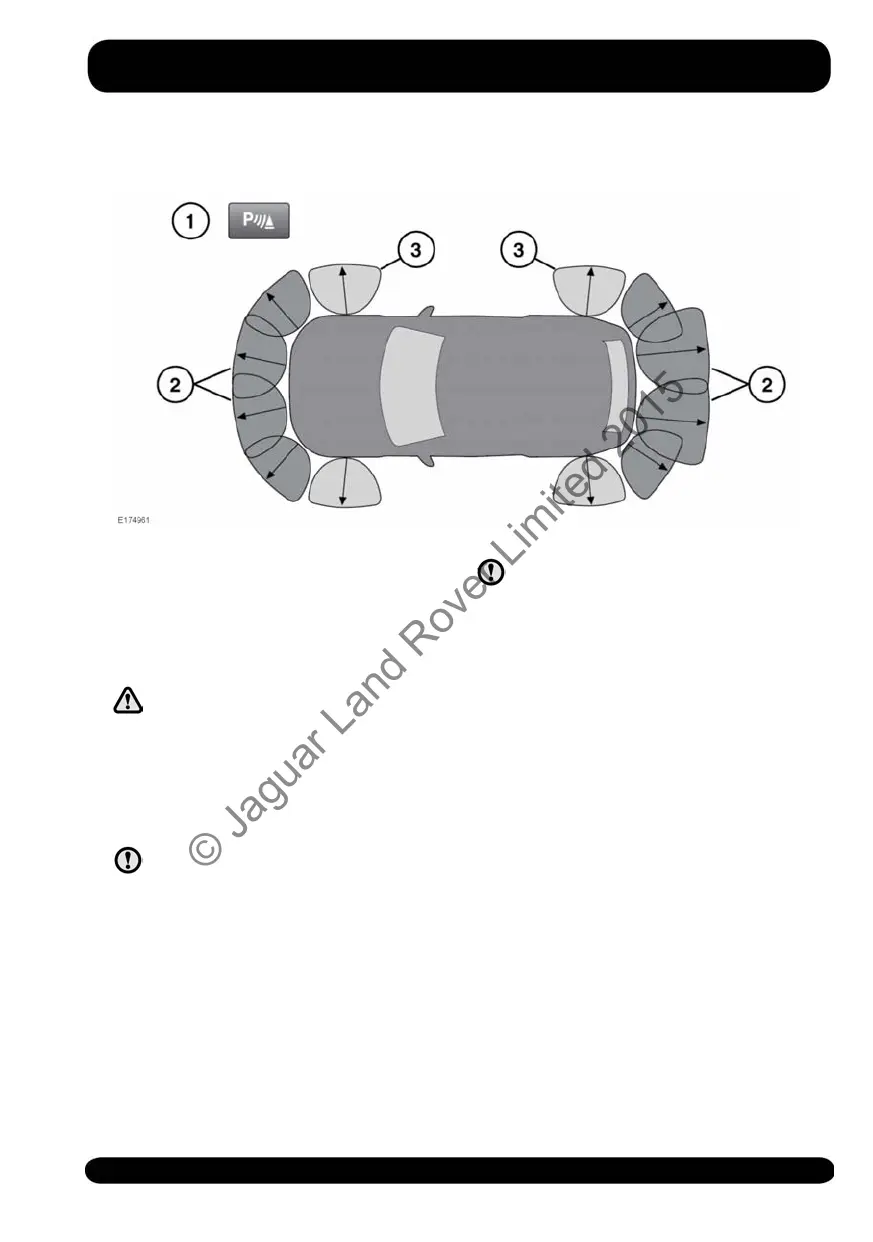
USING THE PARKING AID
1. Parking aid switch. Located next to the
Touch screen.
2. Parking aid sensor detection zones.
3. 360° Park Distance Control sensor
detection zones.
Parking aid and 360° Park
Distance Control sensors will not
detect moving objects, such as
children and animals, until they
are dangerously close. Always use
extreme caution when
manoeuvring.
The Parking aid and 360° Park
Distance Control sensors may not
detect some obstructions, for
example, narrow posts or small
objects close to the ground.
If accessories, for example, a tow
bar, are fitted to the rear of the
vehicle, particular care must be
taken when reversing. The rear
sensors will only indicate the
distance from the bumper to the
obstacle.
Note: If a trailer is connected to a Jaguar
Land Rover approved trailer socket, the
rear sensors will be disabled.
The Parking aid and 360° Park Distance
Control systems assist the driver while
manoeuvring the vehicle in confined
spaces. When active, object tracking along
the front, side, and rear of the vehicle are
displayed on the Touch screen. The four
corner sensors provide the 360° Park
Distance Control monitoring along the
vehicle sides. While the vehicle is passing
an object that is within sensor range, the
vehicle's integrated systems calculate its
trajectory within the 360° Park Distance
Control monitored area.
119
Parking aids
© Jaguar Land Rover Limited 2015



 To Next Page