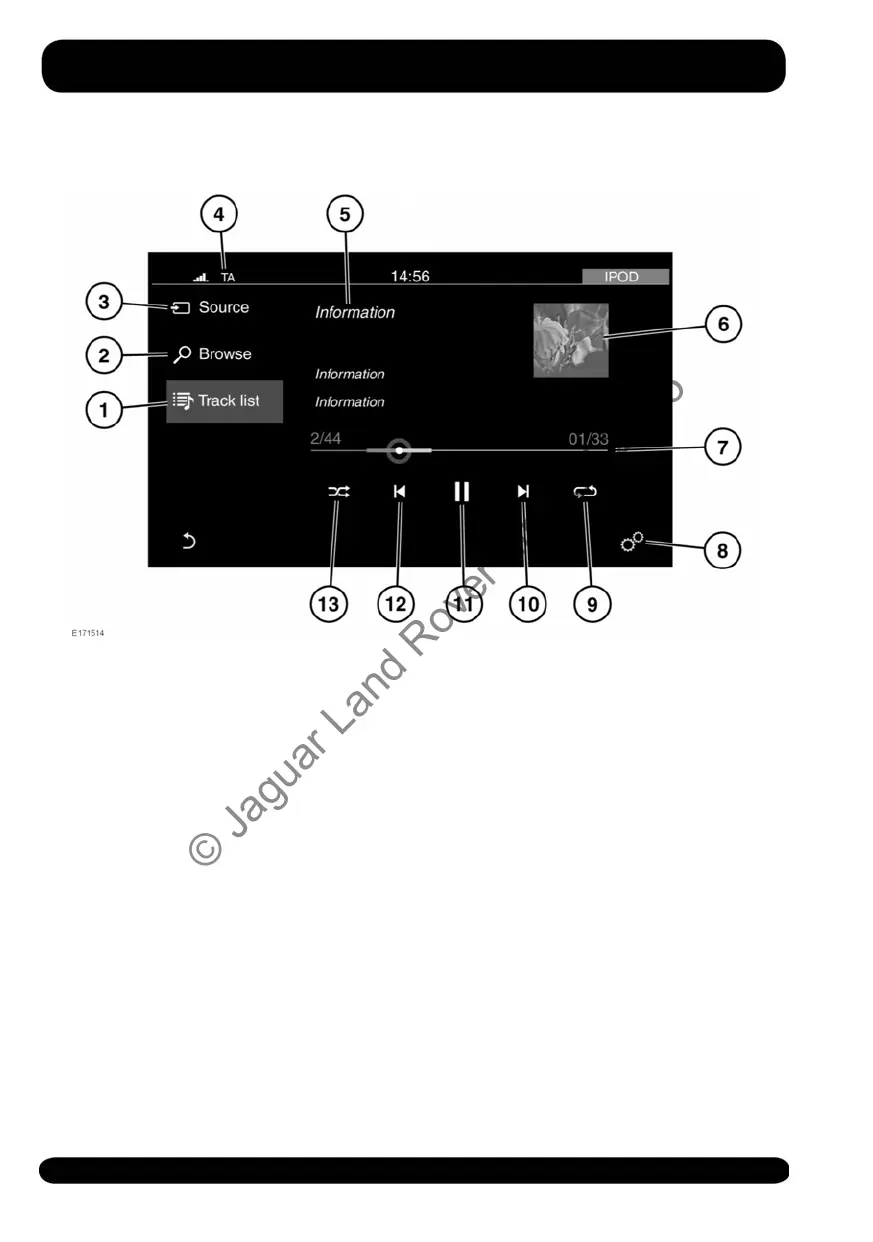
PORTABLE MEDIA CONTROLS
The following portable devices can be
used on the Media system: iPod, USB,
AUX, and Bluetooth® wireless technology
devices.
Note: Auxiliary devices have no Touch
screen controls.
1. Track list: Touch to select the list of
tracks from the connected device.
2. Browse: Touch to select the menu
screen for the required music or audio
source subject list for the connected
device: Playlists, Artists, Albums,
Songs, etc.
3. Source: Touch to select the media
source menu screen.
Note: The media source has to be
connected to the vehicle before it will
appear in the media source list.
4. Status icons: When a phone is
connected, the battery level and
network signal strength is displayed.
Also, when selected, TA (Traffic
announcements) is displayed.
5. Information relating to the music or
audio being played.
6. Image display:
• If available, the album art for the
current track being played will be
displayed.
• When a video (from a connected
USB source only) is about to be
played, an image from the video
is displayed.
7. Progress bar: Drag the spot or touch
the line to move forwards or
backwards through the track.
158
Media
© Jaguar Land Rover Limited 2015



 To Next Page