6. Press to switch the Media system
on/off.
Note: The Media system will operate
with the ignition on or off, but will
always switch off, when the ignition is
switched off. Switch the Media system
on again, if required.
Rotate to adjust volume level.
Note: If volume is turned to zero while
a Compact Disc (CD) is playing, the
CD will pause play. Play will resume
when a greater volume is selected.
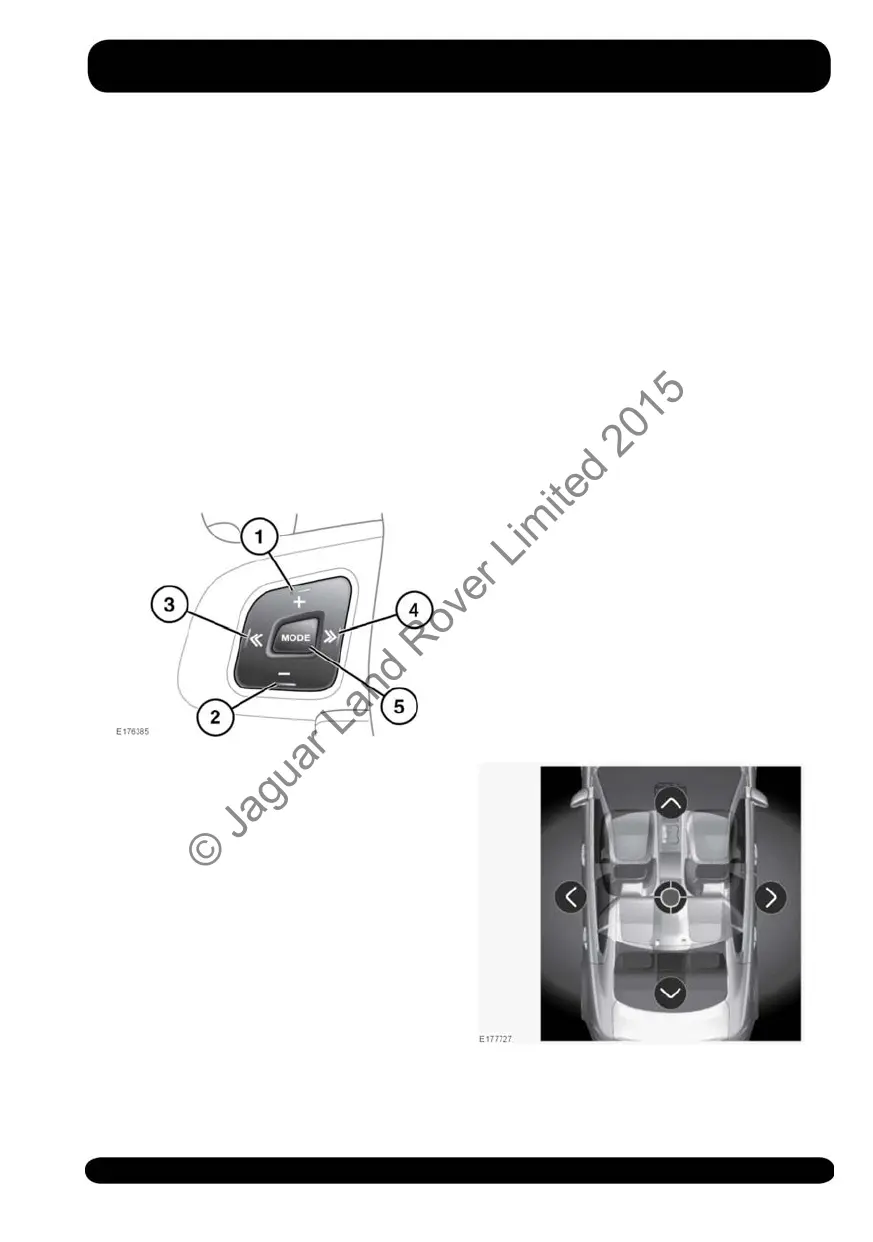
AUDIO STEERING WHEEL
CONTROLS
1. Press to increase the volume for any
source.
2. Press to decrease the volume for any
source.
3. Skip/scan backwards: Press to skip
back to the beginning of the current
track being played, or long-press to
scan backwards through the current
track being played. Playback resumes
when released.
4. Skip/scan forwards: Press to skip
forwards to the start of the next track,
or long-press to scan forwards through
the current track being played.
Playback resumes when released.
5. MODE: Press repeatedly to scroll
through all of the available, or
connected, media sources.
MEDIA SETTINGS
To view the MEDIA SETTINGS menu,
select Media from the GENERAL
SETTINGS menu.
The MEDIA SETTINGS menu contains the
following options:
• Traffic Announcement. Swtich on/off.
• Sound: Select to view the SOUND
SETTINGS.
• Radio: These setting options are
dependent on the radio source
selected. See 153, AM/FM RADIO
CONTROLS or 155, DAB RADIO
CONTROLS.
SOUND SETTINGS
To adjust the Balance/Fader settings:
151
Media
© Jaguar Land Rover Limited 2015



 To Next Page