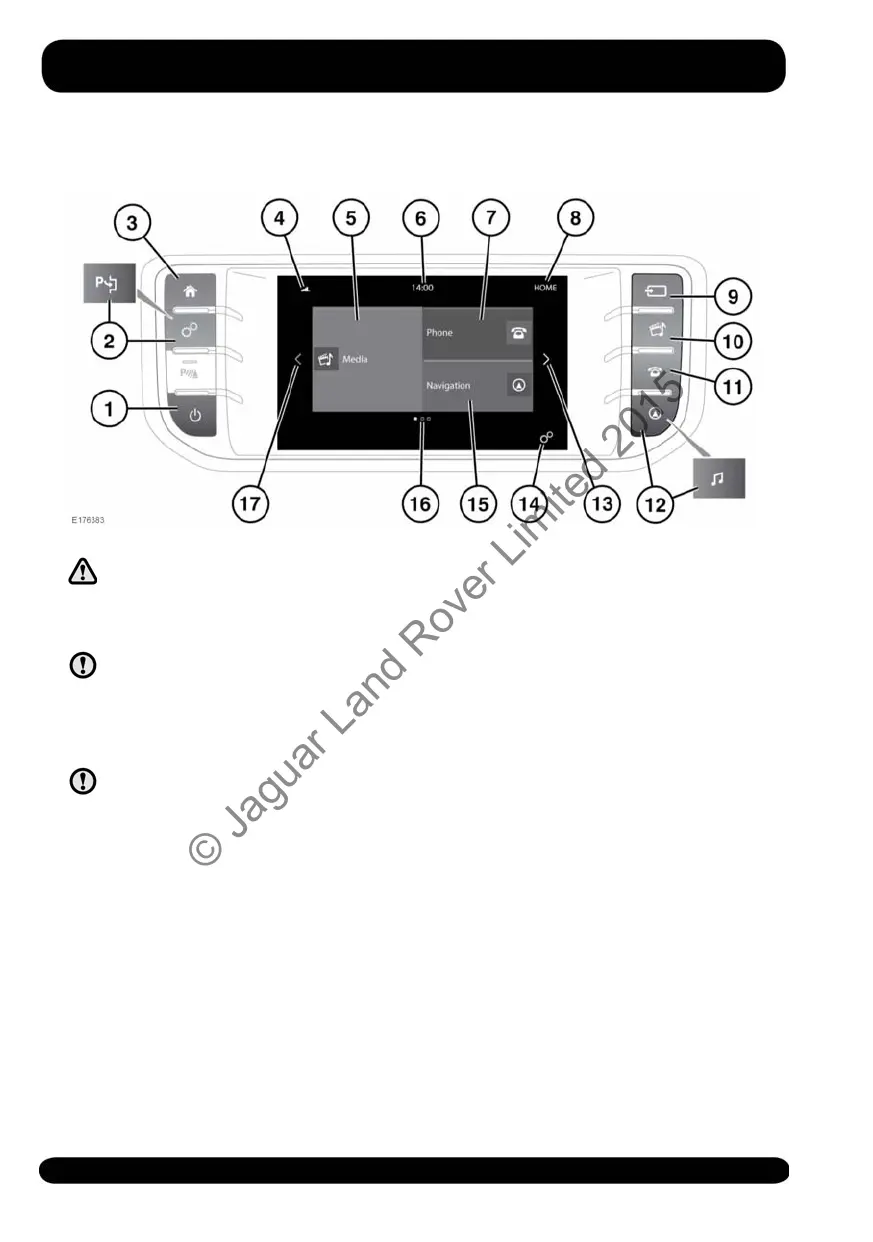
TOUCH SCREEN CONTROLS
Do not adjust the Touch screen
controls, or allow the system to
distract the driver, while the
vehicle is moving.
Always run the engine during
prolonged use of the Touch screen.
Failure to do so may discharge the
vehicle's battery; preventing the
engine from starting.
Avoid spilling or splashing liquids
onto the Touch screen.
1. Press to switch the screen on/off.
2. Press to select the GENERAL
SETTINGS menu, see 81, GENERAL
SETTINGS. If Park assist is fitted, then
see 124, PARK ASSIST
3. Press to select the HOME screen.
4. Status icons: When a phone is
connected, the battery level and
network signal strength is displayed.
5. Touch to select the Media system; or
if the Media system is already switched
on, touch to select the current media
source menu.
Note: When the system is active,
current information for the media
being played will be displayed.
6. Clock: The clock can be adjusted via
the System option, in the GENERAL
SETTINGS menu.
7. Touch to display the PHONE screen.
See 166, TELEPHONE SYSTEM
OVERVIEW.
8. Screen title.
9. Press to select the media SOURCE
menu.
10.Press to select the Media system; or if
the Media system is already switched
on, press to select the current media
source menu.
Note: When the system is active,
current information for the media
being played will be displayed.
80
Touch screen
© Jaguar Land Rover Limited 2015



 To Next Page