SERVICE INTERVAL INDICATOR
An upcoming service interval will be
notified to the driver via the Message
centre, as either a distance or time left
until the service is due. Once the distance
or time are exceeded, the display will
show a negative (-) value to indicate that
a service is overdue.
One or both types of service interval
(distance and time) may be displayed.
Details of the next service can be found
in the Instrument panel menu. See 49,
INSTRUMENT PANEL MENU.
HEAD UP DISPLAY
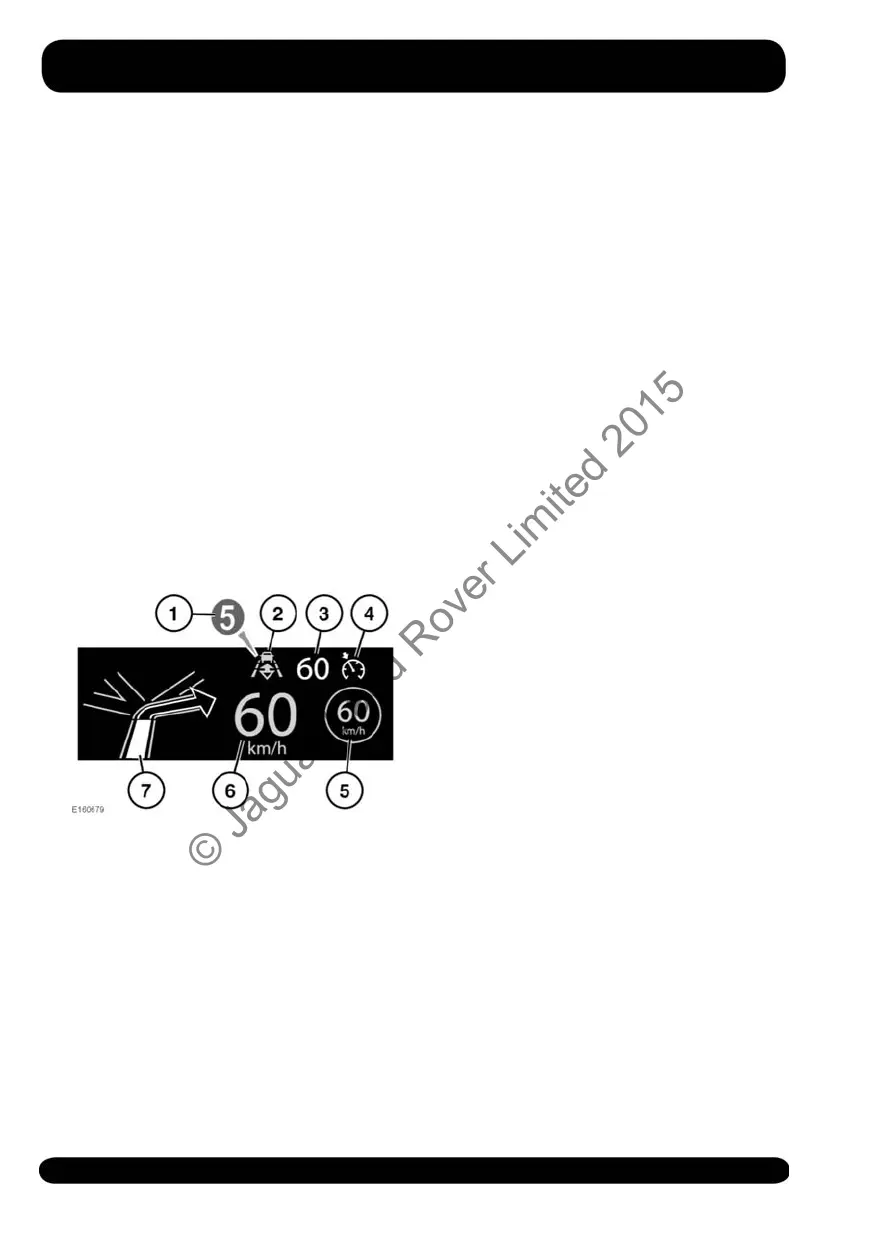
The Head-Up Display (HUD) feature
projects driver information onto the inside
of the windscreen.
The information displayed is as follows:
1. Current gear selected.
2. Follow mode is active. See 130,
ENTERING FOLLOW MODE.
3. Cruise control set speed.
4. Cruise control or Adaptive Cruise
Control (ACC) is active.
5. Traffic sign recognition, identified
speed limit. See 148, TRAFFIC SIGN
RECOGNITION.
6. Current vehicle speed.
7. Turn-by-turn navigation instructions.
The HUD can be controlled from the
Head-Up Display (HUD) option in the
Instrument panel menu. For more
information, see 49, INSTRUMENT
PANEL MENU.
Once selected, the menu offers a number
of options, including:
• Switching the HUD on/off.
• Selecting which information is
displayed on the inside of the
windscreen.
• The position of the display.
• The brightness of the display.
It is important that the position of the
display is set correctly. The correct
position is dependent on a number of
conditions, including the height of the
driver and the seat position.
Note: Before setting the position of the
HUD, make sure that the driver's seat is
correctly positioned. See 22, SITTING IN
THE CORRECT POSITION. The HUD level
should be set horizontally, within the
driver's vision.
To set the display position, select Position
from the Head-Up Display (HUD) menu
and follow the on-screen instructions. Use
the driver's seat memory store button (M)
to store your preferences. See 22,
DRIVING POSITION MEMORY.
The brightness of the display is set
automatically to suit the ambient light
conditions. Brightness can be manually
adjusted to your preferred level by
selecting Brightness from the Head-Up
Display (HUD) menu. Follow the
on-screen instructions and then press OK
to confirm.
52
Instrument panel
© Jaguar Land Rover Limited 2015



 To Next Page