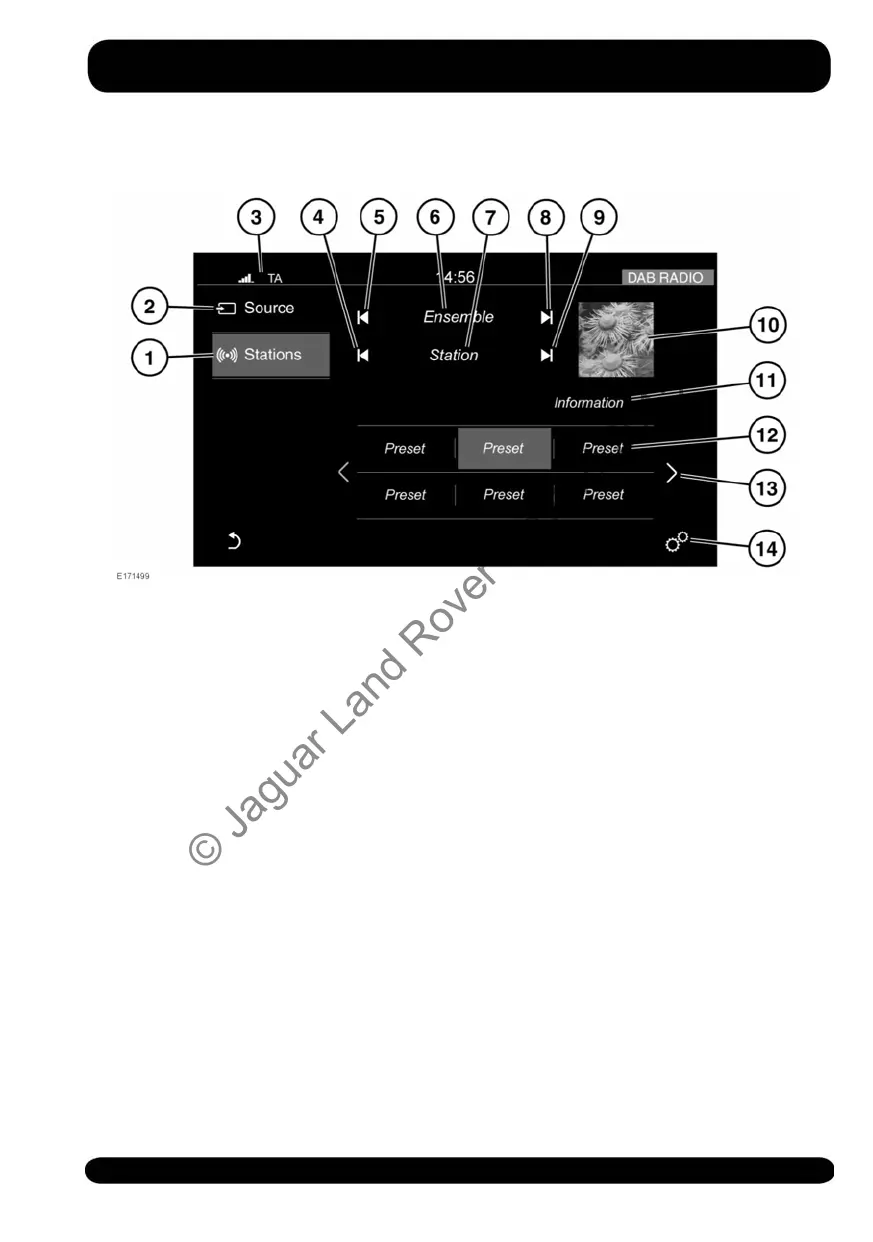
DAB RADIO CONTROLS
1. Stations: Touch to select the station
list for the selected waveband.
2. Source: Touch to select the media
source list.
3. Status icons: When a phone is
connected, the battery level, and
network signal strength is displayed.
Also, when selected, TA (Traffic
announcements).
4. Seek down: Touch to auto-seek down
the frequency to the next radio station.
5. Seek down: Touch to auto-seek down
the frequency to the next radio
ensemble.
6. The selected radio ensemble name.
7. The selected radio station name.
8. Seek up: Touch to auto-seek up the
frequency to the next radio ensemble.
9. Seek up: Touch to auto-seek up the
frequency to the next radio station.
10.Waveband image (if available).
11.Information from the selected station.
12.Station presets:
• Touch and release to tune to the
radio station stored on that preset.
• Touch and hold to store the current
radio station on that preset.
• Use the seek buttons on the
steering wheel to change to the
next or previous preset radio
station.
13.Touch to scroll through the preset
stations.
14.Touch to select the SETTINGS pop-up
menu. Select Media and then Radio,
where the following features can be
activated/deactivated:
• Radiotext
• Alternative Frequency (AF)
155
Media
© Jaguar Land Rover Limited 2015



 To Next Page