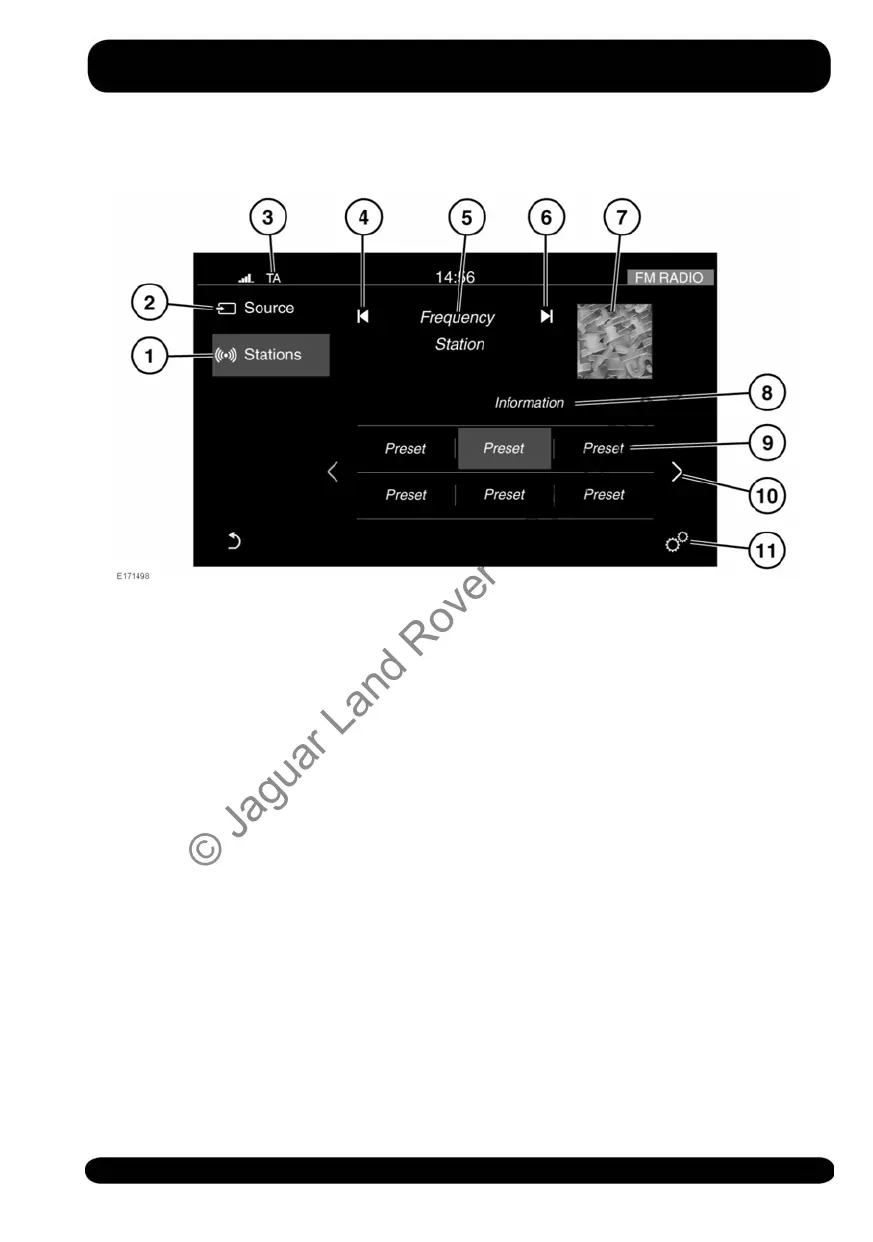
AM/FM RADIO CONTROLS
1. Stations: Touch to select the station
list for the chosen radio source.
2. Source: Touch to select the media
source list. See 150, MEDIA
CONTROLS.
3. Status icons: When a phone is
connected, the battery level and
network signal strength is displayed.
Also, when selected, TA (Traffic
announcements) is displayed.
4. Seek down: Touch to auto-seek down
the frequency to the next radio station.
Note: In some markets, additional
buttons are available to enable manual
tuning.
5. The selected station name and
frequency.
6. Seek up: Touch to auto-seek up the
frequency to the next radio station.
Note: In some markets, additional
buttons are available to enable manual
tuning.
7. Waveband image (if available).
8. Information from the selected station.
9. Station presets:
• Touch to tune to the station stored
on that preset.
• Touch and hold to store the current
station on that preset.
• Use the seek buttons on the
steering wheel to change to the
next or previous preset station.
10.Touch to scroll through the preset
stations.
11.Touch to select the SETTINGS pop-up
menu. Select Media and then Radio,
where the following features can be
activated/deactivated:
• Manual tune.
153
Media
© Jaguar Land Rover Limited 2015



 To Next Page