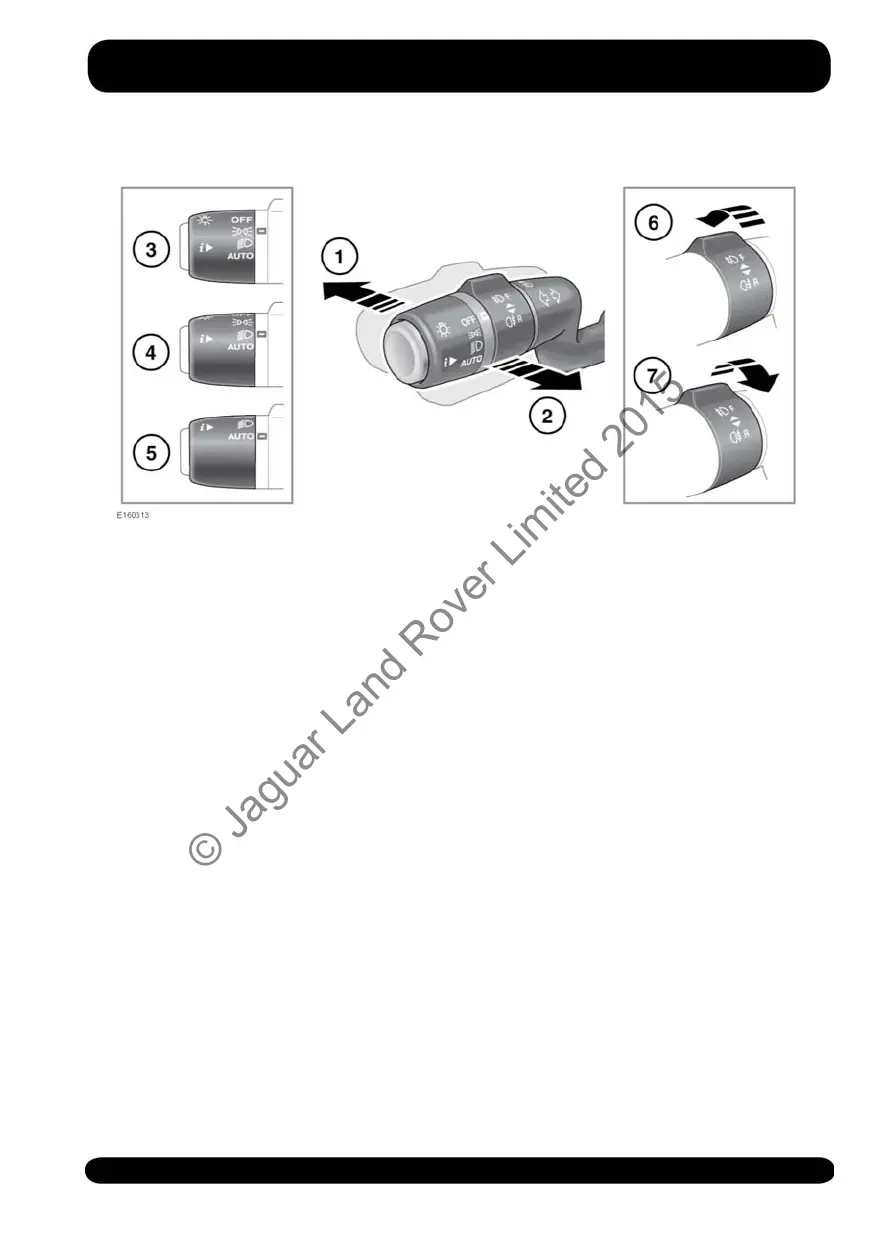
LIGHTING CONTROL
1. With the headlamps on, push the
control away from the steering wheel
to select high beam. The Instrument
panel warning lamp will illuminate. See
58, HIGH BEAM (BLUE).
Note: Do not use high beam where it
may distract other road users.
2. Pull the control towards the steering
wheel and release to flash the high
beam on and off. The high beam will
remain on for as long as the switch is
held.
3. Side lamps: Rotate the control to this
position to switch the side lamps on.
The Instrument panel warning lamp
will illuminate. See 58, SIDE LAMPS
(GREEN).
4. Headlamps: Rotate the control to this
position to switch the headlamps on.
5. AUTO: With Auto lamps selected,
when the ambient light fades and the
ignition is on, the side lamps, tail
lamps, dipped beam headlamps and
licence plate lamps will switch on
automatically. Headlamp courtesy
delay, Auto high beam and the
Windscreen wipers detection may also
be activated.
Note: Low exterior light levels, caused
by adverse weather conditions, may
also cause the Auto lamps to activate.
6. Front fog lamps: Will operate only
while side lamps, headlamps or Auto
lamps are selected. Turn the collar
away from the steering wheel and
release. The Instrument panel warning
lamp will illuminate. See 57, FRONT
FOG LAMPS (GREEN).
To switch off the front fog lamps: Turn
the collar away from the steering wheel
again and release.
59
Exterior lights
© Jaguar Land Rover Limited 2015



 To Next Page