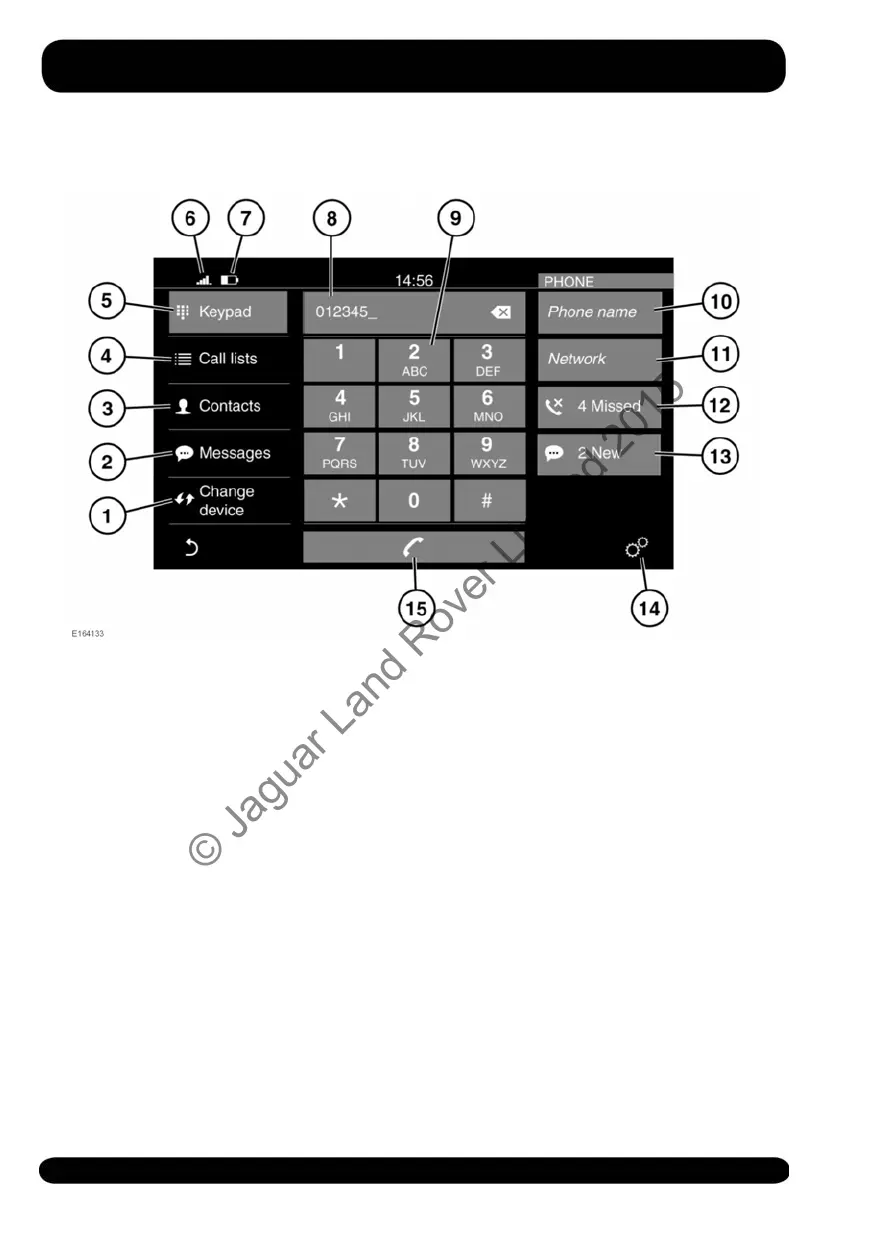
TELEPHONE SYSTEM OVERVIEW
For information on connecting a
Bluetooth® phone or device. See 163,
PAIRING AND CONNECTING A
BLUETOOTH® PHONE OR DEVICE.
For information on mobile phone
compatibility, see 163, TELEPHONE
COMPATIBILITY.
Note: Some Telephone system features
will not operate unless the SD card
supplied with the vehicle is inserted
correctly into the SD card slot. See 156,
CONNECTING A MEDIA DEVICE.
1. Change device: Touch to search for a
new, or change to another paired
phone or device.
2. Messages: Touch to select the
Messages inbox, or to create a new
message.
3. Contacts: Touch to select the
connected phone's Contacts list. Scroll
through the list or use the alphas (A-C,
D-F etc.) to find the contact more
quickly.
4. Call lists: Touch to access the
connected phone's Call lists.
5. Keypad: Touch to display the keypad.
6. Network signal strength icon.
7. The connected phone's battery level
icon.
8. Status display: Displays the number or
contact selected.
9. Keypad.
10.Name of the connected phone.
11.The connected phone's network
provider.
166
Telephone
© Jaguar Land Rover Limited 2015



 To Next Page