Roland VS-2400CD Owner’s Manual www.RolandUS.com 33
2—Getting Around
The Top Panel of the VS-2400CD
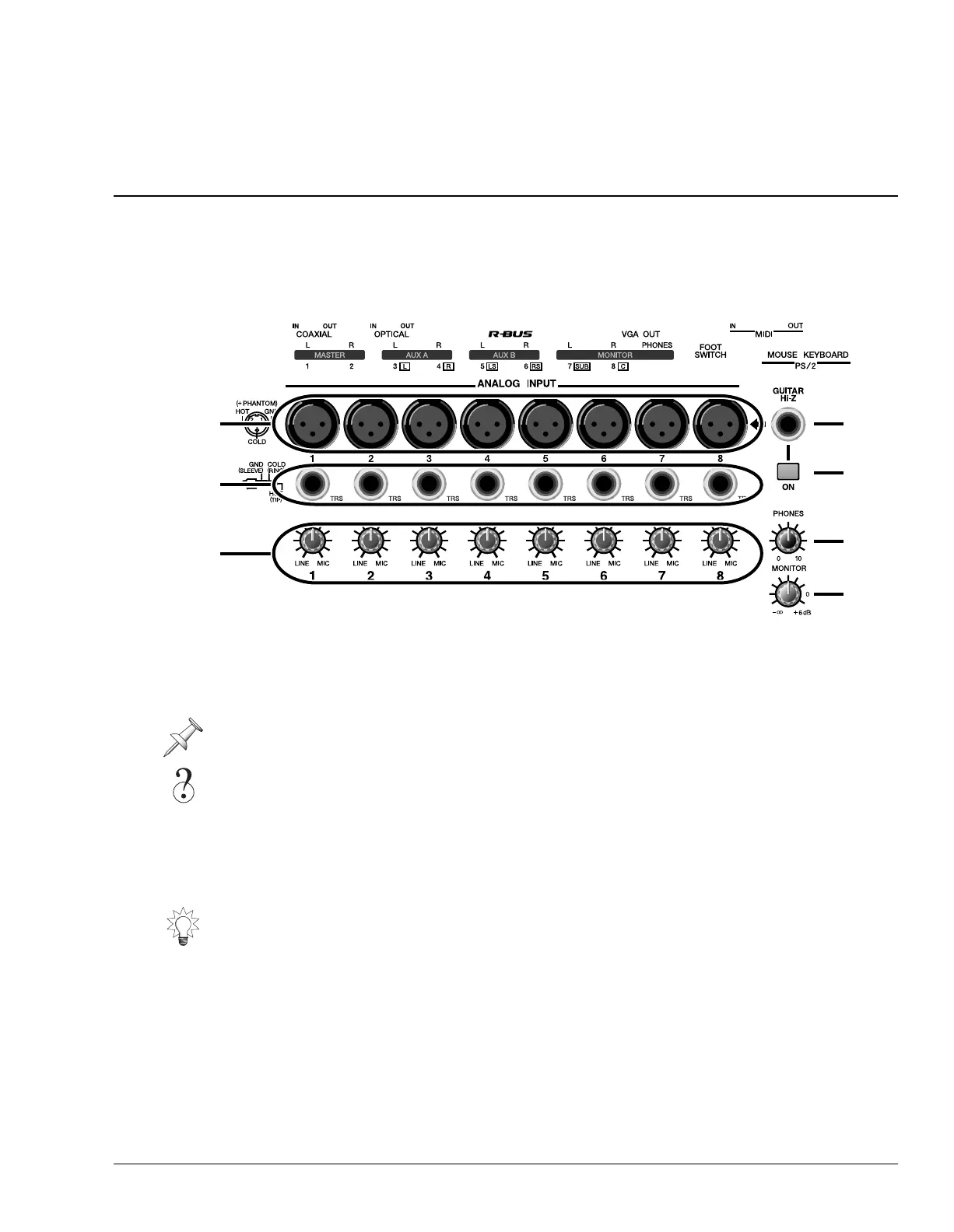
Analog Input Jacks
The analog input jacks allow you to bring analog audio into the VS-2400CD’s 24-bit
analog-to-digital (A/D) converters using balanced XLR connectors and balanced or
unbalanced 1/4” connectors. We’ll explain how to correctly set an analog input’s level
in “Setting Analog Input Levels” on Page 126.
1—XLR Inputs 1-8
Each of the eight XLR input jacks accepts an input signal from a balanced XLR
connector.
2—TRS Inputs 1-8
Connect a 1/4” phone-type TRS balanced or unbalanced audio connector to any of the
eight TRS input jacks.
Don’t use the same-numbered XLR and TRS input jack—each SENS knob controls both
jacks, so you won’t have independent control of the two jacks’ signals.
Analog, 24-bit, balanced, XLR, unbalanced, TRS, dB
The VS-2400CD can provide phantom power for a condenser-type mic connected to an
XLR jack. See “To Turn an XLR Input Jack’s Phantom Power On or Off” on Page 126.
VS2400OMUS.book 33 ページ 2006年2月28日 火曜日 午前11時12分







 To Next Page