156 • Program Mode Programming SAM4S SPS-300 Series Electronic Cash Register AU
PLU Options - Reference Information
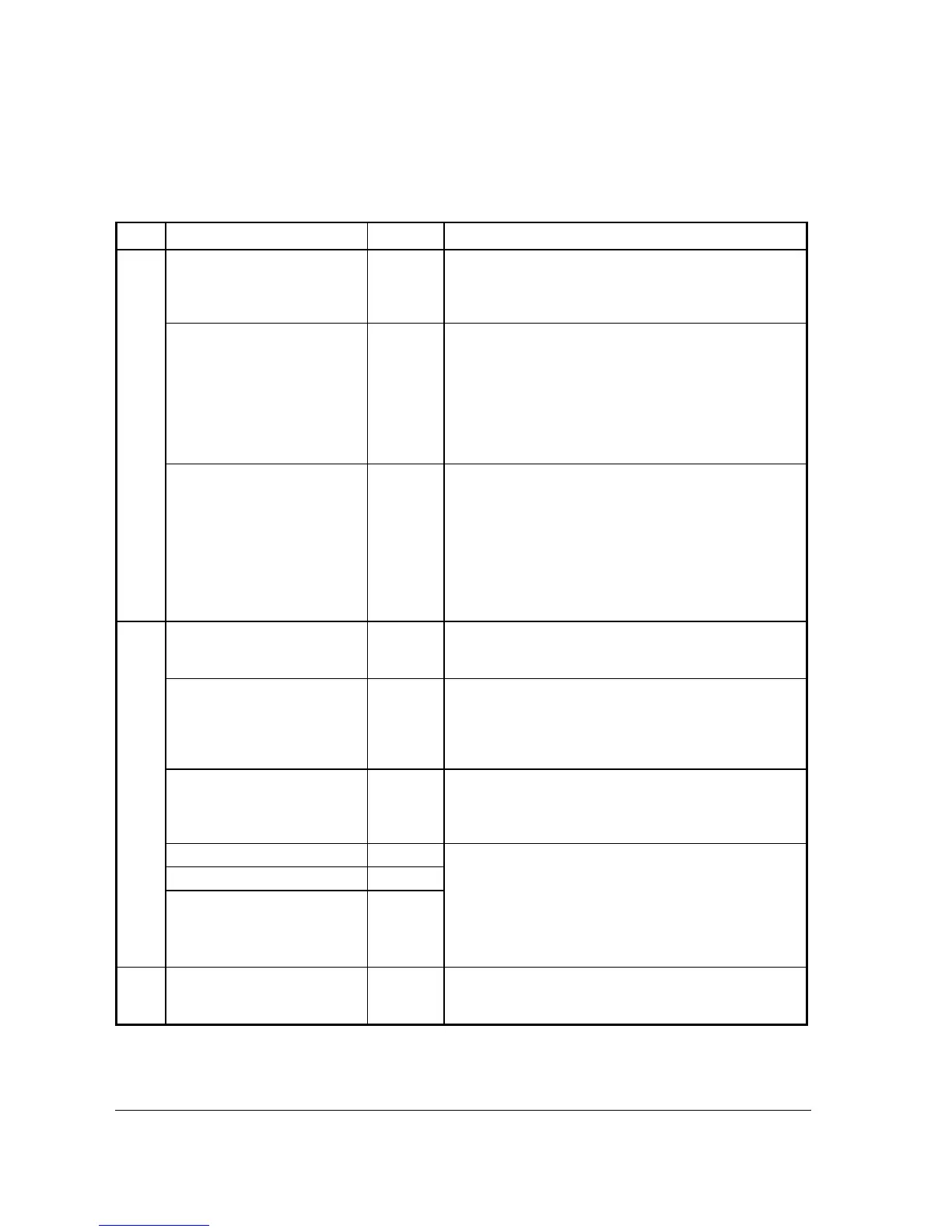
Page Field Value Description
1 DESC
Alpha
numeric 18
character
The field to program a descriptor for the PLU. Type the
descriptor using the Program Overlay. The overlay is
automatically activated when the cursor is pointing at the
DESC field. The default descriptors are PLU1, PLU2, etc.
PRESET
Y or N
This determine if this PLU have a preset price or not. A PLU
will be an Open Price PLU when set to N (No). A price
(without decimal point) has to be entered before register an
Open Price PLU. If set to Y (Yes), the PLU will registered
with a pre-programmed price when pressed. A non-zero
price has to be programmed into the following
PRICE/HALO1 field to avoid selling the PLU with zero
price.
PRICE/HALO1
PRICE/HALO2
PRICE/HALO3
PRICE/HALO4
PRICE/HALO5
7 digit
amount
Here is the field(s) to program the Price or the High Amount
Lock Out (HALO) of a PLU. When a PLU is a Preset PLU
(PRESET is Y), the dollar amount entered here is a Preset
Price, the dollar amount entered here will become a HALO
when the PLU is an Open PLU (PRESET is N). You can
limit errors by setting the maximum amount that can be
entered into a PLU. According to the setting - LEVELS (1-5)
- in SM Mode Æ MEMORY ALLOCATION, you may or
may not see PRICE/HALO 2 ~ 5.
2 PRESET OVERRIDE
Y or N When PRESET is Y, use this option to determine is the
Preset Price is Overridable or not. Set to Y (Yes) to allow,
N (No) to disallow.
TAXable BY TAX1 (GST),
TAX2, TAX3 or TAX4
Y (to GST
(Tax1)) or
N (to Tax
2, 3 and 4)
Determines if a PLU is taxable by any tax or is tax free. By
changing between Y and N, a PLU will be taxable or tax
free. Default setting is link to Tax1 (GST) only, therefore the
PLU is taxable by Tax1 (GST). The actual Tax program is in
Program Mode Æ 2.SALE TAX.
FOOD STMP ELIGIBLE
Y or N Select Y to accumulate a total of food stamp eligible items in
the current sale. The total can be viewed by pressing the F/S
SUB key and food stamps can be tendered with the F/S
TEND key. (US market feature)
GROUP #1
1
A PLU can link to up to 3 groups for group
totaling/reporting purpose. For each of three group
assignments, enter a group where this PLU's sales will
accumulate. The number of groups available is determined
by memory allocation. For Kitchen Printing, only Group
Assignment on first Link group (GROUP #1) will take
effect.
GROUP #2
0
GROUP #3
0
3 NEGATIVE ITEM
Y or N
Use this to set a PLU that entered as normal, but recorded
with a negative value. This is useful for a PLU like Lottery
Price Payment.



 To Next Page