182 • Program Mode Programming SAM4S SPS-300 Series Electronic Cash Register AU
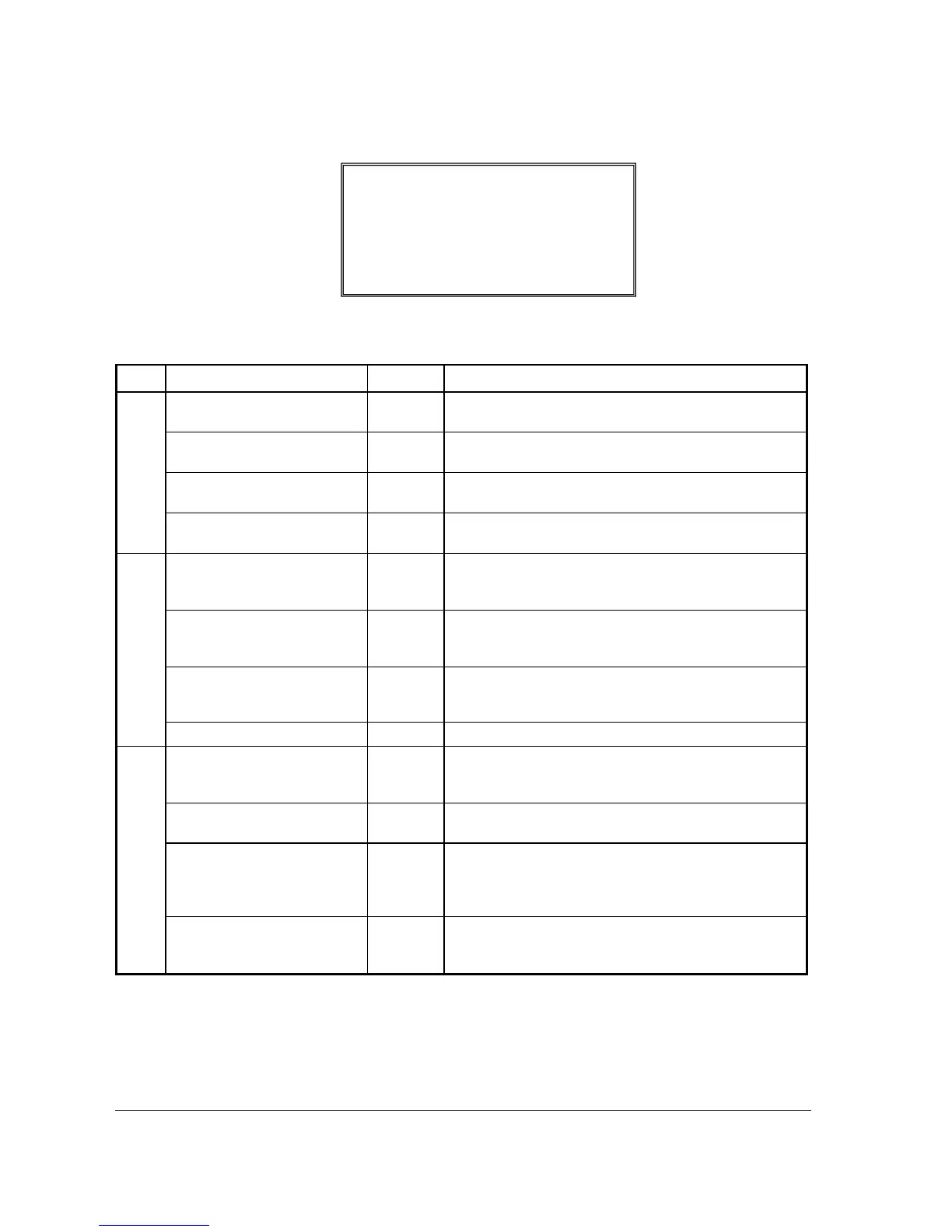
Print Options - Reference Information
Page Field Value Description
1 PRINT MEDIA TOTALS ON
CLERK REPORT
Y or N Select Y to print media totals for each clerk, thus allowing
clerk cash drawer accountability.
PRINT TAX SYMBOL
Y or N Select N to remove the tax symbol (i.e."T1")
from the print
and display.
PRINT VD MODE AND
RETURN ON REPORT
Y or N Select N to remove the VOID MODE and RETURN totals
from the financial and clerk reports.
PRINT AUDACTION ON
REPORT
Y or N Select N to remove the AUDACTION total from the
financial and clerk reports.
2 SKIP ZERO TOTALS ON
FINANCIAL REPORT
Y or N
By default, the register prints only totals with information
other than zero. Select N, if you wish to print the contents of
all the financial report totals, even if the total is zero.
SKIP ZERO TOTALS ON
CLERK REPORT
Y or N
By default, the register prints only totals with information
other than zero. Select N, if you wish to print the contents of
all the clerk report totals, even if the total is zero.
PRINT CLERK REPORT
AFTER FINANCIAL
REPORT
Y or N Select Y if you wish to include the clerk report information
at the end of the financial report.
PRINT SALE ITEM NO.
Y or N Select Y if you wish to print sale item no.
3 PRINT PLU WITH ZERO
TOTALS ON REPORT
Y or N
By default, the register prints only totals with information
other than zero. Select Y, if you wish to print the contents of
all the PLUs, even if the total is zero.
PRINT SUBTOTAL WHEN
PRESSED
Y or N Select Y if you wish the subtotal to print when the SBTL key
is pressed.
PRINT % OF SALES ON
PLU REPORT
Y or N
The register can calculate the percentage of sales represented
by each PLU. Select Y if you wish to print this percentage on
the PLU report. Note: the percentage will print only on
standalone register reports, not IRC report.
PRINT CONS. NO.
Y or N
The consecutive number (also referred to as the transaction
counter, or receipt counter) normally prints on each receipt.
Select N if you do not wish to print this counter.
PRINT OPTION pg 17
PRINT CHECK# LINE ON Y
Å
GUEST CHECK
PRINT ROUND AMT ON KP N



 To Next Page