SAM4S SPS-300 Series Electronic Cash Register AU Program Mode Programming • 231
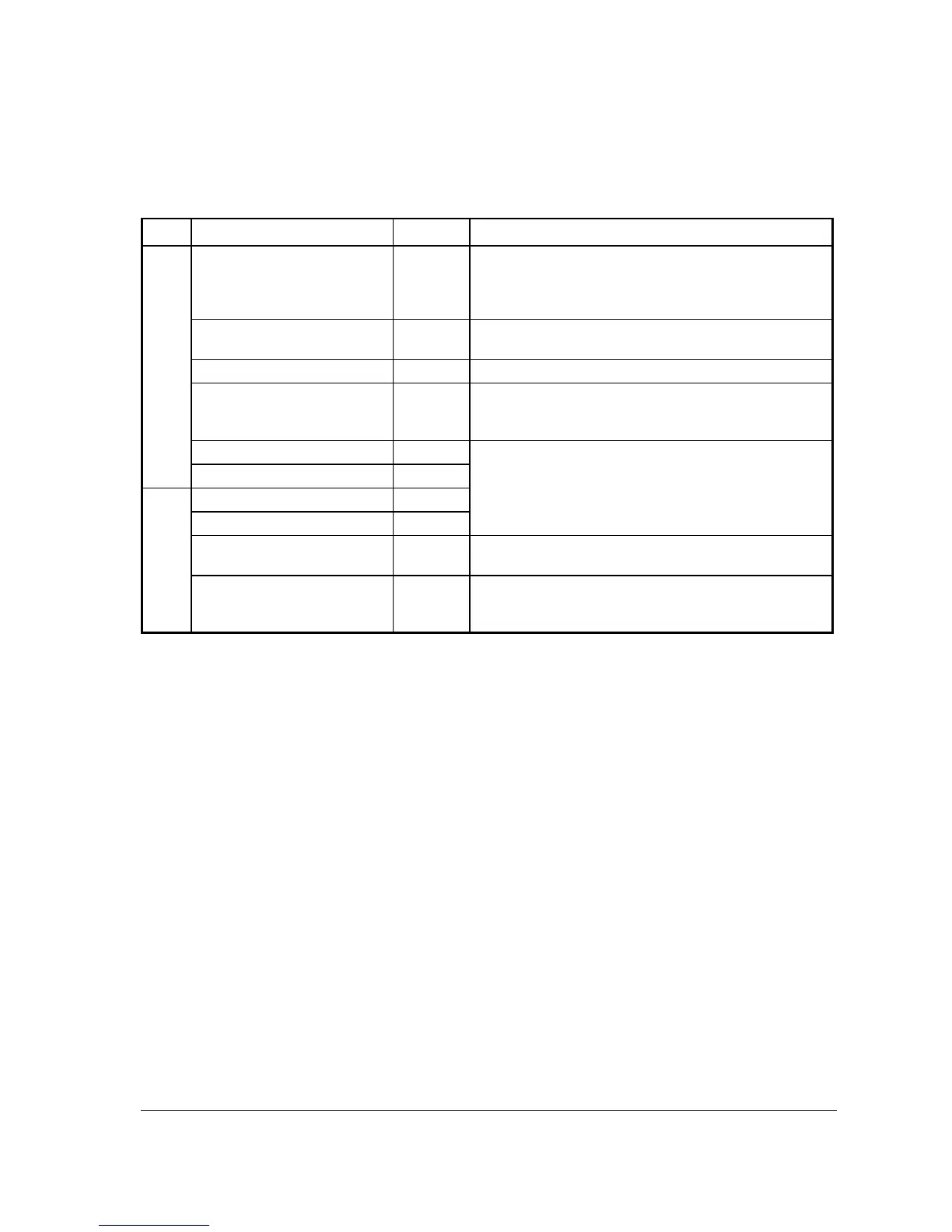
SERVICE Key Function Options
Page Field Value Description
1
DESC
Alpha
numeric up
to 12
character
You can program a descriptor. The default descriptor is
SERVICE.
NON-ADD # COMP
Y or N Select Y if you wish to force the entry of a non-add number
(i.e. a tax exempt #) before the key is used.
PRINT ON RECEIPT
Y or N Select N to not print on the receipt.
NEGATIVE BALANCE IN
MGR CONTROL
Y or N Select Y if you do not want the operator use this function in
REGISTER mode. When selected, the function is allowed
only in the X control lock position.
CALCULATE TAX1
Y or N Select Y to calculate and add the appropriate tax
automatically when finalized with this key.
CALCULATE TAX2
Y or N
2
CALCULATE TAX3
Y or N
CALCULATE TAX4
Y or N
COMPULSORY
VALIDATION
Y or N Choose Y to enforce validation if an optional printer with
validation capability is connected to an RS-232C port.
HARD CHECK PRINTER
PORT (0-4)
0
If you are using a hard check system, enter the RS232C port
number (1,2,3 or 4) where the optional guest check printer is
attached.



 To Next Page