S3F84B8_UM_REV 1.00 19 EMBEDDED FLASH MEMORY INTERFACE
19-10
SB1
Start
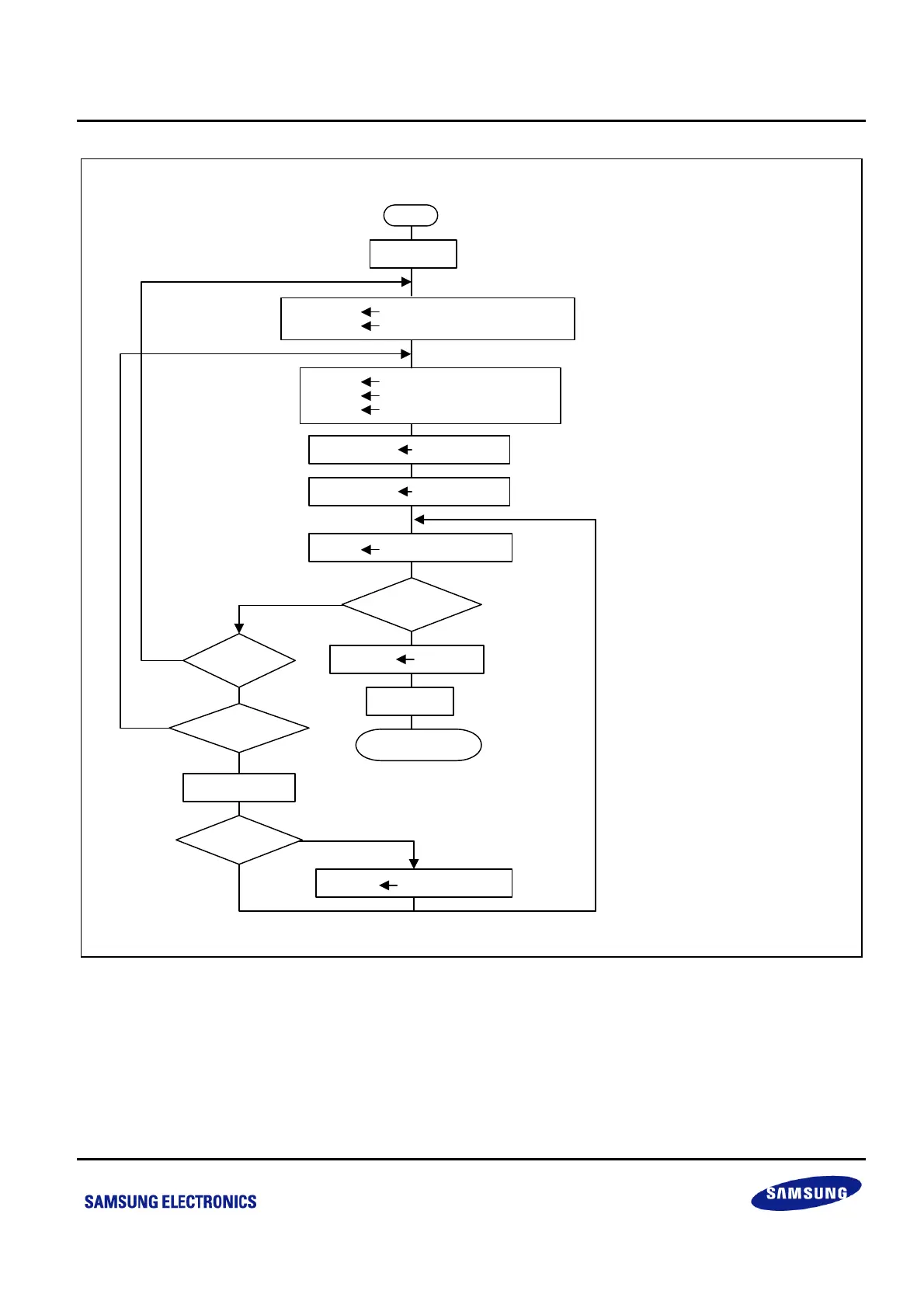
; Select Bank1
; User Program Mode Enable
; Set Secotr Base Address
; Write data at flash
; User Program Mode Disable
FMSECH High Address of Sector
FMSECL Low Address of Sector
R(n) High Address to Write
R(n+1) Low Address to Write
R(data) 8-bit Data
LDC @RR(n),R(data)
; Mode Select
FMCON #01010000B
FMUSR #0A5H
; Select Bank0
; Set Address and Data
INC R(n+1)
Same Sector?
R(data) New 8-bit Data
FMUSR #00H
SB0
Finish Writing
NO
YES
NO
YES
NO
YES
NO
YES
; User Program Mode Disable
;; Update Data to Write
;; Check Sector
;; Check Address
;; Increse Address
Different Data?
Continuous address?
Write again?
Figure 19-9 Program Flowchart in a User Program Mode



 To Next Page