3.3
Date Code 20081022 Instruction Manual SEL-787 Relay
PC Software
Terminal
Step 5. If a telephone modem is chosen from the relay text box, enter
the dial-up telephone number in the Phone Number text box.
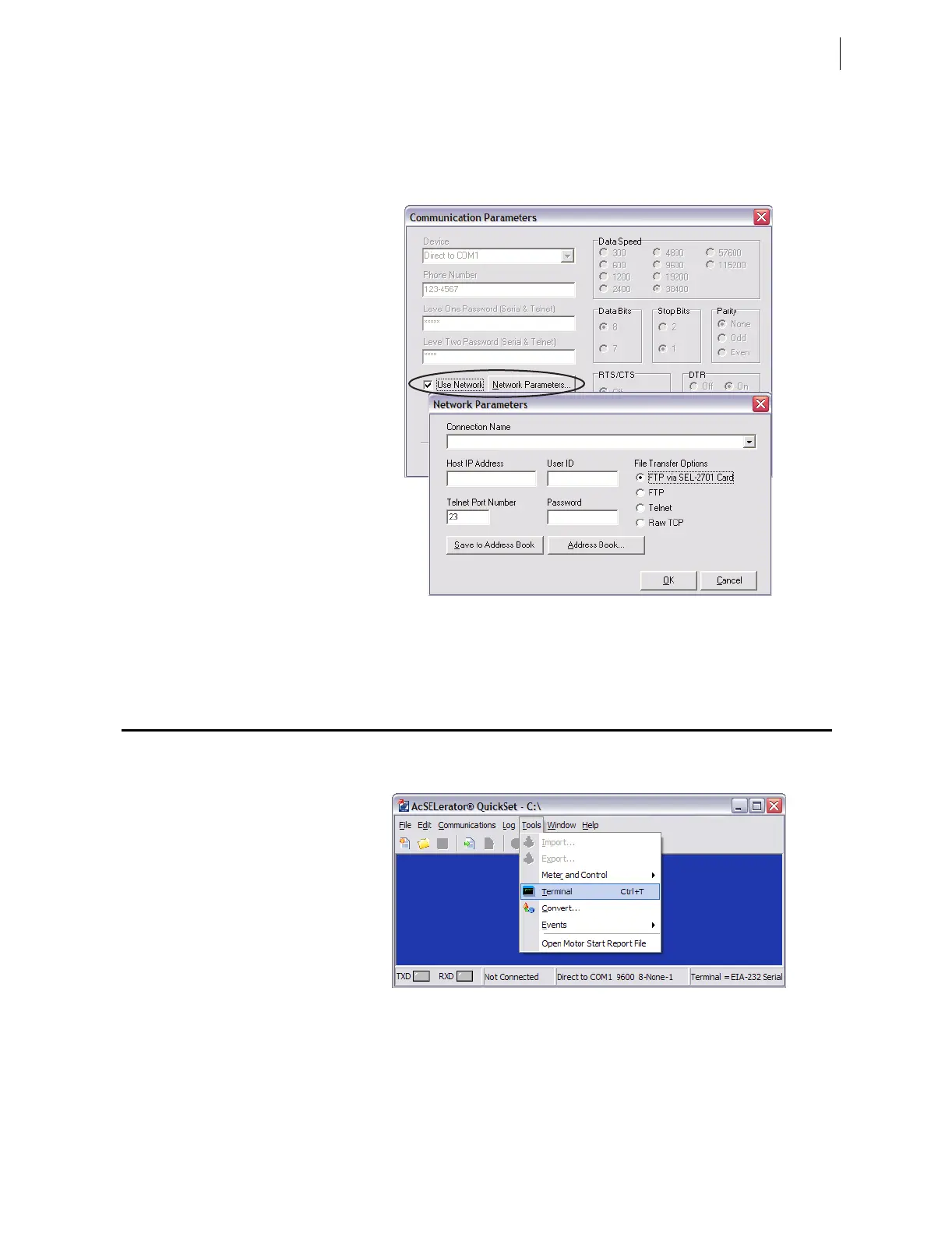
Step 6. For network communications, check the Use Network check
box and enter the network parameters as shown in Figure 3.3.
Figure 3.3 Network Communication Parameters Dialog Box
Step 7. Exit the menus by clicking OK when finished.
Terminal
Terminal Window
Select Tools > Terminal on the ACSELERATOR QuickSet main menu bar to
open the terminal window (shown in Figure 3.4).
Figure 3.4 Tools Menu
The terminal window is an ASCII interface with the relay. This is a basic
terminal emulation. Many third-party terminal emulation programs are
available with file transfer encoding schemes. Open the terminal window by
either clicking Tools > Terminal or by pressing <Ctrl+T>. Verify proper
communications with the relay by opening a terminal window, pressing
<Enter> a few times, and verifying that a prompt is received. If a prompt is
not received, verify proper setup.



 To Next Page