[7sj6x_dyn_parumschaltung-150502-kn, 1, en_US]
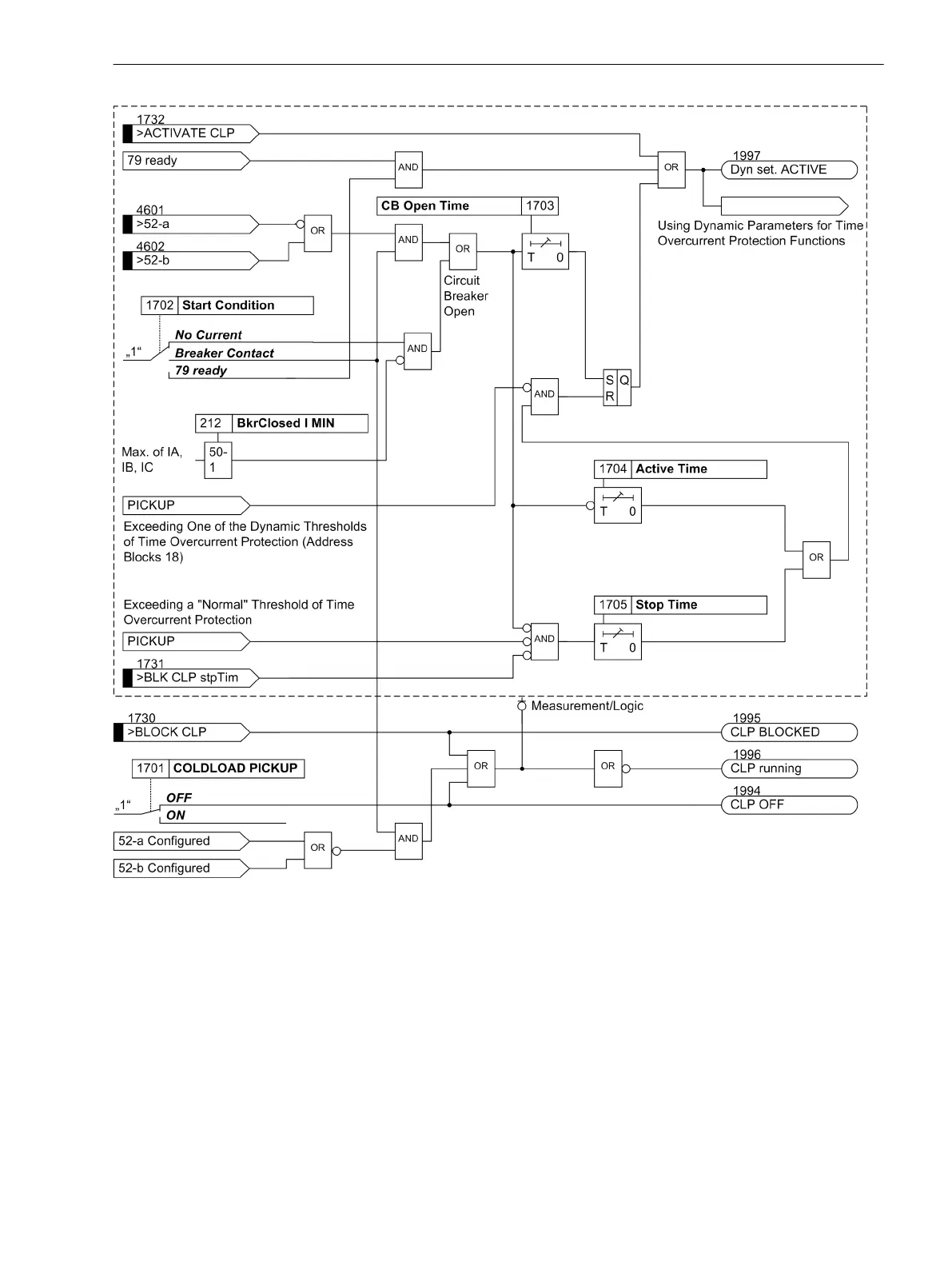
Figure 2-39
Logic diagram of the dynamic cold load pickup function (50c, 50Nc, 51c, 51Nc, 67c, 67Nc)
Setting Notes
General
The dynamic cold load pickup function can only be enabled if address 117 Coldload Pickup was set to
Enabled during configuration of the protection functions. If not required, this function is set to Disabled.
The function can be turned ON or OFF under address 1701 Coldload Pickup.
Depending on the starting condition of the cold load pickup function, address 1702 Start Condition is set
to either No Current, Breaker Contact or 79 ready. Breaker Contact can only be selected if the device
receives information regarding the switching state of the circuit breaker via at least one binary input. The
option 79 ready dynamically modifies the pickup thresholds, trip times, characteristics, and the dropout
behavior of the directional and non-directional time overcurrent protection when the automatic reclosing
2.4.2
Functions
2.4 Dynamic Cold Load Pickup
SIPROTEC Compact, 7SC80, Manual 153
E50417-G1140-C486-A8, Edition 07.2017



 To Next Page