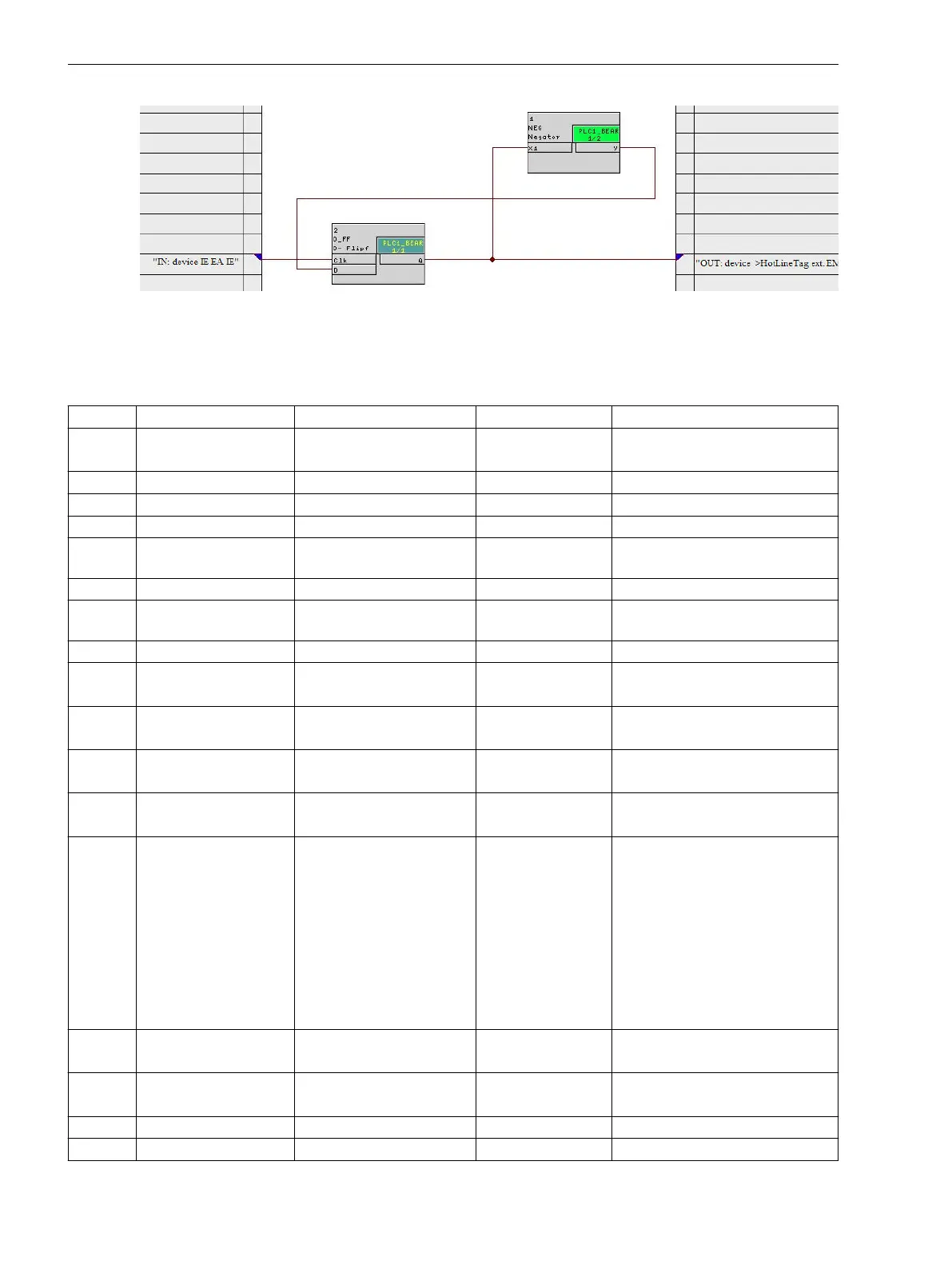
[7sc80-service-131030, 1, en_US]
Figure 2-3 CFC – service interlocking control via function key
Settings
Addresses which have an appended “A” can only be changed with DIGSI, under “Additional Settings”.
Addr. Parameter Setting Options Default Setting Comments
351 Bat. Monitor ON
OFF
ON Battery voltage Monitor
352 V bat. crit. 22.0 .. 48.0 V 23.0 V Battery critical voltage level
353 V bat. nom. 22.0 .. 48.0 V 24.0 V Nominal battery voltage level
354 BatTestInterval 12 .. 672 hour 48 hour Battery test time interval
355 BatVoltDropLoad 0.1 .. 5.0 V 0.5 V Battery voltage drop caused by
test load
356 T load active 0.1 .. 60.0 sec 5.0 sec Test load active time
357 BatVoltDrpLdTst 0.1 .. 5.0 V 0.5 V Battery voltage drop after load
test
358 BatTestDelay 1 .. 60 min 30 min Start battery test delay
610 FltDisp.LED/LCD Target on PU
Target on TRIP
Target on PU Fault Display on LED / LCD
611 Spont. FltDisp. YES
NO
NO Spontaneous display of flt.annun-
ciations
618 Direct Control NO
YES
NO Direct control of open/close
buttons
620 Remote FwUpdate Disabled
Enabled
Disabled Remote firmware update
640 Start image DD image 1
image 2
image 3
image 4
image 5
image 6
image 7
image 8
image 9
image 1 Start image Default Display
700 GOOSE-Stop YES
NO
NO GOOSE-Stop
702A Fast IO-Box OFF
ON
OFF Fast GOOSE transmission
710 EvLog Fill Lev1 10 .. 100 % 70 % Threshold Fill level 1 Event Log
711 EvLog Fill Lev2 10 .. 100 % 90 % Threshold Fill level 2 Event Log
2.1.2.3
Functions
2.1 General
46 SIPROTEC Compact, 7SC80, Manual
E50417-G1140-C486-A8, Edition 07.2017



 To Next Page